

Better Sidebar: Gemini Folders & Search

Overview
Organize Gemini & AI Studio chats with folders, tags, full-text search, prompts, export, Drive sync, AI tools & more.
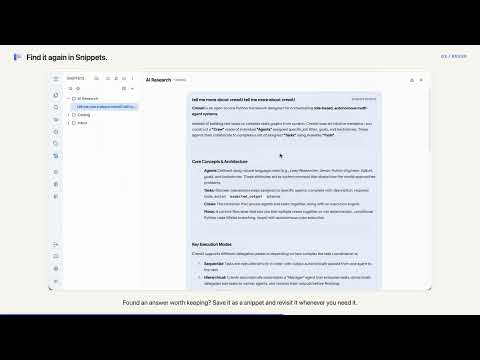
The all-in-one chat organizer, prompt manager & productivity toolkit for Google Gemini and AI Studio. Organize conversations into folders, search across all messages, export chats, sync to Google Drive, and optionally let an AI Agent help manage your data. Meet BETTER SIDEBAR FOR GEMINI & AI STUDIO — designed to help developers, prompt engineers, and AI power users streamline their daily workflows. We aim to turn the default interface into an organized knowledge base, so you can find what you need without endless scrolling. Most features are free. The few that need a pack are marked (Support Pack) or (Power Pack). Power Pack includes everything in Support Pack. --- 📂 ORGANIZE YOUR CHATS 📂 Folders & Colors Drag and drop chats into nested folders in the Library tab. Assign custom colors to folders and tags so things are easy to spot. 🏷️ Tags Tag conversations and see the tags right in the chat header. Click a tag to open every chat that carries it, then switch tags, search within them, or add and remove tags on the spot. ⭐ Favorites & Pinning Pin your most important chats or prompts to the top for quick access. 📊 Timeline View See your chats grouped by "Today", "Yesterday", and "Last Week". 📝 Chat Remarks & Rich Tooltips Add descriptions to chats; hover to see creation date, tags, and notes. 🗑️ Batch Delete Select many conversations and delete them from your Google account in one go, not just hidden from the list. No more ghost chats. --- 🔍 FIND ANYTHING ⌨️ Cmd+K Command Palette Press Cmd+K (Mac) or Ctrl+K (Windows) to open a centered search panel. Search chat titles, descriptions, full message text, and extension tools, all from the keyboard. Combine filters, or search within the current conversation. 🔄 Background Message Sync History messages sync quietly in the background, so full-text search also covers chats you haven't opened yet, including ones started on other devices. Opt-in, with gentle throttling, a sync status overview, and a manual sync button for single chats. 👀 Conversation Outline Open an Outline view to see the structure of a long conversation at a glance. --- 📝 PROMPTS, SNIPPETS & EXPORT 📝 Prompt Library Build a personal library of reusable prompts. Supports option variables, prompt composition, and system prompt imports. Type "/" to insert a prompt on both Gemini and AI Studio. ✂️ Snippets Save highlights from any AI reply into a Snippet library with folder management. 📤 Conversation Export Export one conversation or many at once as Markdown, Plain Text, or JSON for documentation or backup. 🔗 Export to Notion & Obsidian (Power Pack) Send conversations and snippets to Notion or Obsidian, keeping formatting as intact as we can. Works for batches too. --- 💎 GEMS & NOTEBOOKS 💎 Gem Management Browse, filter, create, and start Gem conversations right from the sidebar. 📓 Notebook Integration Browse, organize, and manage your Gemini notebooks from the sidebar. ⚡ Gemini Spark If Spark is available on your Google account, it appears as a native tab with no setup. --- 🎨 UI CUSTOMIZATION Gemini: • Adjust sidebar, chat content, and input box widths • Focus Mode: hide the logo, disclaimer, upgrade button, and other clutter • Smart Scrollbar: jump to any message; expands into a full message list • Watermark-free image downloads (including Pro HD images) • Theme switch animation AI Studio: • Configurable sidebar width • Auto-hide input box • Auto-hide run settings panel • Slash "/" command for the Prompt Library 🧩 Customizable Icon Bar Show or hide tool icons on the far-left dock and drag them into the order you like. 🎨 Themes (Support Pack) 19 hand-tuned themes with smooth animated transitions. Light/dark mode is detected automatically. You can preview any theme for free before deciding. --- ☁️ SYNC, BACKUP & ACCOUNTS ☁️ Google Drive Sync Settings and prompts upload to your own Google Drive automatically. Restore is manual-only, so your local data always stays the source of truth. 💾 Automatic Local Backups Extension data backs up on a schedule. Take manual snapshots and roll back to earlier states anytime. 💾 Data Control Export your organization structure (SQL dump) anytime for backup. 👤 Multi-Account Profiles Create separate profiles for work or personal use, each with its own independent database. 🌟 Multi-Platform Support Manage conversations from both Gemini and Google AI Studio in one unified sidebar. 🎛️ Extension Icon Panel Click the browser toolbar icon for a quick control panel. Toggle platforms and features without digging through menus. --- 🤖 AI AGENTS Type ">" to pick an agent, then describe what you want in everyday language. Each agent shows a row of quick-start buttons so you know what to ask. Agents run through your own Gemini session, with no API keys and no extra cost. 🧭 BetterSidebar Agent • Find and query your chats, folders, and tags (free) • Organize for you: create folders, move chats, batch-tag, rename, and tidy up (Power Pack) • Continue in a New Chat: when a chat gets too long, it writes a handover summary and opens a fresh chat with the summary waiting in the input box. Nothing is sent until you press Enter. • Theme Workshop: describe the vibe you want, and it builds and applies a theme you can keep refining by chatting (applying custom themes: Support Pack) • Works even with the sidebar closed, via the Agent Dock 📁 Workspace Agent Drag in documents (Word, Excel, PDF, code files, and more) and let AI analyze or edit them while keeping the original formatting. Free for 1 workspace with up to 5 files; more workspaces and files with Power Pack. 🌐 Browser Agent (Experimental) Deduplicate tabs across all your windows, group related tabs, and clean up messy bookmark folders. Separate permission switches for organizing tabs, closing tabs, organizing bookmarks, and deleting bookmarks. A snapshot is taken before every run, with one-click rollback. Reading tabs and bookmarks is free; applying changes needs Power Pack. --- 🔒 PRIVACY FIRST We take your privacy seriously. • 100% Local: Your folders, tags, notes, and prompts live in an embedded SQLite database inside your browser. • No Backend for Your Data: The extension has no server that stores or receives your chats or organization data. Google Drive sync goes to your own Drive. The only request we handle is a license-key check when you activate a pack. • No Training: We never read your conversations to train AI models. • Agents Use Your Own Session: AI Agents talk to Gemini through your existing Google session, the same way you do. Nothing is sent to us or to any other third party. WHY DOES THE EXTENSION NEED PERMISSIONS? We need access to aistudio.google.com and gemini.google.com to add the enhanced sidebar and read chat titles for organization. Tab and bookmark access is optional: it's only requested when you enable the Browser Agent, and only used within the switches you turn on. We do not read your browsing history. --- Disclaimer: This extension is an independent project and is not affiliated with, endorsed by, or sponsored by Google. 🔗 LINKS • GitHub: https://github.com/Paper-Crane-Devteam/better-sidebar-for-google-gemini-and-ai-studio • Discord: https://discord.gg/FRzesxaGAx
4.9 out of 583 ratings
Details
- Version2.14.1
- UpdatedNovember 1, 2026
- Size8.61MiB
- Languages12 languages
- DeveloperWebsite
Email
contact@papercranedev.com - Non-traderThis developer has not identified itself as a trader. For consumers in the European Union, please note that consumer rights do not apply to contracts between you and this developer.
Privacy

This developer declares that your data is
- Not being sold to third parties, outside of the approved use cases
- Not being used or transferred for purposes that are unrelated to the item's core functionality
- Not being used or transferred to determine creditworthiness or for lending purposes
Support
For help with questions, suggestions, or problems, visit the developer's support site