

Better Google Docs Copy
2 ratings
)
Overview
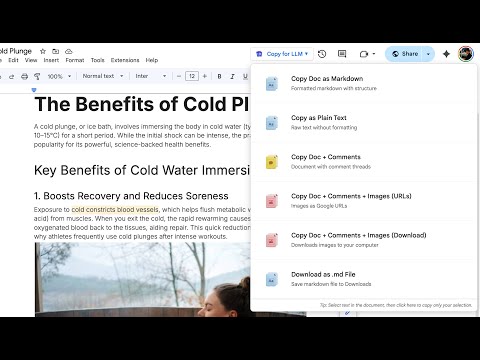
Copy Google Docs content as markdown with images and comments for easy pasting into LLMs
Copying from Google Docs sucks. If you've ever tried to copy images, comments, or anything more than simple text, you know how frustrating this can be. https://www.bettergoogledocscopy.com/ 💬 Comments are missing: There's no way to copy comments without copying them one by one 🖼️ Image URLs are giant: Google gives you massive, ugly URLs that crush your context window 🧠 You lose context: Your LLM can't see the full picture without comments and clean image references This extension solves that. Copy clean markdown with comments and images included, without wasting your context window on enormous URLs. It's open source- check it out here: https://github.com/shubgaur/better-google-docs-copy
5 out of 52 ratings
Details
- Version1.3
- UpdatedNovember 22, 2025
- Offered byshub
- Size6.5MiB
- LanguagesEnglish (United States)
- Developer
Email
shubhankargaur1@gmail.com - Non-traderThis developer has not identified itself as a trader. For consumers in the European Union, please note that consumer rights do not apply to contracts between you and this developer.
Privacy

This developer declares that your data is
- Not being sold to third parties, outside of the approved use cases
- Not being used or transferred for purposes that are unrelated to the item's core functionality
- Not being used or transferred to determine creditworthiness or for lending purposes