


Overview
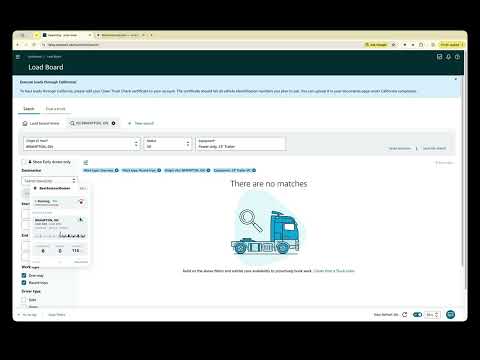
Filter and highlight Amazon Relay loads. See bobtail and weight on the board. Optional Telegram alerts.
BestAmazonBooker is a productivity helper for freight carriers and dispatchers who work on the Amazon Relay load board in Chrome. WHAT IT DOES After you open relay.amazon.com, a floating panel helps you work the board with less repetitive clicking: • Choose payout and rate thresholds that match your operation • Exclude cities, states, or facilities you do not want so matching loads are skipped • Watch the board for matches and highlight loads that meet your filters • Spot bobtail loads with a clear badge under each row’s Drop/Live column • See pickup weight under the trailer column, including Empty when Relay reports a tiny mass • Optional Telegram alerts for highlights, books, and misses — link the bot in Options • Open Post a truck or Quick Post from an expanded load to offer supply on Relay • Start a focused search loop so you can review and book eligible loads more quickly • Hide the panel from the logo when you need a clear board; restore it from the toolbar icon • Open Options from the panel footer gear for account and alert settings • Keep your preferences synced when you sign in to your BestAmazonBooker account HOW TO USE IT 1. Install the extension and pin it in Chrome 2. Create or sign in to your account at https://bestamazonbooker.com 3. Open the Amazon Relay load board 4. Set your filters in the floating helper (including any location excludes), then start when you are ready 5. Expand a load when you want to post supply, then use Post a truck or Quick Post 6. Optional: link Telegram in Options if you want alerts on your phone REQUIREMENTS • Works only on relay.amazon.com • Requires an active BestAmazonBooker account to sync subscription and features • Free includes 1 successful autobook per day; Pro is $99/month for unlimited autobook while subscribed • Post a truck and Quick Post need a Pro subscription • You stay in control of every booking and post action on Relay • Not affiliated with Amazon or Amazon Relay PRIVACY & SUPPORT We do not ask for or store your Amazon Relay password. Account, billing, and product usage details are handled under our Privacy Policy: https://bestamazonbooker.com/privacy Need help? Visit https://bestamazonbooker.com or open Support from the extension.
0 out of 5No ratings
Details
- Version1.0.16
- UpdatedOctober 27, 2026
- Size197KiB
- LanguagesEnglish (United States)
- DeveloperWebsite
Email
solotechdude@gmail.com - Non-traderThis developer has not identified itself as a trader. For consumers in the European Union, please note that consumer rights do not apply to contracts between you and this developer.
Privacy

This developer declares that your data is
- Not being sold to third parties, outside of the approved use cases
- Not being used or transferred for purposes that are unrelated to the item's core functionality
- Not being used or transferred to determine creditworthiness or for lending purposes
Support
For help with questions, suggestions, or problems, visit the developer's support site