Best Screenshot
1 rating
)


Overview
Screenshot and screen capture tool for instant annotations on any selected area — perfect for feedback, bugs, and tutorial.
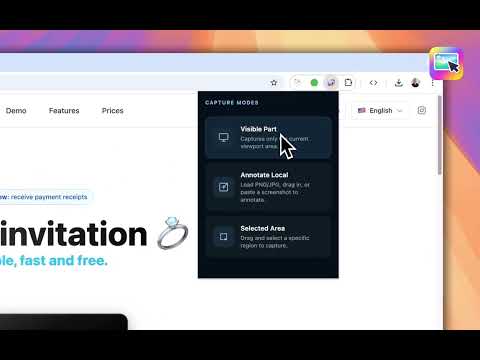
The best screenshot and screen capture tool for instant visual feedback — perfect for bug reports, design feedback, and step-by-step tutorials. Need to report a bug, give design feedback, or create a tutorial? Best Screenshot makes it fast, clean, and effortless. Here are 10 reasons to choose Best Screenshot: 1️⃣ Capture any part of any page in seconds 2️⃣ Powerful annotation tools built for feedback and tutorials 3️⃣ Highlight important areas so viewers focus on what matters most 4️⃣ Draw with circle and rectangle tools for clear visual explanations 5️⃣ Numbered steps (① ② ③) to guide anyone through any process 6️⃣ Blur sensitive data before sharing — privacy first 7️⃣ Annotate screenshots you already have with Annotate Local 8️⃣ Keyboard shortcuts for blazing-fast workflows 9️⃣ 100% local — no account, no cloud, no tracking 🔟 Copy to clipboard or download as PNG in one click 📸📸📸 Capture Modes 📸📸📸 🖥️ Capture ▸ Capture the visible area of any page instantly ▸ Drag and select any specific region with pixel precision ▸ Load a local PNG or JPG file to annotate ▸ Paste a screenshot directly from your clipboard (Cmd+V / Ctrl+V) ▸ Drag and drop images right into the annotator 🖍 Annotate, Highlight & Draw ▸ Draw arrows to point out exactly what matters ▸ Highlight key areas to direct attention instantly ▸ Draw with circle and rectangle shapes to frame important areas clearly ▸ Add text labels with custom font, size, and color ▸ Choose from fonts like Roboto, Montserrat, Arial, and Times ▸ Place emoji callouts (📌 ✅ ❗ 👉 💡 🚀 🔥 👀 🎯 📝) for expressive context ▸ Add numbered step markers — perfect for tutorials and how-tos ▸ Blur sensitive areas to protect passwords, emails, and personal data ▸ Select, move, resize, and delete annotations freely ▸ Delete any annotation with the keyboard for speed 💾 Save & Share ▸ Copy the annotated screenshot directly to your clipboard ▸ Download as PNG with one click ▸ Reset all annotations to restore the original image at any time 🎯 Who is Best Screenshot for? ▸ Developers & QA teams — Capture and annotate bugs with numbered steps and arrows for precise reproduction ▸ Designers & Product teams — Share clear visual feedback without long back-and-forth threads ▸ Teachers & Content creators — Build step-by-step tutorials with highlights, shapes, and numbered markers ▸ Support teams — Show exactly where to click or what to do, with zero ambiguity ▸ Anyone who needs to communicate visually and quickly 🔒 Privacy You Can Trust Everything runs 100% locally in your browser. No servers. No accounts. No data collection. Your screenshots never leave your machine. 📧 Feedback & Suggestions Have an idea or found an issue? We’d love to hear from you. Your feedback helps shape what we build next.
5 out of 51 rating
Details
- Version1.1.1
- UpdatedApril 28, 2026
- Offered byDM Tecnologia ltda
- Size694KiB
- LanguagesEnglish
- Developer
Email
diogo@diogomachado.com - Non-traderThis developer has not identified itself as a trader. For consumers in the European Union, please note that consumer rights do not apply to contracts between you and this developer.
Privacy

This developer declares that your data is
- Not being sold to third parties, outside of the approved use cases
- Not being used or transferred for purposes that are unrelated to the item's core functionality
- Not being used or transferred to determine creditworthiness or for lending purposes
Support
For help with questions, suggestions, or problems, please open this page on your desktop browser