


概述
为标签页或笔记安排提醒通知,并按星期或时间间隔创建自定义提醒计划。
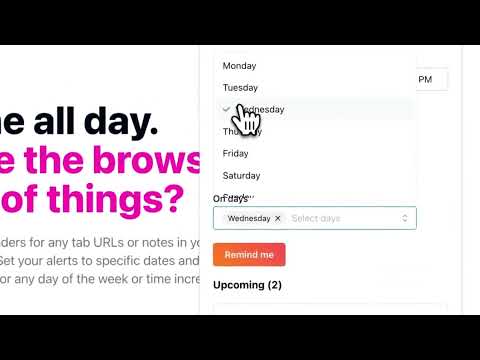
Remind yourself of that interesting article you just found, daily tasks, drink water, get up and walk around, or maybe just to check a website again. The extension allows you to easily set reminders for tab URLs and/or notes. You will receive a Chrome notification for the date and time of the reminder. 🚨🚨 Important Note! 🚨🚨 Make sure that you have notifications for Chrome and Chrome Notification Helpers enabled. The reminder notifications will not show if this is not enabled. You can check this by going to your browser settings and searching for notifications. Or, by checking the system settings on your computer. For Windows users, there is a video here that shows how to allow notifications - https://www.youtube.com/watch?v=qudjOsPWpMQ 🆕 New! - Cloud Sync and Email Reminders - Sync your reminders across devices and receive email notifications even when your browser is closed (subscription) 🆕 New! - View and manage your past reminders — filter, sort, search, and recreate them. You can also check whether each notification was acknowledged. 🆕 New! - Set default reminder options (Include URL, text, sound) for the extension popup. 🆕 New! - Add custom time intervals for "quick reminders". These will show in the extension popup and right-click context menu, if enabled. 🆕 New! - Reminders page - Filter, sort, search, and edit your reminders. Also, export your current reminders in .CSV format. 🆕 New! - Right-click and create reminders with selected text or page URL from the context menu (turn on in settings). Create a reminder just by right-clicking on a page or link. 🆕 New! - Settings page - show number of upcoming reminders on extension icon. Features: 🔒 Privacy and Offline Functionality: All your reminders function offline, meaning your data is stored locally and never leaves your browser. This ensures your privacy and security. ☕ Add daily reminders: Add price tracker reminders, remember to check your flight status, drink water every hour, or anything else you can think of. 🔄 Repeating Reminders: Forget the hassle of setting multiple alarms. Customize your alerts to repeat at intervals spanning minutes to weeks or specific days. It's the simple solution to managing recurring tasks, meetings, and habits! 🏗️ Custom Schedules for Time Intervals: Set your reminders for specific dates and times or choose recurring intervals in minutes, hours, days, or weeks. 🖱️ Right-click and create "quick reminders": Right-click on any webpage to quickly create a reminder for 30 minutes, 1 hour, 1 day, or 1 week. This is useful for creating reminders for webpages without having to open the extension popup. 🔈 Include Sound: Enable sound notifications to play when your reminder notification pops up. 🗓️ Flexible Day Scheduling: Get reminded on specific days of the week—weekends, weekdays, individual days like Mondays or Thursdays, or select multiple days like Mondays, Wednesdays, and Fridays. 🙌 Simple and Easy to Use: Add reminders in just a few clicks. No need to open a separate app or tab. The interface is clean and straightforward, so you can focus and not get distracted with clunky UIs or features you don't need. ⏰ Rich Notifications: Include the tab URL by default, or personalize your reminder with custom text. How to Set Reminders --------------------------------------- 1. Install the extension. 2. Browse to a tab you want to be reminded of or use the extension popup to enter a custom note. 3. Include URLs and notes 🔗 Include Tab URL: Switch this on to link your reminder to the current webpage. When the reminder notification pops up, clicking on it will open the linked URL, allowing you to close the tab after setting the reminder. 🖊️ Include Note Text: Activate this to access a text area to jot down notes for your reminder. This is useful for adding detailed information to your tasks. 4. Or, use Quick Set Options 💥 For immediate reminders, use one of the quick options: 'in 30 mins', 'in 1 hour', 'in 1 day', or 'in 1 week'. 5. Set Date and Time Configuration 🗓️ Date: Choose a future date for your reminder. For repeating reminders, the blue dot signifies the 'first' date in the series. 🕟 Time: Set a future time when you want the reminder to alert you. Make sure that both date and time are set ahead of the current time to ensure proper scheduling. 6. Repeat Schedule From the 'Repeat' dropdown, select how often you want the reminder to occur. Your choices can range from once to recurring patterns like daily or weekly. The starting date of this sequence is indicated by a blue dot. 7. Add Reminder Hit the 'Remind me' button to save your reminder. You can close the tab after setting the reminder, since clicking on the reminder notification will reopen the URL when it’s time. 8. Upcoming Reminders The 'Upcoming' section allows you to see all reminders that are set. Make sure that notifications are enabled for the browser. Notifications have to be enabled for the browser, not just the extension. You can check this by going to your browser settings and searching for notifications. Or, by checking the system settings on your computer. Receive browser notifications when it's time! ━━━ Have any questions? Don't hesitate to email (contact@bestreminderapp.com) or tweet us at @bestreminderapp. Find out what's changed in the official subreddit: https://www.reddit.com/r/bestreminderapp/
4.6 星(5 星制)26 个评分
详情
隐私权

该开发者已声明,您的数据:
- 不会因未获批准的用途出售给第三方
- 不会为实现与产品核心功能无关的目的而使用或转移
- 不会为确定信用度或放贷目的而使用或转移
支持
若有任何疑问、建议或问题,请在桌面浏览器中打开此页面