


Overview
Protects pinned tabs against unintentional closures and prevents opening a different website inside a pinned tab.
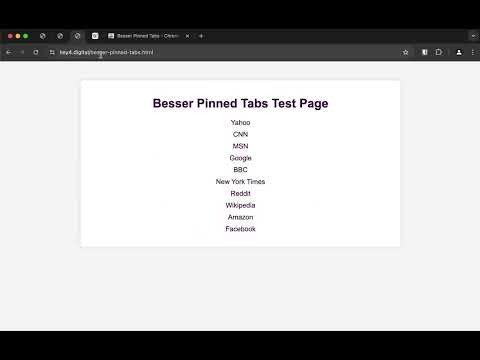
WHAT'S NEW • Reopening a pinned tab that you closed with Cmd-W or Ctrl-W has been rebuilt to work with the latest Chromium code. It had stopped working on Brave and Microsoft Edge, and works again on both. • Google Chrome's own warning is left alone. Chrome now asks you to press the shortcut a second time before it closes a pinned tab, which stops the tab from closing at all — better than reopening it afterwards. So on Chrome the extension steps aside and lets Chrome handle that case. • Both the Chrome and the Firefox version gained an About page explaining what the extension does. Click the extension's toolbar icon to open it. • The icon was updated, and is now the same on both browsers. • One new permission, "sessions". It lets the extension read the browser's own record of the tab you just closed — the same list behind "Reopen closed tab" — so a pinned tab comes back exactly as it was, with its history. It gives no access to the content of the pages you visit, and nothing is sent anywhere. --- INTRODUCTION Besser Pinned Tabs protects the tabs you keep pinned. It brings your pinned tabs closer to how Safari treats them: hard to lose, and not replaced by whatever you click next. WHAT IT DOES • Accidentally closed a pinned tab? It comes straight back. Whether you used Cmd-W, Ctrl-W, the close button or the context menu, the tab reappears in the same place, showing the same site. • Click a link to another site and it opens in a new tab, instead of taking over your pinned page. Your pinned tab keeps showing what you pinned it for. • Type a new address in a pinned tab and it opens in a fresh tab as well, so the pinned page stays where it is. • It runs quietly in the background. There is nothing to set up and nothing to configure. • No data collection of any kind, and the source code is public. An About page, reachable by clicking the extension's toolbar icon, explains all of this along with the limitations below. PLEASE NOTE The pinned page always reloads in two cases: when you type a new address in a pinned tab, and when you close a pinned tab with a keyboard shortcut. In both, the tab is put back rather than held in place, so the page loads again and anything unsaved on it — scroll position, half-filled forms — is lost. GOOD TO KNOW These points are the result of what a browser permits an extension to do. They are not faults in the extension, and they cannot be fixed from the extension's side. • A closed pinned tab is restored, not stopped from closing. The browser gives extensions no way to cancel a tab closing. What really happens is that the tab closes and is immediately reopened at the same position, showing the same site. Visually the tab barely flinches, but the page does reload. • Google Chrome now handles this case itself: it asks you to press Cmd-W or Ctrl-W a second time before closing a pinned tab. That prevents the close outright, which is better than reopening the tab afterwards, so on Chrome the extension leaves the close alone — once you have confirmed twice, the tab stays closed. On Brave, Microsoft Edge and other Chromium browsers, which still close a pinned tab on the first press, the extension reopens it. • A typed address is caught as it starts loading rather than beforehand, so the pinned page is put back and reloads. This is the trade-off for the extension not asking for permission to read the pages you visit. • Links that stay on the same site load in the pinned tab as usual. Only links leading to a different site are moved to a new tab. • The browser's own pages (chrome://, about: and similar) are not covered, and neither is a window that starts up with a pinned tab on one of them. • The browser's Home button is not intercepted, because it is not reported in a way the extension can act on. • When a site bounces through another domain, which sign-in pages often do, the second attempt to reach that domain is allowed through in the pinned tab. Without this, a sign-in could open new tabs endlessly. • This extension is built and tested for Google Chrome, Brave and Microsoft Edge. Other browsers built on Chromium — Vivaldi, Helium and so on — handle tabs and navigation their own way, so it may behave differently there. Please report anything that only happens in one of those browsers to that browser's own community, as it may not be fixable here. PERMISSIONS The extension cannot read the content of the pages you visit, and asks for no host permissions. It needs to see your tabs and their addresses in order to know which are pinned, to store that list locally, and to read the browser's own record of the tab you just closed — the same list behind "Reopen closed tab" — so it can put a pinned tab back exactly as it was. Nothing is sent anywhere. THERE IS ALSO A FIREFOX VERSION Firefox handles two of these three cases by itself: it refuses to close a pinned tab with Ctrl-W or Cmd-W, and it already opens links leading to another site in a new tab. The Firefox version therefore does one thing only — an address you type in a pinned tab and that leads to another site opens in a new tab. There too, the pinned page reloads when that happens. Search the Firefox Add-ons site for Besser Pinned Tabs. Open source, no data collection: https://github.com/gerardkieffer/Besser-Pinned-Tabs-Chrome
4.3 out of 515 ratings
Details
- Version1.1.4
- UpdatedJuly 30, 2026
- Size143KiB
- LanguagesEnglish
- DeveloperWebsite
Email
gerard.kieffer@ikmail.com - Non-traderThis developer has not identified itself as a trader. For consumers in the European Union, please note that consumer rights do not apply to contracts between you and this developer.
Privacy

This developer declares that your data is
- Not being sold to third parties, outside of the approved use cases
- Not being used or transferred for purposes that are unrelated to the item's core functionality
- Not being used or transferred to determine creditworthiness or for lending purposes
Support
For help with questions, suggestions, or problems, visit the developer's support site