

Sidebar for Tabs/Bookmarks

Overview
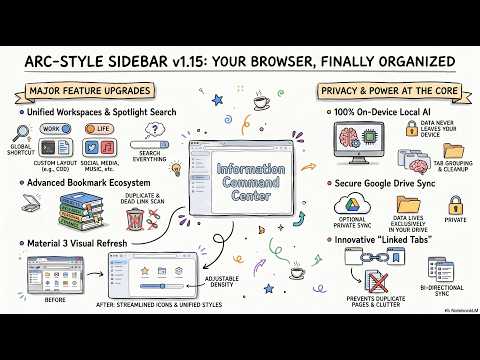
Arc-style sidebar: tabs, bookmarks & reading list + local AI (grouping, cleanup, summary, search), Workspaces. API key optional.
# Arc-like Vertical Tabs & Bookmarks · Your Knowledge Workspace for Chrome 🔒 **Local by default** · 🔑 **No API key needed (BYO optional)** · 🤖 **Built-in Gemini Nano AI** Chrome's native vertical tabs (2025) only show your tabs vertically. **This is a full knowledge workspace**: unified tabs + bookmarks + reading list, AI-powered (auto group naming, tab cleanup, hover summaries, natural-language search), Workspaces for hibernate-and-restore tab bundles synced across devices, a ⌘K Command Palette, and Bookmark Tools for tagging, deduping, and dead-link cleanup — on-device by default (no API key), with optional bring-your-own-key cloud AI (Gemini API / Claude / OpenAI-compatible / Ollama). Tired of getting lost in dozens of cluttered tabs? Craving the sleek, vertical tab experience of the Arc browser but can't leave the Chrome ecosystem? **Arc-like Vertical Tabs & Bookmarks** is your ultimate answer! 🚀 ## 🆚 Why not just Chrome's native vertical tabs? | Feature | Native Vertical Tabs | This Extension | | :--- | :---: | :---: | | Vertical tab list, tab groups | ✅ | ✅ | | Bookmarks in the same panel | ❌ | ✅ | | Reading List integrated | ❌ | ✅ | | RSS subscriptions | ❌ | ✅ | | Cross-window tab view | ❌ | ✅ | | **Workspaces (hibernate + restore, cross-device)** | ❌ | ✅ | | **Auto Grouping Rules (site → group routing)** | ❌ | ✅ | | **Auto-Archive + Snooze** | ❌ | ✅ | | **AI Auto Group Naming** | ❌ | ✅ Local AI | | **AI Tab Cleanup Suggestions** | ❌ | ✅ Local AI | | **AI Hover Summary** | ❌ | ✅ Local AI | | **Ask AI Find (natural-language search)** | ❌ | ✅ Local AI | | **Bookmark Tools** (tags / dedupe / dead-link) | ❌ | ✅ | | **Command Palette (⌘K)** | ❌ | ✅ | | **Custom theme + background image** | ❌ | ✅ | | API key required | N/A | ❌ Optional | | Local & offline | ✅ | ✅ By default | We've completely reimagined Chrome, introducing a modern side panel that unifies **Vertical Tabs**, **Tab Groups**, and **Bookmark Management**. Say goodbye to the traditional horizontal tab bar and regain control of your browser. Experience focus and efficiency like never before. 🌐 **Official Website**: [https://sidebar-for-tabs-bookmarks.taislife.work/](https://sidebar-for-tabs-bookmarks.taislife.work/) --- ## 🔥 Key Features ### 🤖 Knowledge Workspace 2026 (new) - **AI Auto Group Naming**: New empty tab groups get an emoji + short label automatically (Gemini Nano). - **AI Tab Cleanup Suggestions**: 🧹 button — AI tells you which tabs you can probably close, with short reasons. - **AI Hover Summary**: Hover any tab 2s for a one-sentence page summary. - **AI Reading List Summary Memory**: Added to Reading List? AI summarizes once and stores locally — preview later, even offline. - **Ask AI to Find (⌘K)**: Natural-language search across tabs, bookmarks, and reading list — "the React Hooks article I read last week" actually works. - **Workspaces**: Bundle tabs as named workspaces, hibernate-and-restore one-click, metadata sync across devices. - **Command Palette (⌘K / Ctrl+K)**: Linear/Raycast-style unified search + actions overlay. - **Bookmark Tools**: 🛠️ for multi-tag, duplicate finder, dead-link checker. - **Local by Default, Cloud Optional**: AI runs on Chrome's built-in Gemini Nano out of the box — nothing leaves your machine. Optionally connect your own API key (Gemini API / Claude / OpenAI-compatible / Ollama). ### 🔗 Exclusive Innovation: Linked Tabs This is our most powerful feature! When you open a bookmark from the sidebar, we automatically create a **"Link"**. - **Avoid Tab Clutter**: Click the link icon next to a bookmark to see all tabs opened from it, helping you avoid opening duplicates and saving system resources. - **Two-Way Sync**: When a tab is closed, the bookmark status updates automatically; when a bookmark is deleted, the linked tab is handled intelligently. - **Visual Feedback**: A refined link icon appears next to bookmarks, letting you know at a glance which ones are currently active. ### ⚡️ Smart Rendering Have thousands of bookmarks? No problem! - **Dynamic Rendering**: Switched from Virtual Scrolling to an efficient Dynamic Rendering mechanism, ensuring smooth performance with better compatibility. - **Smooth Experience**: Navigate through large bookmark libraries effortlessly without lag. ### 🪟 Cross-Window Management - **Window Overview**: View tabs from all open Chrome windows directly in the sidebar, not just the current one. - **Global Search**: Search results include tabs from all windows, allowing for instant navigation across your entire session. ### 🔍 Professional Grade Search Don't just search—find instantly. - **Multi-Keyword Filtering**: Supports space-separated keywords (e.g., "google docs work") for precise targeting. - **Domain Search**: Type a domain (like `github.com`) to instantly filter tabs and bookmarks from specific sources. - **Smart Highlighting**: Real-time highlighting of matched keywords keeps your visual focus clear. - **Every Section Covered**: Filtering, keyword highlighting and domain matching now span every sidebar section — including the new Archive. ### 🗂️ Unified Workspace - **Vertical Tabs**: View full page titles, no longer compressed into tiny icons. - **Native Group Support**: Perfectly integrates with Chrome Tab Groups, syncing colors and names. - **Custom Window Naming**: Assign custom names to your windows (e.g., "Work", "Personal") for clearer context. - **Drag & Drop**: Intuitive management—move items effortlessly between tabs, groups, and bookmark folders. - **Drag to Save**: Drag a tab into the bookmarks area to save it instantly; drag a bookmark to the tabs area to open it. - **Reading List & RSS**: Your personal hub for article curation. Sync with the native Chrome Reading List, subscribe to RSS feeds, and manage everything in one place with smart deduplication and sorting. ### 🚦 Tab Autopilot (new) - **Auto Grouping Rules**: Right-click a tab once — every future tab from that site slides into its group the moment it loads. Full rule management in Settings, synced across devices. - **AI Auto Grouping (optional)**: No rule matched? Open a few tabs from the same site in a row and AI groups them and names the group for you. - **Auto-Archive**: Tabs idle beyond your threshold (default 12h) tuck themselves into the sidebar’s new Archive — pinned, grouped, active or audible tabs are never touched, and every sweep undoes in one click. - **Snooze**: “Snooze this tab…” closes it now and brings it back on schedule — in 1 hour, tonight, tomorrow morning, or next Monday. ### 🎨 Premium Design & Customization - **Custom Background Image**: Personalize your workspace! Upload your own image or use a URL. Fine-tune it with adjustable **opacity** and **blur** for the perfect look. - **Revamped Settings UI**: Enjoy a modern, organized settings panel with a new **Accordion layout**, making it easier than ever to configure your sidebar. - **Custom Theme Colors**: Go beyond presets. You now have full control over the main background, accent, and text colors. - **Focus Mode**: A sleek dark theme with carefully tuned contrast to reduce eye strain. - **Auto-Expand**: Hover over folders while dragging items to automatically expand the path. - **Smart Hover**: Action buttons appear only when needed, keeping the interface clean and distraction-free. --- ## ⌨️ Full Keyboard Navigation & Shortcuts - **Native Experience**: Use `Arrow Up`/`Arrow Down` keys to navigate seamlessly between tabs and bookmarks. - **Micro-Interactions**: Use `Arrow Left`/`Arrow Right` to navigate and trigger internal buttons (like Close, Add to Group). - **Productivity Shortcuts**: - `F2`: Instantly rename any tab or bookmark. - `Delete`: Quickly remove unwanted items. - `Cmd/Ctrl + I`: Toggle Sidebar. - `Opt/Alt + T`: Create a new tab next to the current one. - **Search Integration**: Press `Up` at the top of the list to focus the search bar; press `Down` in the search bar to jump to results. - **Focus Tip**: Once the sidebar is open, simply press any arrow key to automatically grab focus and start navigating. --- ## Privacy & Security We value your privacy. This extension operates **locally by default**. Your bookmarks, browsing history, and tab information are **never** uploaded to our servers. If you opt in to a cloud AI provider, AI requests go directly from your browser to that provider only, using your own API key. --- **Install now and upgrade your Chrome to a productivity beast! 🌟** --- ## Open Source & Community This is an open source project. If you are interested in contributing, please visit our GitHub repository: https://github.com/Tai-ch0802/arc-like-chrome-extension
4.4 out of 57 ratings
Details
- Version1.20.0
- UpdatedAugust 19, 2026
- Size878KiB
- Languages14 languages
- DeveloperWebsite
Email
chrome-extension@taislife.work - Non-traderThis developer has not identified itself as a trader. For consumers in the European Union, please note that consumer rights do not apply to contracts between you and this developer.
Privacy

Sidebar for Tabs/Bookmarks has disclosed the following information regarding the collection and usage of your data. More detailed information can be found in the developer's privacy policy.
Sidebar for Tabs/Bookmarks handles the following:
This developer declares that your data is
- Not being sold to third parties, outside of the approved use cases
- Not being used or transferred for purposes that are unrelated to the item's core functionality
- Not being used or transferred to determine creditworthiness or for lending purposes
Support
For help with questions, suggestions, or problems, please open this page on your desktop browser