Item logo image for Benny's Hub Companion

Benny's Hub Companion

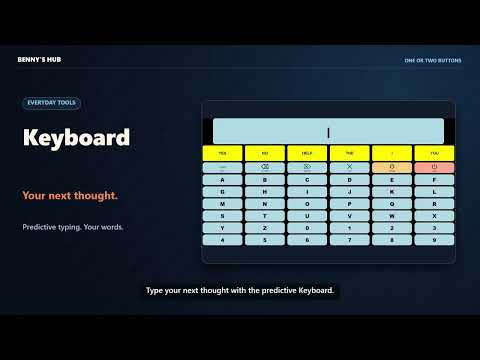
Item media 6 (screenshot) for Benny's Hub Companion
Item video thumbnail
Item media 2 (screenshot) for Benny's Hub Companion
Item media 3 (screenshot) for Benny's Hub Companion
Item media 4 (screenshot) for Benny's Hub Companion
Item media 5 (screenshot) for Benny's Hub Companion
Item media 6 (screenshot) for Benny's Hub Companion
Item video thumbnail
Item media 2 (screenshot) for Benny's Hub Companion
Item media 3 (screenshot) for Benny's Hub Companion
Item media 4 (screenshot) for Benny's Hub Companion
Item media 5 (screenshot) for Benny's Hub Companion
Item media 6 (screenshot) for Benny's Hub Companion

Overview

Control supported streaming players and connect Day Hub sources using one or two switches with Benny's Hub.

Benny’s Hub Companion makes supported streaming websites easier to use with one or two switches. It works alongside Benny’s Hub, a library of accessible tools and games designed for controls mapped to Spacebar and Enter. The companion adds a simple, color-coded control bar to supported streaming pages. Users can scan through controls and select actions without navigating a busy player interface. Features include: - Accessible playback controls: Play or pause, rewind, fast forward, adjust volume, enter fullscreen, and navigate available episodes or playlist items. - One- or two-switch navigation: Use automatic scanning or separate scan and select buttons. - Personalized scanning: Use the Hub’s Scan Manager settings for scan speed, input timing, and anti-tremor preferences. - Easy return to the Hub: Return directly from the streaming control bar. - Connected tools: Enable supported calendar, news, and weather connections for Day Hub. Install Benny’s Hub Companion to bring consistent switch controls to supported streaming players and enable the Hub’s connected features. Connection options are available in companion settings, and access to supported sites is requested when needed. Use with Benny’s Hub: https://narbehouse.github.io/bennyshub/ Streaming services may require their own accounts or subscriptions. Available playback controls depend on the service. Developed by NARBE LLC. Support: narbehousellc@gmail.com

Details

  • Version
    1.0.8
  • Updated
    October 7, 2026
  • Size
    114KiB
  • Languages
    English
  • Developer
    Email
    NARBEHOUSELLC@GMAIL.COM
  • Non-trader
    This developer has not identified itself as a trader. For consumers in the European Union, please note that consumer rights do not apply to contracts between you and this developer.

Privacy

Manage extensions and learn how they're being used in your organization

Benny's Hub Companion has disclosed the following information regarding the collection and usage of your data. More detailed information can be found in the developer's privacy policy.

Benny's Hub Companion handles the following:

Personally identifiable information
Authentication information
Personal communications
Location
Web history
User activity
Website content

This developer declares that your data is

  • Not being sold to third parties, outside of the approved use cases
  • Not being used or transferred for purposes that are unrelated to the item's core functionality
  • Not being used or transferred to determine creditworthiness or for lending purposes

Related

Tag 2 3 4 Players – Multiplayer Party Game

5.0

Play Tag 2 3 4 Players Gane in your browser. Run, chase, and compete with friends in fun multiplayer matches.

Video Speed Controller Pro

3.0

Control HTML5 video speed with shortcuts, presets, A–B loops, filters and up to 600% volume boost on compatible players.

StreamPro: Speed Control works with Hotstar

5.0

Independent software not affiliated with Hotstar. Control Hotstar video playback speed and watch at your own pace.

MarsConnect

5.0

MarsConnect helps you temporarily connect data between different browser clients and provides refined control.

VOD Review Enhancements

5.0

Audio compressor and playback fixes for Twitch, plus BiliBili live-status, profile pictures and player controls, on vodreview.app.

MemorIN: CS2 Demo Viewer

0.0

Turn CS2 demos into interactive 3D browser replays. Open a supported match or demo link and build the replay with one click.

You Controller

4.7

Control YouTube, Twitch and Spotify from an Elgato Stream Deck, with the video or album art live on the keys.

Cayde's Cache - Your Destiny 2 Hub

0.0

Your Destiny 2 companion hub right in the browser. Track your Guardians, gear, and activities.

Browser Media Controls

3.0

Connect browser media to the Browser Media Controls Windows app and Stream Deck integration.

Twitch DVR player

5.0

Replaces the standard twitch player with a custom one that supports DVR.

Couch Controller

0.0

Use your game controller like a TV remote: scroll, control video playback, switch tabs, go fullscreen, set custom bindings.

Audible Player Enhanced - Dark Mode, Volume Slider

4.6

Adds a dark theme and volume control to Audible's web player.

Tag 2 3 4 Players – Multiplayer Party Game

5.0

Play Tag 2 3 4 Players Gane in your browser. Run, chase, and compete with friends in fun multiplayer matches.

Video Speed Controller Pro

3.0

Control HTML5 video speed with shortcuts, presets, A–B loops, filters and up to 600% volume boost on compatible players.

StreamPro: Speed Control works with Hotstar

5.0

Independent software not affiliated with Hotstar. Control Hotstar video playback speed and watch at your own pace.

MarsConnect

5.0

MarsConnect helps you temporarily connect data between different browser clients and provides refined control.

VOD Review Enhancements

5.0

Audio compressor and playback fixes for Twitch, plus BiliBili live-status, profile pictures and player controls, on vodreview.app.

MemorIN: CS2 Demo Viewer

0.0

Turn CS2 demos into interactive 3D browser replays. Open a supported match or demo link and build the replay with one click.

You Controller

4.7

Control YouTube, Twitch and Spotify from an Elgato Stream Deck, with the video or album art live on the keys.

Cayde's Cache - Your Destiny 2 Hub

0.0

Your Destiny 2 companion hub right in the browser. Track your Guardians, gear, and activities.

Google apps