


Overview
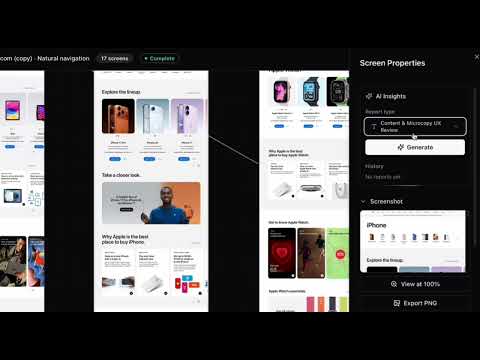
Capture URLs or record a tab video and turn it into a BenchCanvas flow map.
BenchCanvas Capture turns the site you are on into a visual flow map in BenchCanvas. Start from a URL, or record a short walkthrough of the tab when the app is behind login. URL CAPTURE • Click the extension on any http or https page. • Choose This page (exact URL) or Root domain (homepage). • Tap Start capture. BenchCanvas opens and creates the project from that URL. TAB RECORDING • Tap Record tab flow on a page you want to map (great for logged-in or private apps). • Follow the on-page recording guide, then walk through your UI on that tab (up to 90 seconds). • When you stop, create a new BenchCanvas project, or add the flow to an existing project. WHAT YOU GET • A visual flow map of pages, paths, and how they connect. • Screens pulled from your recording or crawl, ready to explore, annotate, and share with your team. • The same capture tools as the BenchCanvas web app, started from the page you already have open. PRIVACY URL capture reads the active tab URL when you click the icon. Tab recording captures only that Chrome tab while you record, not your whole screen or other tabs. Full policy: https://app.benchcanvas.app/extension/privacy ACCOUNT You need a free BenchCanvas account to save projects. Sign up at https://benchcanvas.app
5 out of 51 rating
Details
- Version0.2.0
- UpdatedJune 10, 2026
- Size29.54KiB
- LanguagesEnglish (United States)
- DeveloperBenchCanvasWebsite
26-38 Jackson Ave Long Island City, NY 11101-2914 USEmail
privacy@benchcanvas.app - Non-traderThis developer has not identified itself as a trader. For consumers in the European Union, please note that consumer rights do not apply to contracts between you and this developer.
Privacy

BenchCanvas Capture has disclosed the following information regarding the collection and usage of your data. More detailed information can be found in the developer's privacy policy.
BenchCanvas Capture handles the following:
This developer declares that your data is
- Not being sold to third parties, outside of the approved use cases
- Not being used or transferred for purposes that are unrelated to the item's core functionality
- Not being used or transferred to determine creditworthiness or for lending purposes
Support
For help with questions, suggestions, or problems, visit the developer's support site