


Overview
Starts, watches and stops a Claude Code worker on your university's Open OnDemand cluster and hands you its Remote Control link.
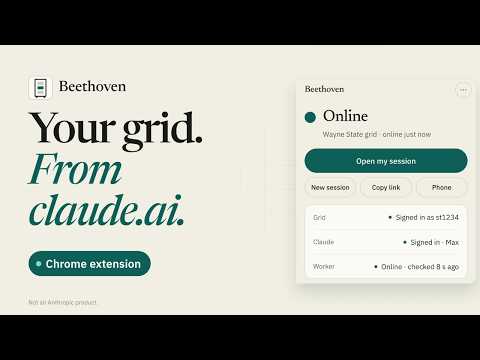
Your grid. From claude.ai. Beethoven starts a Claude Code worker in your own account on the Wayne State grid and opens it in claude.ai. Ask there or in the Claude app, and your worker does the work. HOW IT WORKS 1. Accept the agreement on Beethoven's welcome page. 2. Turn on GlobalProtect, then type your AccessID and password into Beethoven's sign-in sheet. Beethoven signs in to the grid for you, in the background. 3. Sign in to Claude once, on Anthropic's own page. 4. Click Open my session. Your worker runs until you press Stop. If the grid is out of reach, Beethoven waits and carries on by itself as soon as GlobalProtect is on. Nothing is installed outside Chrome. YOU NEED A Wayne State AccessID with a grid account, GlobalProtect, Chrome on Windows, macOS or Linux, and Claude Pro or Max. By approval only: ask at https://openspineconsortium.com/beethoven/ One approval covers every installation of your own: your computers and your Chrome profiles. YOUR DATA To check your approval, Beethoven sends our access service the account name the grid's website shows and a random installation identifier, with your portal's address and the version. It sends nothing else about you. Your password goes only to the grid, never to us, and Beethoven keeps it, encrypted on this computer, only if you ask it to. The service records each check with a salted hash of the network address it came from, never the address. Privacy: https://openspineconsortium.com/beethoven/privacy.html Beethoven runs Claude Code and is not an Anthropic product; "Claude" and "Claude Code" are Anthropic's marks.
5 out of 51 rating
Details
- Version25.0.0.125
- UpdatedOctober 25, 2026
- Size447KiB
- LanguagesEnglish (United States)
- DeveloperWebsite
Email
gregoryamdg@gmail.com - Non-traderThis developer has not identified itself as a trader. For consumers in the European Union, please note that consumer rights do not apply to contracts between you and this developer.
Privacy

Beethoven has disclosed the following information regarding the collection and usage of your data. More detailed information can be found in the developer's privacy policy.
Beethoven handles the following:
This developer declares that your data is
- Not being sold to third parties, outside of the approved use cases
- Not being used or transferred for purposes that are unrelated to the item's core functionality
- Not being used or transferred to determine creditworthiness or for lending purposes
Support
For help with questions, suggestions, or problems, visit the developer's support site