


Overview
YouTube on a parent's rules: a time limit that refills, challenges that earn minutes, treats, and channels set from a phone.
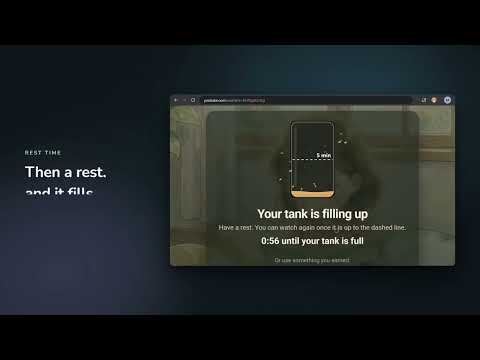
Your child keeps the real YouTube. KidPacer adds a parent's rules to it, set from your phone. CHALLENGES AND TREATS • Challenge treats: a green tile asks one to three questions, and every right answer brings your child closer to more minutes. Sums, spelling read aloud, the alphabet in six languages, what comes next, and telling the time, each set for your child's level. • You decide how many a day, what each is worth, and whether a wrong answer means another go or a fresh start. • Treats you hand out from your phone ("Homework done, 10 minutes"). Your child banks them and spends one when they choose, even in the middle of a rest. A TIME TANK THAT REFILLS • Each child has a tank of watching time, say 45 minutes refilling over 8 hours. It drains only while a video plays and refills the rest of the time, so your child can split it up however they like. • Two minutes before it runs out the video pauses and says so, so a rest never lands mid-song. When it's empty, a rest screen covers YouTube until minutes are back. • The tank is your child's, not the computer's: it counts across every computer they use. ONE CARD SETS EVERYTHING • Recipe cards for ages 2 to 18, plus Gentle senses for children who are sensitive to flashing and noise. One tap deals a whole setup: watching time, video length, Shorts, challenges and more. • Holiday and Rough week tweaks go on top for a while. Or answer the questions one at a time with Your own. CHANNELS YOUR WAY • Open mode: all of YouTube except what you block. Closed mode: only the channels you allow. • Block whole lists in one tick, such as toy and family vlogs or fast nursery-rhyme cartoons; allow calmer cartoons or calmer learning the same way. • Word rules ("prank", "skibidi"), a longest video, and Shorts and YouTube's games off unless you turn them on. • On your child's computer, parent view puts a Block button on every video. • Works on YouTube Kids too, with the same rules and the same tank. CALM RATINGS (BETA) • KidPacer measures each video as it plays, on your child's computer: cuts a minute, flashes, colour, loudness swings, startles. Pick how calm (Under 4, Calm or Relaxed) and the videos that are too much are taken out of the feed and the search results. Nearly a thousand kids' channels are measured already. WATCH ALONG FROM YOUR PHONE • See what your child is watching right now and how much time is left. Pause it, or block its channel. PRIVATE BY DESIGN • The picture and sound never leave your child's computer. What does: the numbers measured, which video it was, and the seconds watched. No ads, no analytics, no data sold. • Children never sign in or make an account. Two parents can share a family, each with their own Google sign-in. HOW TO START KidPacer is free. Sign in at kidpacer.com with Google, add your child and tap their card. Then install this extension on their computer: YouTube shows a QR code until you scan it with your phone and pick your child. Works in Chrome, Edge and Brave on a computer.
0 out of 5No ratings
Details
- Version1.1.0
- UpdatedOctober 16, 2026
- Size17.93MiB
- LanguagesEnglish
- Developer
- Non-traderThis developer has not identified itself as a trader. For consumers in the European Union, please note that consumer rights do not apply to contracts between you and this developer.
Privacy

KidPacer has disclosed the following information regarding the collection and usage of your data. More detailed information can be found in the developer's privacy policy.
KidPacer handles the following:
This developer declares that your data is
- Not being sold to third parties, outside of the approved use cases
- Not being used or transferred for purposes that are unrelated to the item's core functionality
- Not being used or transferred to determine creditworthiness or for lending purposes
Support
For help with questions, suggestions, or problems, visit the developer's support site