


Overview
Who's calling, what's it about? Look up a contact in Tape and see the related companies, tickets and deals at a glance.
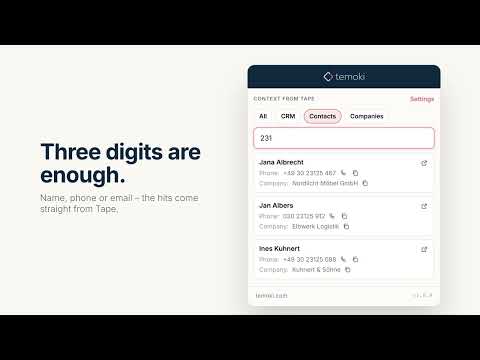
Find information in Tape in seconds – along with the linked records: the company, open tickets, current deals. Without opening Tape, without clicking through apps. How it works: type a few characters – a name, an email address or part of a phone number. Hits from your Tape app appear right away in the popup. Click a hit and its linked records show up directly below, each with a link to Tape. For example: a call comes in. You type three digits of the number and see who is calling, which company the contact belongs to and which tickets are still open – before you pick up. BENEFITS • Fast search: in the fields you choose (e.g. name, phone, email), or full text across all fields • Linked records at a glance: one block per linked app, always expanded • Only what matters: limit each block (e.g. the 3 most recent), sort it and filter by status (e.g. open tickets only) • Right-click selected text: “Look up in Tape” on any web page • Multiple sources, e.g. contacts, companies or projects – each with its own menu entry • Search all sources at once or as a bundle, e.g. “CRM” = companies + contacts; hits appear in tabs per source • Phone and email values with call and mail links, a copy icon on every field • One click opens the record in Tape; Ctrl/Cmd-click opens it in the background and keeps the popup open • Your last search is kept for two hours – reopen the popup and carry on • Export sources and bundles as a file or share them with your team straight in Tape Quick to set up: sign in to Tape with one click – no key to copy. Then pick workspace, app, search fields and linked apps from lists – no field IDs, no copying. What you need: a Tape account. Tape itself offers a free plan; if you need more features, you can book more feature-rich plans. You can try Tape's Premium Edition free for 30 days: twzn.de/tapelink This extension is free and independent – it is not made by Tape. Good to know: phone numbers are matched as stored in Tape. Search without the leading 0 or country code – “351 123” finds both “0351 123…” and “+49 351 123…”. Privacy: sign-in uses Tape's OAuth; your access stays on this device, is never synced and can be disconnected in the settings at any time. Data goes only to the Tape API (api.tapeapp.com), there is no tracking. Search results are not stored. About temoki: temoki is a knowledge management system for companies. Our free browser extensions are small, practical tools that capture knowledge and information – so you can use it for processes, automation and AI. With Temoki Send to Tape you file knowledge in Tape via right-click – Temoki Context from Tape brings it back in a moment. Install it and try it with your next search. More temoki extensions: twzn.de/tmstore
5 out of 52 ratings
Details
- Version1.0.0
- UpdatedOctober 21, 2026
- Size1.0MiB
- Languages2 languages
- DevelopertwentyZEN GmbHWebsite
Loschwitzer Straße 15A Dresden 01309 DEEmail
contact@twentyzen.comPhone
+49 1514 7347464 - TraderThis developer has identified itself as a trader per the definition from the European Union and committed to only offer products or services that comply with EU laws.
- D-U-N-S342667872
Privacy

This developer declares that your data is
- Not being sold to third parties, outside of the approved use cases
- Not being used or transferred for purposes that are unrelated to the item's core functionality
- Not being used or transferred to determine creditworthiness or for lending purposes