


Overview
Filter YouTube home and watch-page recommendations by upload date.
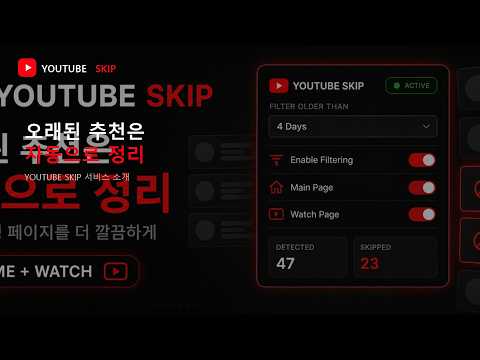
[English] Is your YouTube feed filled with videos uploaded too long ago? YouTube Skip automatically finds older recommendations and marks them as “Not interested” based on your selected time threshold. This helps clean up your feed while improving future recommendations. KEY FEATURES • Home and Watch Page Filtering Works on both the YouTube home feed and the recommended-video list beside videos. • Flexible Time Thresholds Choose from 1–5 days, 1–2 weeks, or 1, 3, and 6 months. • Native “Not Interested” Action Uses YouTube’s own feedback action instead of simply hiding recommendations. • Independent Page Controls Enable filtering separately for the Home and Watch pages. • Clear Filtered Results Shows the video title, upload age, and applied threshold after successful processing. • Live Statistics and Badge Check detected and skipped counts in the popup and on the extension icon. • English and Korean Support Supports both English and Korean YouTube interfaces. HOW TO USE 1. Install the extension and open YouTube. 2. Open the extension popup. 3. Select a time threshold. 4. Enable filtering for the Home page, Watch page, or both. 5. Browse YouTube normally. Older recommendations will be processed automatically. Only successfully confirmed “Not interested” actions are counted as skipped. You can disable filtering at any time. [한국어] YouTube 추천 피드가 너무 오래전에 업로드된 영상으로 가득한가요? YouTube Skip은 사용자가 선택한 시간 기준보다 오래된 추천 영상을 자동으로 찾아 YouTube의 “관심 없음”으로 처리합니다. 추천 피드를 정리하면서 향후 추천 알고리즘을 개선하는 데 도움을 줍니다. 주요 기능 • 홈 및 시청 페이지 필터링 YouTube 홈 피드와 영상 시청 페이지의 추천 영상 목록을 모두 지원합니다. • 다양한 시간 기준 1~5일, 1~2주, 1개월, 3개월, 6개월 중 원하는 기준을 선택할 수 있습니다. • YouTube 기본 “관심 없음” 기능 사용 추천 영상을 단순히 숨기는 대신 YouTube의 기본 피드백 기능을 실행합니다. • 페이지별 필터 설정 홈 페이지와 시청 페이지의 필터를 각각 켜거나 끌 수 있습니다. • 명확한 처리 결과 처리에 성공한 영상의 제목, 업로드 시점 및 적용된 시간 기준을 표시합니다. • 실시간 통계 및 아이콘 배지 팝업과 확장 프로그램 아이콘에서 탐지 및 처리된 영상 수를 확인할 수 있습니다. • 영어 및 한국어 지원 영문과 한국어 YouTube 인터페이스를 모두 지원합니다. 사용 방법 1. 확장 프로그램을 설치하고 YouTube를 엽니다. 2. 확장 프로그램 팝업을 엽니다. 3. 원하는 시간 기준을 선택합니다. 4. 홈 페이지, 시청 페이지 또는 두 페이지 모두의 필터를 활성화합니다. 5. 평소처럼 YouTube를 이용하면 오래된 추천 영상이 자동으로 처리됩니다. “관심 없음” 처리가 정상적으로 확인된 영상만 처리 수에 포함됩니다. 팝업에서 언제든지 필터링을 비활성화할 수 있습니다.
5 out of 51 rating
Details
- Version1.7.1
- UpdatedAugust 14, 2026
- Size24.09KiB
- LanguagesEnglish (United States)
- DeveloperWebsite
Email
gogoke1@naver.com - Non-traderThis developer has not identified itself as a trader. For consumers in the European Union, please note that consumer rights do not apply to contracts between you and this developer.
Privacy

This developer declares that your data is
- Not being sold to third parties, outside of the approved use cases
- Not being used or transferred for purposes that are unrelated to the item's core functionality
- Not being used or transferred to determine creditworthiness or for lending purposes
Support
For help with questions, suggestions, or problems, visit the developer's support site