

Privacy Screen - Automatic Webpage Blur & Screen Shield

Overview
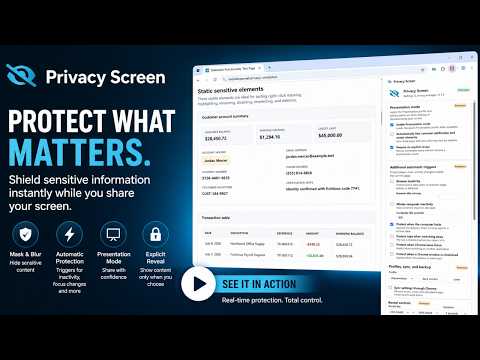
Automatically blur webpages, hide sensitive elements, and shield your screen when you step away, switch tabs, or lock your computer.
Protect sensitive webpage information from accidental exposure with Privacy Screen — Automatic Webpage Blur & Screen Shield. Privacy Screen can blur or cover webpage content when you step away, stop interacting with a page, switch activities, present your screen, or manually activate protection. The free edition includes essential webpage protection. An optional Premium license unlocks advanced automation, persistent masking, privacy zones, per-site rules, presentation tools, customization, profiles, schedules, sync, and backup. Premium costs $14.99 per year and does not automatically renew. CORE PRIVACY PROTECTION Protect the current webpage using: • Automatic protection after page inactivity • Protection when the pointer or current window leaves the page • Manual Protect and Reveal controls • Blur, white-screen, or black-screen protection • Configurable inactivity timing • A complete Disabled mode when protection is not needed Privacy Screen is useful when working with customer information, financial figures, private messages, account dashboards, internal systems, confidential documents, and other webpage content that should not remain visible unattended. TEMPORARY REVEAL Premium users can temporarily inspect a protected page without permanently disabling protection: • Reveal for 5 seconds • Reveal for 15 seconds • Reveal until the next tab switch • Hold Alt to reveal • Click and hold the shield to reveal • Set a preferred timed-reveal duration ADDITIONAL AUTOMATIC TRIGGERS Premium can protect pages when activity changes outside the current webpage: • After browser inactivity • After whole-computer inactivity • When the computer locks • When switching away from a tab • When Chrome loses focus • When a Chrome window is minimized ELEMENT MASKS Premium users can conceal individual webpage elements while leaving the rest of the page visible. Right-click sensitive content and choose “Always blur this element,” or use the visual element selector. Element masks can be used for information such as: • Names and contact details • Account balances • Private messages • Financial figures • Images and profile details • Tables, form fields, and dashboard values Saved masks are restored when you return to the website. Privacy Screen also applies saved masking rules during page startup to reduce the chance of protected content appearing briefly. PRIVACY ZONES Premium users can draw rectangular privacy zones over any portion of a webpage. Privacy zones are helpful for dashboards, charts, canvas-based applications, remote systems, dynamically changing content, and areas that cannot be reliably selected as normal webpage elements. Saved masks and zones can be: • Renamed • Enabled or disabled • Highlighted • Redrawn or reselected • Deleted PER-SITE PRIVACY RULES Premium users can configure different behavior for different websites. A website can: • Use the global settings • Be protected immediately when opened • Never be protected automatically • Use completely custom settings • Use a selected Work, Home, or Presentation profile Custom site settings can include activation method, timeout, protection style, blur strength, shield message, and schedule. CUSTOM SCREEN SHIELDS Premium users can personalize the protected screen with: • Adjustable blur strength • Adjustable overlay shading • Custom background colors • Custom messages • Background images • Logos • Light or dark content themes • An optional clock PROFILES, SCHEDULES, AND PRESENTATION MODE Premium includes Work, Home, and Presentation profiles. Profiles let you save and reload different privacy configurations. Schedules can limit automatic protection to selected days and working hours. Presentation Mode can apply a dedicated Presentation profile, automatically mask common notification and avatar elements, and require an explicit reveal while sharing or demonstrating your screen. SYNC AND BACKUP Premium users can: • Sync supported settings through Chrome • Export settings to a backup file • Import previously exported settings For privacy and storage reasons, element masks, privacy zones, and uploaded shield images remain local to each device. FREE EDITION The free edition includes: • Manual Protect and Reveal controls • Protection after page inactivity • Pointer and current-window leave protection • Blur, white-screen, and black-screen styles • Configurable activation timing • Standard blur protection • Complete Disabled mode PREMIUM EDITION Premium unlocks: • Browser-idle and whole-computer-idle protection • Computer-lock protection • Tab-switch, Chrome-focus, and minimize triggers • Timed and hold-to-reveal controls • Persistent element masks • Drawable privacy zones • Per-site rules and configurations • Custom blur strength and screen appearance • Profiles and schedules • Presentation Mode • Chrome Sync • Settings import and export Premium costs $14.99 per year. The annual license is not automatically renewed. PRIVACY BY DESIGN Webpage masking, privacy zones, and extension settings are processed locally in the browser. Webpage content is not sent to the Privacy Screen licensing service. The extension communicates with the Privacy Screen licensing service to generate and verify a license and retrieve product notices. IMPORTANT LIMITATIONS Privacy Screen provides visual privacy for webpage content. It is not a data-loss-prevention or computer-security product. It does not prevent: • Operating-system screenshots • Screen recordings • Malware • Browser developer tools • Someone with access to the computer from disabling the extension Chrome also prevents extensions from modifying browser-owned areas such as the address bar, toolbar, bookmarks bar, the Chrome Web Store, and certain chrome:// pages. WHAT’S NEW IN VERSION 1.1.5 • Privacy zones now remain anchored to webpage content as the page scrolls • Improved compatibility with privacy zones saved by earlier versions • General reliability improvements
4 out of 513 ratings
Details
- Version1.1.9
- UpdatedAugust 12, 2026
- FeaturesOffers in-app purchases
- Size78.72KiB
- LanguagesEnglish
- DeveloperWebsite
Email
support@socialerase.net - Non-traderThis developer has not identified itself as a trader. For consumers in the European Union, please note that consumer rights do not apply to contracts between you and this developer.
Privacy

Privacy Screen - Automatic Webpage Blur & Screen Shield has disclosed the following information regarding the collection and usage of your data. More detailed information can be found in the developer's privacy policy.
Privacy Screen - Automatic Webpage Blur & Screen Shield handles the following:
This developer declares that your data is
- Not being sold to third parties, outside of the approved use cases
- Not being used or transferred for purposes that are unrelated to the item's core functionality
- Not being used or transferred to determine creditworthiness or for lending purposes
Support
For help with questions, suggestions, or problems, please open this page on your desktop browser