


Pangkalahatang-ideya
Rayo is a Chrome Extension that summarizes any webpage for screen reader users with just one click using ChatGPT OpenAI
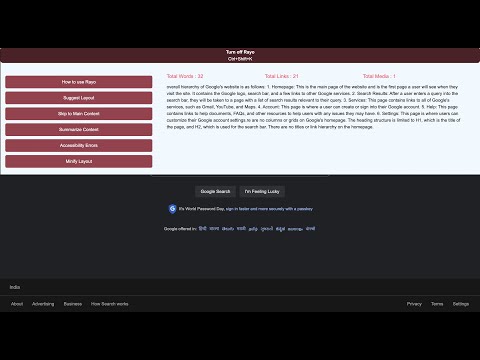
The Rayo Assistant is a powerful Chrome extension specifically designed to enhance the browsing experience for visually impaired individuals. With just one click, Rayo leverages the advanced capabilities of ChatGPT, an OpenAI language model, to summarize any webpage, making it easily accessible to screen reader users. Say goodbye to the frustration of unfamiliar web layouts and cluttered navigation menus. Rayo empowers you to consume information efficiently and hassle-free. Key Benefits: i) Hassle-free information consumption for screen reader users, allowing them to save time and effort. ii) Enhanced productivity and accessibility for researchers, students, teachers, and anyone who experiences frustration with inaccessible web content. Key Features: 1. Web Layout Description: Rayo provides a concise and intuitive description of the web layout, enabling easy navigation through the webpage. 2. Website Content Summarization: With just one click, Rayo's advanced algorithm analyzes the webpage's content and generates a succinct summary of its main points. 3. Skip to Main Content: Quickly extract the main content of a webpage without spending hours navigating through menus or encountering ad banners. 4. Link Compilation: Rayo compiles all the links and buttons of the website into one convenient location, allowing for easy access and exploration. 5. Image Captioning: Describe desired images within the webpage to gain a better understanding of visual content. 6. Full Keyboard Support: Rayo offers complete keyboard navigation support, ensuring a seamless browsing experience. 7. Screen Reader Compatibility: Rayo is designed to seamlessly integrate with screen reader software, ensuring optimal accessibility for visually impaired users. 8. No OpenAI Account Required: Enjoy the benefits of Rayo without the need for an OpenAI account. Instructions: 1. Install Rayo from the Chrome Web Store.. 2. Visit any web page with written content. 3. Activate Rayo by pressing Ctrl + Shift + L. 4. Utilize the Tab key to navigate through buttons. 5. Press Enter to select a button. 6. Use the Tab key to read the content and explore the webpage effortlessly.
0 sa 5Walang rating
Mga Detalye
- Bersyon0.2.2.1
- Na-updateHulyo 5, 2023
- Iniaalok ngdeveloper
- Laki15.19MiB
- Mga WikaEnglish
- DeveloperRayo Lab Pte. Ltd.
Email
developer@therayo.com - Hindi traderHindi tinukoy ng developer na ito ang sarili bilang trader. Para sa mga consumer sa European Union, pakitandaang hindi naaangkop ang mga karapatan ng consumer sa mga kontrata sa pagitan mo at ng developer na ito.
Privacy

Ipinapahayag ng developer na ito na ang iyong data ay
- Hindi ibinebenta sa mga third party na hindi kabilang sa mga naaprubahang sitwasyon ng paggamit
- Hindi ginagamit o inililipat para sa mga layuning hindi nauugnay sa pangunahing functionality ng item
- Hindi ginagamit o inililipat para tukuyin ang pagiging creditworthy o para sa mga layunin ng pagpapautang
Suporta
Para sa tulong sa mga tanong, suhestyon, o problema, pakibuksan ang page na ito sa iyong desktop browser