


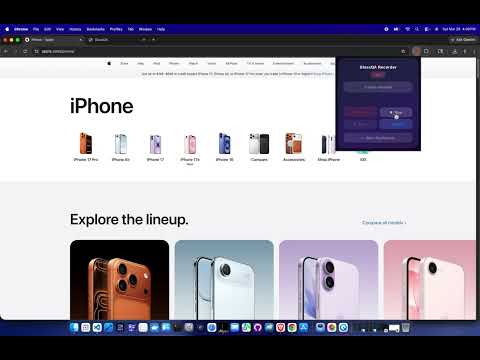
Overview
Record browser interactions and turn them into resilient Playwright-compatible test steps.
Stop writing repetitive UI test setup by hand. GlassQA Recorder captures the browser interactions that matter — clicks, form inputs, and navigation — and turns them into structured test steps with resilient selector data. Record a flow, send it to GlassQA, and run the generated Playwright test locally. How it works: 1. Press Record in the GlassQA extension 2. Interact with the website you want to test 3. Stop recording 4. Export the recording, or send it directly to the local GlassQA dashboard 5. Run the generated test GlassQA captures semantic information such as ARIA roles, accessible names, test IDs, text, and fallback selectors to make generated tests more resilient to common UI changes. Run tests locally with the GlassQA CLI: npm install -g glassqa@latest glassqa setup glassqa ui The first-run experience guides you through setup and helps you run your first test. Why GlassQA: • Record browser interactions instead of writing repetitive test steps by hand • Generate Playwright-compatible tests • Use semantic and fallback selectors for greater resilience • Run tests locally from the GlassQA dashboard • Automatically sync recordings to the local dashboard while GlassQA is running • Keep your testing workflow local and under your control • Export structured recordings when you want to use them elsewhere GlassQA is designed for developers, testers, and teams that want a faster path from browser interaction to repeatable UI testing. Some websites may restrict or challenge automated browsers with CAPTCHA, bot detection, authentication requirements, or other security controls. GlassQA does not bypass those protections. Privacy first: GlassQA does not require an account for the local workflow. Recording and test execution are designed to stay on your machine. The recorder activates when you choose to record. Get started: 1. Install GlassQA Recorder 2. Follow the first-run setup 3. Record a browser flow 4. Run your first test Learn more at glassqa.app
0 out of 5No ratings
Details
- Version1.0.3
- UpdatedAugust 13, 2026
- Size69.14KiB
- LanguagesEnglish
- Developer
- Non-traderThis developer has not identified itself as a trader. For consumers in the European Union, please note that consumer rights do not apply to contracts between you and this developer.
Privacy

GlassQA Recorder has disclosed the following information regarding the collection and usage of your data. More detailed information can be found in the developer's privacy policy.
GlassQA Recorder handles the following:
This developer declares that your data is
- Not being sold to third parties, outside of the approved use cases
- Not being used or transferred for purposes that are unrelated to the item's core functionality
- Not being used or transferred to determine creditworthiness or for lending purposes
Support
For help with questions, suggestions, or problems, visit the developer's support site