


Overview
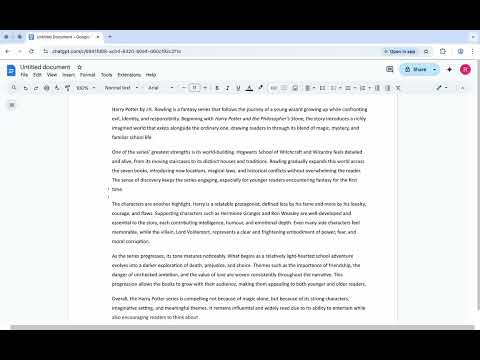
Disguise ChatGPT, Claude, and Gemini as Google Docs.
This extension provides a visual overlay for ChatGPT, Gemini and Claude, disguising it as either a Google Doc, MS Word or Notion. Whether you get social anxiety from using AI in public spaces, or trying to be discreet about your AI usage, GPTDisguise provides a robust solution for all of your AI needs. Disguise ChatGPT with the Google Docs theme for free! Privacy is very important to us: GPTDisguise does not see any conversation history - it is just a visual overlay! How to use: 1. Visit chatgpt.com, claude.ai (Premium) or gemini.google.com (Premium) 2. Click on the extension 3. Click the toggle on the top left of the extension 4. Click Ctrl + Shift + Z to toggle the extension on and off: Please note that on MacOS it is also the 'control' button rather than the 'command' button.(Premium) Upgrading plan: 1. Click on the extension 2. Click the sign in button 3. Upgrade your plan on gptdisguise.app 4. Reopen the extension and wait a few seconds for the extension to update Premium features: Currently these features are now live: 1. Claude and Gemini support 2. Toggle keyboard shortcut 3. Custom themes (Microsoft Word and Notion*) For Claude, please enter two responses for the first response to appear: a little bit of a weird bug currently but wil Please report bugs to gptdisguise on Instagram or TikTok :)
4.8 out of 518 ratings
Details
- Version2.1.8
- UpdatedOctober 5, 2026
- FeaturesOffers in-app purchases
- Size951KiB
- LanguagesEnglish
- DeveloperWebsite
Email
cloakstudios@outlook.com - Non-traderThis developer has not identified itself as a trader. For consumers in the European Union, please note that consumer rights do not apply to contracts between you and this developer.
Privacy

GPTDisguise has disclosed the following information regarding the collection and usage of your data. More detailed information can be found in the developer's privacy policy.
GPTDisguise handles the following:
This developer declares that your data is
- Not being sold to third parties, outside of the approved use cases
- Not being used or transferred for purposes that are unrelated to the item's core functionality
- Not being used or transferred to determine creditworthiness or for lending purposes