


Overview
Easily bulk export your Gemini AI conversations to Notion databases. Save time with fast batch processing and auto-sync.
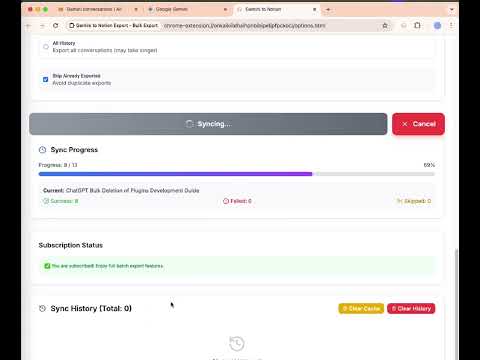
✨ Bulk Export AI Chats from Gemini to Notion Easily bulk export your Gemini AI conversations to Notion databases. Save time with batch processing and auto-sync features. No more copy-paste mess — this extension lets you automate backup and transfer of your AI chat history with just one click. Disclaimer: This is an independent project and has no relationship, affiliation, or endorsement from Google LLC. Perfect for researchers, developers, creators, and anyone using Gemini as a productivity or knowledge tool. 🚀 FEATURES • One-click bulk export of Gemini chats to Notion • Export Gemini Spark conversations individually or in batches, just like your regular Gemini chats • Flexible export modes: sync the current page, your full history, selected conversations, or conversations from specific Gems • Gem-friendly Notion organization: Gem conversations can be saved with their Gem name for easier filtering and review • Custom Preview export: review the chat before saving and select exactly which messages to export • Preview rendered with Markdown support for code blocks, tables, lists, links, and inline code • Export format controls: enhanced formatting, split long conversations into child pages, message filters, and custom Notion tags • Preserves content structure: chat flow, formatting, code blocks, markdown • Saves user and Gemini messages as structured Notion sections with clear heading hierarchy • Export deep research documents as Notion sub-pages for detailed analysis • Automatically sync and organize your AI conversations by topic or date • Refreshable conversation overview to check your total Gemini conversations and pages before syncing • Customizable display name and message background colors in Notion • Secure by design – all data stays in your browser, never uploaded • Clean, fast, and modern UI with intuitive controls 🛠️ HOW TO USE 1. Open any Gemini chat conversation 2. Click the extension icon in your browser 3. Select your Notion database 4. Click “Export” to save the whole chat, or use “Custom Preview” to select specific messages before exporting 📦 USE CASES • Export Gemini chats to Notion for writing, research, or code • Save only selected prompts and Gemini answers from a long conversation • Save deep research findings as structured Notion sub-pages • Backup your Gemini conversations for future reference • Organize AI knowledge into your Notion workspace • Share AI-generated content with teammates or collaborators • Build your Second Brain in Notion using Gemini's output 🔗 USEFUL LINKS • Product Homepage: https://chatgpt2notion.com/products/gemini-to-notion/ • Submit Issues or Feedback: https://github.com/joysey/chatgpt-to-notion/issues • ✉️ Contact: chatgpt2notion@gmail.com 📜 UPDATE LOG • 2026-09-16: Added support for exporting LaTeX mathematical expressions to Notion. • 2026-08-24: Added Spark conversation export for individual and batch workflows. Fixed an issue where pinned conversations could be missed during export. • 2026-06-14: Added more flexible export modes for bulk, selected, and Gem-based syncing. Gem conversations can now be organized in Notion with their Gem name, and the options page now makes conversation counts and export settings easier to review before syncing. • 2026-05-18: Added support for exporting Gem conversations with proper URL format (/gem/{gemId}/{conversationId}) • 2026-05-13: Fixed an issue where some data could be lost when using the Enhanced Formatting feature. • 2026-04-30: Added Custom Preview export — subscribers can preview a Gemini conversation, select individual messages, filter prompts or answers, and save only the selected content to Notion. The preview page now renders Markdown, code blocks, tables, lists, links, and inline code. • 2026-04-30: Added Export Format controls — enhanced Notion formatting, split long conversations into child pages, message filters, and custom Notion tags. • 2026-04-30: Improved Notion output structure — user and Gemini labels are now exported as Notion heading sections for clearer hierarchy. • 2026-04-30: Fixed Custom Preview export configuration — preview export now reuses the same Notion token and database selection as the popup export flow. • 2026-04-12: Added multi-account support for Gemini `/u/<n>/` routes — extension now correctly handles multiple Google accounts. Improved title extraction with validation to prevent UI labels from overwriting conversation titles. • 2026-02-25: Fixed conversation title using the last question instead of the first one. Added Notion Preferences — customize your display name and message background colors for user/Gemini roles. • 2026-02-02: Some minor modifications to optimize user experience. • 2026-01-09 Fixed an issue where Gemini conversations were truncated when the chat history was too long. Full export of the entire conversation is now supported. • 2025-12-09 Optimized error prompts and fixed the issue of retrieving Gemini sub-documents. 🛡️ PRIVACY FIRST This extension processes everything 100% locally in your browser. No data is sent to any server, ensuring total privacy and security.
4.7 out of 527 ratings
Details
- Version5.0.0
- UpdatedSeptember 17, 2026
- Size809KiB
- Languages11 languages
- DeveloperWebsite
Email
aluoapps@gmail.com - Non-traderThis developer has not identified itself as a trader. For consumers in the European Union, please note that consumer rights do not apply to contracts between you and this developer.
Privacy

Export Gemini Chats to Notion has disclosed the following information regarding the collection and usage of your data. More detailed information can be found in the developer's privacy policy.
Export Gemini Chats to Notion handles the following:
This developer declares that your data is
- Not being sold to third parties, outside of the approved use cases
- Not being used or transferred for purposes that are unrelated to the item's core functionality
- Not being used or transferred to determine creditworthiness or for lending purposes
Support
For help with questions, suggestions, or problems, visit the developer's support site