

BassBoost — Local Tab Audio
Overview
Add low-end weight to the audio of a tab you choose. Everything is processed locally on your device.
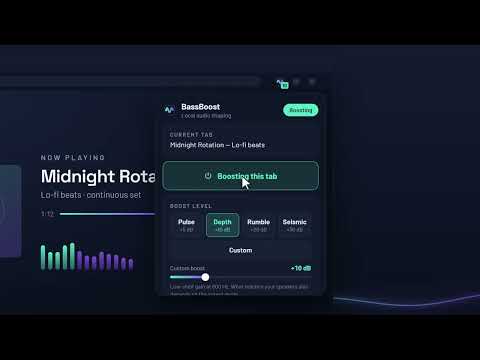
BassBoost adds low-end weight to the audio of the tabs you choose. It runs entirely on your device. BEFORE ANYTHING ELSE The first time you open it, BassBoost tells you plainly what it uses the title, URL and audio of the tab you pick and waits for you to agree. Until you do, it reads nothing and captures nothing. HOW IT WORKS Open a tab that is playing something, click BassBoost, and press "Boost this tab". The audio keeps playing with the boost applied even after you close the popup. Press the button again to stop and hear the original. BOOST LEVELS · Pulse — +5 dB on the low shelf · Depth — +10 dB · Rumble — +20 dB · Seismic — +30 dB · Custom — a slider from 0 to +40 dB Those figures are the low-shelf gain at 800 Hz. What finally reaches your speakers also depends on the output mode and on how loud the material already was, so the interface shows the control value rather than promising a number. The level changes smoothly while the audio plays. Nothing restarts, and there is no gap or click when you switch. TWO OUTPUT MODES · Classic (default) — original loudness. No compression, no trim, no dynamic reduction. Loud material can distort. · Protected — a peak limiter at -1 dBFS. Less distortion, and it can sound quieter. BUILT FOR ONE JOB · Only the tabs you pick, never automatically · Independent state per tab; more than one tab can be processed at once · A badge on the toolbar icon shows which tabs are active · Keyboard shortcut: Alt+Shift+B (Command+Shift+B on macOS), rebindable at chrome://extensions/shortcuts · System, Light and Dark themes · Interface in English · Fully usable with the keyboard alone PRIVACY The audio of the tab you choose is filtered in memory on your device and played straight back. Nothing is recorded, retained, uploaded, analysed or transcribed. The popup reads the current tab's title and URL once — to show you which tab you are about to affect, and to warn you about pages Chrome will not let it capture — and discards both when it closes. Nothing is transmitted to the developer or to anyone else. The extension makes no network requests, has no analytics, no identifiers and no account, and it never touches a page's DOM, text, forms, cookies or storage. SUPPORTING THE PROJECT BassBoost is free and has no paid features. The popup carries a small "Support BassBoost" row with a Donate button that opens the developer's Ko-fi page in a new tab, and only when you click it. Donating is optional: it unlocks nothing, changes no audio and removes no limitation. Nothing about your tabs is sent anywhere, and the extension never sees any payment details. Requires Chrome 116 or later.
0 out of 5No ratings
Details
- Version0.1.1
- UpdatedSeptember 21, 2026
- Offered byObzelo
- Size59.03KiB
- LanguagesEnglish
- Developer
Email
obzelosupport@gmail.com - Non-traderThis developer has not identified itself as a trader. For consumers in the European Union, please note that consumer rights do not apply to contracts between you and this developer.
Privacy

BassBoost — Local Tab Audio has disclosed the following information regarding the collection and usage of your data. More detailed information can be found in the developer's privacy policy.
BassBoost — Local Tab Audio handles the following:
This developer declares that your data is
- Not being sold to third parties, outside of the approved use cases
- Not being used or transferred for purposes that are unrelated to the item's core functionality
- Not being used or transferred to determine creditworthiness or for lending purposes
Support
For help with questions, suggestions, or problems, please open this page on your desktop browser