

Bank Statement Downloader – Bulk Download & Rename

Overview
Bulk download and automatically rename bank & credit card statements in one click.
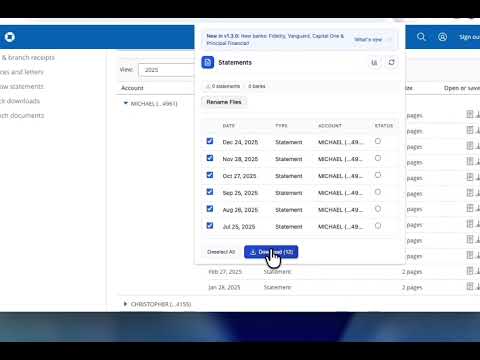
Download multiple bank and credit card statements at once instead of clicking one by one. Bank Statement Downloader lets you bulk download financial statements and automatically rename them into clean, organized filenames — saving time every month. No repetitive downloads. No messy file names. No spreadsheets to track what you grabbed. 🚀 WHAT IT DOES ✓ Bulk Download Statements Select multiple bank or credit card statements and download them all at once. ✓ Smart File Renaming (New) Automatically format filenames by bank, year, month, or custom pattern. ✓ Custom Naming Templates Create your own filename structure for accounting, bookkeeping, or tax prep. ✓ Rename Preview See exactly how files will be named before downloading. ✓ Progress Tracking Watch downloads complete in real time. ✓ Download History Track which statements you've already downloaded. ✓ Smart Detection Automatically detects already-downloaded statements to prevent duplicates. 💼 WHO IT'S FOR • Small business owners • Bookkeepers & accountants • Landlords • Anyone who downloads monthly bank or credit card statements If you regularly download financial statements, this extension eliminates repetitive manual work. 🏦 WHERE IT WORKS The extension activates automatically when you're on a supported account portal. It works directly on official bank, credit card, and brokerage websites after you log in — your credentials never touch the extension. Coverage today includes major US banks, national credit card issuers, large brokerages, retirement-account providers, mortgage servicers, and HSA/FSA administrators. For the full, current list of supported sites — and to request your bank — visit: www.batchdownloader.com/supported-banks More sites are added regularly. 🔒 PRIVACY & SECURITY Your financial data stays on your device. This extension: • Works entirely inside your browser • Requires no account • Does not collect financial data • Does not upload statements • Does not access your banking credentials • Stores download history locally in Chrome storage only You log in directly on your bank's official website. The extension simply helps automate downloading files you already have access to. 🛠 HOW IT WORKS 1. Log into your bank's official website 2. Navigate to your statements page 3. Click the extension icon 4. Select the statements you want 5. Download everything in one click Optional: Turn on Smart Renaming to automatically organize your files. 📦 PERMISSIONS EXPLAINED The extension requests only the permissions required to function: • Active Tab – Detect when you're on a supported bank's statement page • Downloads – Save and rename files to your computer • Storage – Store download history locally • Host Permissions – Access only supported banking domains (Chase, Amex, Discover, Rocket Mortgage, WEX Health) It does not request access to all websites. 💬 SUPPORT Found a bug or want to request support for another bank? Visit: www.batchdownloader.com
2 out of 51 rating
Details
- Version1.5.0
- UpdatedAugust 7, 2026
- Size172KiB
- LanguagesEnglish (United States)
- DeveloperWebsite
Email
support@batchdownloader.com - Non-traderThis developer has not identified itself as a trader. For consumers in the European Union, please note that consumer rights do not apply to contracts between you and this developer.
Privacy

This developer declares that your data is
- Not being sold to third parties, outside of the approved use cases
- Not being used or transferred for purposes that are unrelated to the item's core functionality
- Not being used or transferred to determine creditworthiness or for lending purposes
Support
For help with questions, suggestions, or problems, visit the developer's support site