

BadgeTicker
2 ratings
)
Overview
BadgeTicker - Real-Time Stock Market Ticker & Side Panel
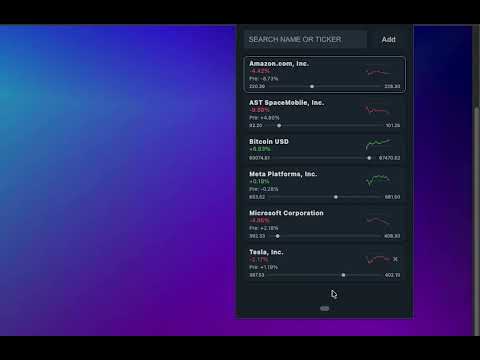
Track your favorite stocks at a glance with the most aesthetic and lightweight stock ticker for Chrome. BadgeTicker is a high-performance, design-first Chrome extension built for investors and traders who value speed, clarity, and style. Monitor the market without breaking your workflow—whether through the dynamic extension icon, a sleek popup, or the persistent Chrome Side Panel. ✅ Real-Time Price Badge Display the live price or percentage change of your top ticker directly on the extension icon. Monitor market movements even while browsing other sites! ✅ Persistent Side Panel Support Perfect for multitasking. Open BadgeTicker in the Chrome Side Panel to keep your watchlist visible alongside your research, news, or work. ✅ Live Sparkline Charts Visualize the trend instantly. Every stock in your list features a beautiful, real-time sparkline chart to show you the intraday momentum at a glance. ✅ Extended Hours Updates The market doesn't sleep, and neither does BadgeTicker. Stay ahead with full support for Pre-Market and After-Hours (Post-Market) price data. ✅ Premium Design Themes Match your workspace with four professionally curated themes: ☀️ Two light themes: Bright: Clean, crisp, and professional. Soft Warm: Eye-friendly tones for long research sessions. 🌘 Two dark themes: Twitter Dim: The community-favorite sleek navy blue. Lights Out: Deep, pure black for OLED screens and maximum focus. 🎮 Console theme - Inspired by 8-bit console games. ✅ Smart Autocomplete Search Powered by Yahoo Finance, find any global company or ticker symbol instantly with our intelligent search bar. ✅ Customizable Update Intervals You’re in control. Set your refresh rate as fast as every 10 seconds for high-volatility days or slower to save resources. ✅ Interactive Watchlist Reorder your symbols with smooth drag-and-drop, toggle between price/percent views, and use Compact Mode to manage large watchlists with ease. 📈 Why Choose BadgeTicker? Most stock extensions are either cluttered with ads or feel like they were designed in the 90s. BadgeTicker was built to be "The Aesthetic Choice." It’s lightweight, incredibly fast, and looks premium on any screen. From visual "price flash" animations to fun, personality-driven empty states, every detail has been polished for the best user experience. 🔒 Privacy & Performance No Tracking: We don't watch your browsing history or sell your data. Lightweight: Minimal CPU/Memory footprint. Secure: Your watchlist stays synced to your Chrome profile.
5 out of 52 ratings
Details
- Version2.3
- UpdatedMay 21, 2026
- Size33.64KiB
- LanguagesEnglish (United States)
- Developer
Email
chrome@gryden.se - Non-traderThis developer has not identified itself as a trader. For consumers in the European Union, please note that consumer rights do not apply to contracts between you and this developer.
Privacy

This developer declares that your data is
- Not being sold to third parties, outside of the approved use cases
- Not being used or transferred for purposes that are unrelated to the item's core functionality
- Not being used or transferred to determine creditworthiness or for lending purposes
Support
For help with questions, suggestions, or problems, visit the developer's support site