

Backtick
5 件の評価
)
概要
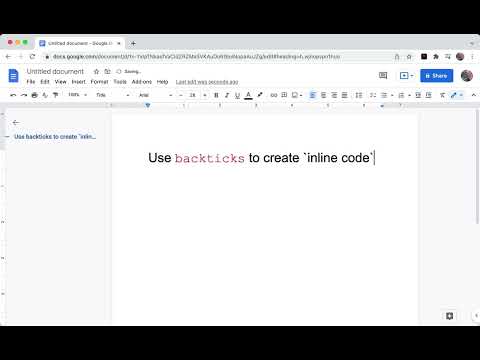
Format code in Google Docs using Markdown-style `backticks`
> Update Aug 11, 2023: > > About a year after this extension first came out, [Google released built-in inline code markdown support for Google Docs](https://workspaceupdates.googleblog.com/2022/12/format-display-code-google-docs.html), rendering this extension obsolete for most use-cases. The extension will remain for those want to continue using it, but I don't intend on making any further updates. To get the built-in inline code and code blocks working via backticks, ensure the Tools -> Preferences -> "Automatically detect Markdown" checkbox is enabled inside Google Docs. Write inline code inside Google Docs. Just enclose a word or phrase with `backticks` and it will be automatically formatted as inline code. A great tool for software developers who are used to the feature in Slack, Github, Jira, Markdown files, etc. # Features • Auto-format inline code using backticks • Customizable text color • Customizable highlight color • Extension on/off toggle • Support for multiple Google accounts • Secure and private. Docs data is processed client-side. # Planned Features: • Add multi-line code blocks using markdown-style triple backtick syntax. Ex) ```javascript console.log('hello!`) ``` • Syntax highlighting in multiple programming languages for code blocks • Theme choices for code blocks # Technical Limitations Due to the way the Google Docs API was designed, there are some limitations to this extension: • The extension has no notion of where your cursor is and will parse the document from bottom to top. Because of this, at most one inline code section is created per backtick key press to avoid large amounts unwanted formatting. • Take care when dealing with large or collaborative documents that may have existing backtick characters. Remember that the extension has a disable toggle for turning it off until it's needed again. • To "escape" backtick characters in your document, format each backtick character differently from the surrounding text. For example, bolding the `s, but leaving text before and after unbolded will hide the characters from the extension. • The formatting will happen more quickly when typing another character immediately after pressing the closing backtick character. The reason is complicated, but is essentially to preserve the existing text formatting and avoid extraneous spaces. # Privacy Policy https://backtick.zachbrogan.com/privacy-policy.html
5 点満点で 3.85 件の評価
詳細
- バージョン0.4.0
- 更新:2023年8月13日
- 提供元Zach Brogan
- サイズ56.33KiB
- 言語English (United States)
- デベロッパー
メール
zachbrogan+backtick@gmail.com - 非取引業者このデベロッパーは取引業者として申告していません。EU 加盟国の消費者とこのデベロッパーとの間に締結された契約には、消費者の権利が適用されません。
プライバシー

このデベロッパーは、お客様のデータについて以下を宣言しています
- 承認されている以外の用途で第三者に販売しないこと
- アイテムの中心機能と関係のない目的で使用または転送しないこと
- 信用力を判断する目的または融資目的で使用または転送しないこと
サポート
質問や提案、問題がある場合は、パソコンのブラウザでこのページを開いてください