

Backs - Beautiful New Tab Dashboard

Overview
Build a beautiful, customizable new tab dashboard with adaptive widgets for tasks, focus, bookmarks, weather and more.
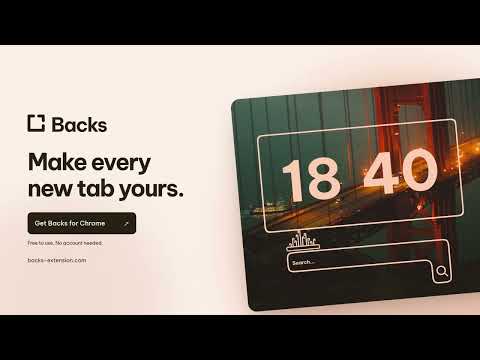
Make Chrome's new tab a space you want to open. Backs turns your new tab into a personal dashboard for the things you want close by. Keep your tasks, notes and favourite links in view, or leave room for just a clock and a background you love. Free to use without an account, with optional Premium. Arrange it around you Choose widgets called Backons, then add, move and remove them on a flexible grid. Put a task list beside your focus timer, keep your favourite websites in one corner, or build a minimal start page with plenty of open space. You choose what belongs on the page and where it goes. Start small and change your layout whenever your needs change. Useful things, close at hand • Task lists: keep track of what you want to get done. • Notes: capture an idea or leave yourself something to come back to. • Bookmarks: give your favourite websites a place in your layout. • Pomodoro timer: set aside time to focus, with breaks between sessions. • Weather: check local conditions from your dashboard. • Clocks: choose a style that fits your setup. • Plants and lanterns: add playful details to make the page feel like yours. Colours that follow your background Discover photographs or upload your own image. Backons automatically adapt their colours to your background, helping your tools and wallpaper feel like part of the same space. Try a misty landscape, warm autumn colours or a bright photograph. Change the background and see your dashboard take on a different mood. Different Spaces for different moments Keep separate setups in Spaces. Make one for work with tasks and useful links, and another for a quieter page when you want a change. You can also share a layout with a link, so someone else can use the arrangement as a starting point for their own setup. A simple start, room to make it yours You do not need to build a whole dashboard at once. Pick a background, add a couple of things you will use, and open your next tab. You can come back and rearrange it whenever you like. Whether you want a visual bookmark page, a study setup with a focus timer, or a personal space that matches your desktop, Backs gives you the pieces to put it together. Free to use, with optional extras The free plan includes custom layouts, tasks, notes, bookmarks, clocks, a Pomodoro timer and two Spaces. You can use it without signing up. Premium is optional and adds extras including unlimited Spaces, cloud sync, additional weather tools and image attachments in notes. For Chrome on your computer. Add Backs to Chrome and make your next tab yours.
4.7 out of 53 ratings
Details
- Version1.0.1
- UpdatedOctober 7, 2026
- FeaturesOffers in-app purchases
- Size2.3MiB
- Languages21 languages
- DeveloperHerkus KairysWebsite
7 Priestown Avenue Kilbride, Co. Meath D15 FD7V IEEmail
help.backs.extension@gmail.comPhone
+353 85 258 1538 - TraderThis developer has identified itself as a trader per the definition from the European Union and committed to only offer products or services that comply with EU laws.
Privacy

Backs - Beautiful New Tab Dashboard has disclosed the following information regarding the collection and usage of your data. More detailed information can be found in the developer's privacy policy.
Backs - Beautiful New Tab Dashboard handles the following:
This developer declares that your data is
- Not being sold to third parties, outside of the approved use cases
- Not being used or transferred for purposes that are unrelated to the item's core functionality
- Not being used or transferred to determine creditworthiness or for lending purposes