

Overview
Turn your voice into text with AI-powered transcription and translation
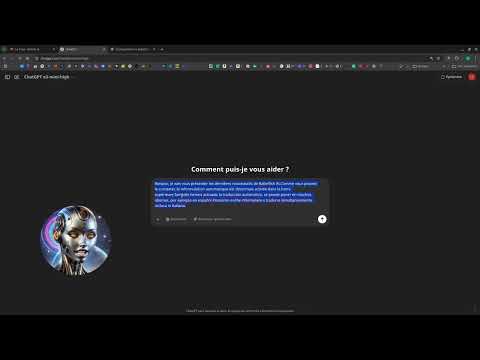
Babel Fish AI - Voice Transcription and Translation Extension with AI To use the extension, you will need an API key from one of the supported providers: Provider Get an API Key Mistral AI Mistral AI: console.mistral.ai/api-keys OpenAI OpenAI: platform.openai.com/account/api-keys 🚅 Custom/LiteLLM: To use your own API endpoints Babel Fish AI is an innovative Chrome extension designed to offer powerful voice transcription with multi-provider support. Transform your voice into text with remarkable accuracy using Mistral AI (Voxtral) or OpenAI (Whisper) transcription APIs, and optionally benefit from real-time automatic translation. You can use Babel Fish AI exclusively for transcription or enable on-the-fly translation as needed. 🌟 Features Advanced Voice Transcription High-quality audio capture via your device's microphone. Accurate transcription via Voxtral (Mistral AI) or Whisper (OpenAI) APIs. Multi-provider support: choose freely between Mistral AI, OpenAI, or a custom endpoint. Multilingual support for voice recognition and text display, allowing you to transcribe voice inputs in different languages and display results (transcription and translation, if enabled) in your chosen language. Automatic insertion of text into the active field or display in a dedicated dialog box. Intelligent Translation and Rephrasing Immediate translation of transcriptions into various languages, enabled as needed. Text rephrasing to improve style and clarity. Use of an advanced AI model to ensure translation faithful to the original meaning. Free choice to use transcription exclusively or combine transcription and translation. Powerful Context Menu "Rephrase selection" option to instantly improve your selected texts. "Translate selection" option with a submenu of all available languages. "Correct spelling" option to correct spelling, grammar, and punctuation errors. Direct replacement of selected text with its translated, rephrased, or corrected version. Seamless integration into the native Chrome user interface. Intuitive and Customizable User Interface Flexible display mode: active input area or floating dialog window. Configurable status banner with choice of colors, opacity, and display duration. Keyboard shortcut (Ctrl+Shift+1 or ⌘+Shift+1 on Mac) to start/stop recording. "Keep open" option to control the display duration of results. Custom icon, integrating a microphone and the number "42", for immediate recognition. Advanced Options Multi-provider support: Mistral AI, OpenAI, and Custom/LiteLLM for maximum flexibility. Ability to customize transcription and translation models per provider. Independent provider selection for transcription and translation/rephrasing. Compatibility with LiteLLM Proxy via the Custom provider to connect to alternative models. Complete internationalization management through language files (_locales), offering an interface and voice support in multiple languages. 🌐 Supported Languages Here is the list of languages supported by Babel Fish AI: Arabic German English Spanish French Hindi Italian Japanese Korean Dutch Polish Portuguese Romanian Swedish Chinese
5 out of 54 ratings
Details
- Version1.1.19
- UpdatedDecember 16, 2025
- Size1.46MiB
- Languages13 languages
- DeveloperWebsite
Email
contact@jls42.org - Non-traderThis developer has not identified itself as a trader. For consumers in the European Union, please note that consumer rights do not apply to contracts between you and this developer.
Privacy

This developer declares that your data is
- Not being sold to third parties, outside of the approved use cases
- Not being used or transferred for purposes that are unrelated to the item's core functionality
- Not being used or transferred to determine creditworthiness or for lending purposes
Support
For help with questions, suggestions, or problems, visit the developer's support site