

AutoSwipe for Tinder — Auto Swiper & Filter
2 ratings
)
Overview
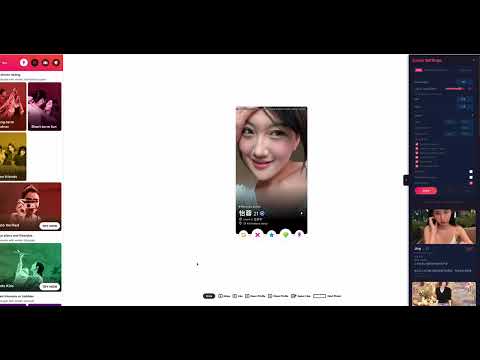
Auto-swipe Tinder with smart filters, custom like ratio, age, distance and all other advanced filters.
AutoSwipe for Tinder automatically likes and passes on profiles with human-like behavior — so you get more matches without the repetitive swiping. KEY FEATURES: Smart Like/Nope Ratio Set your exact like percentage (e.g. 80% like, 20% pass). The algorithm distributes swipes precisely to match your target ratio. Human-Like Behavior Configurable random delays between swipes simulate natural swiping patterns. Profile Logging Sidebar Every swiped profile is logged with photos, name, age, bio, and distance in a sleek sidebar. Review who you liked or passed on anytime. Rate Limit Detection Automatically detects when Tinder's daily like limit is hit and stops immediately. No wasted swipes. Advanced Filters (Pro) Filter profiles by age, distance, height, "looking for" preferences, bio presence, recently active status, and verified badge. Profiles that don't match your criteria are automatically skipped. Profile Expansion Automatically opens each profile to extract detailed info — height, relationship goals, job, school, and more — for smarter filtering decisions. HOW IT WORKS: 1. Install the extension 2. Open tinder.com, log in and click the sidebar tab 3. Set your max swipes, like ratio, and delay timing 4. Optionally configure filters (Pro) 5. Hit Start and watch the matches roll in FREE vs PRO: Free: Basic swiping with configurable ratio, profile logging, and rate limit detection. Pro ($4.99/mo): All advanced filters — age, distance, height, looking for, bio, recently active, verified, and more. IMPORTANT: AutoSwipe currently supports English only. Please set your Tinder display language to English (Profile -> Display preferences -> Language) for the extension and filters to work correctly. Visit https://autoswipe.net for more info. Contact: support@autoswipe.net
5 out of 52 ratings
Details
- Version1.0.10
- UpdatedJune 24, 2026
- FeaturesOffers in-app purchases
- Offered bySG Software
- Size36.45KiB
- LanguagesEnglish (United States)
- Developer
Email
support@autoswipe.net - Non-traderThis developer has not identified itself as a trader. For consumers in the European Union, please note that consumer rights do not apply to contracts between you and this developer.
Privacy

This developer declares that your data is
- Not being sold to third parties, outside of the approved use cases
- Not being used or transferred for purposes that are unrelated to the item's core functionality
- Not being used or transferred to determine creditworthiness or for lending purposes