

Autopilot Browser Automation
6 ratings
)
Overview
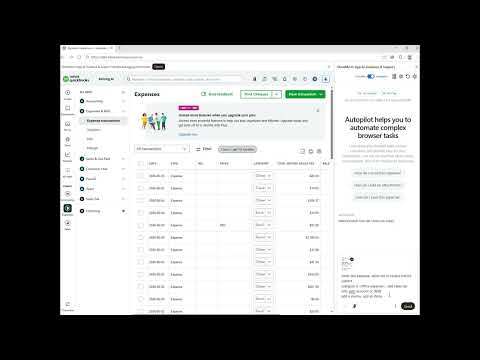
Automate your browser with AI. Autopilot sees your screen and walks you through software step-by-step. Real-time voice guidance.
The AI That Doesn't Just Tell You What to Click — It Clicks for You Have you ever asked an AI assistant to help with a web task, only to end up manually translating a wall of text into dozens of clicks, scrolls, and form fills? Most AI sidebars stop at instructions. Autopilot Browser Automation by Solving.AI goes further: it reads your live screen, understands what you want to accomplish, and executes real browser actions on your behalf — clicking buttons, filling forms, scrolling pages, and navigating URLs — while you stay in control every step of the way. How It Works Describe Your Goal: Speak or type what you want done, just as you would to a coworker. Autopilot captures a live screenshot of your active tab and analyzes the page layout in context. Watch It Act: Instead of only highlighting where to click, Autopilot moves a visible on-screen cursor to the target, performs the action using trusted browser-level input, and shows a pulse animation so you always know exactly what happened. Stay in the Driver's Seat: After each action, you can continue automatically, pause to review, or stop the run entirely. You're not locked into a black-box script — you approve the pace. Key Capabilities True Browser Automation, Not Just Advice: Autopilot performs real clicks, hovers, typing, scrolling, navigation, and form interactions via Chrome DevTools Protocol — producing trusted input that web apps treat like a human user. Screen-Aware Decision Making: The AI doesn't work from memory or generic docs. It reads your current page screenshot and interactive elements to decide the next precise action. Full Action Toolkit: Click and hover at exact screen coordinates. Click a field and type text with smart clear-and-enter behavior. Scroll smoothly in any direction. Navigate to URLs, run searches, and move back and forward through history. Set dropdown values and wait for pages to load. Visible, Trustworthy Execution: An animated autopilot cursor slides to each target before acting, with a pulse ring on clicks — so automation never feels invisible or mysterious. Step-by-Step Transparency: Every run is logged in the sidebar with the AI's reasoning and a clear list of actions taken, so you can audit what happened and why. Voice + Automation: Ask by voice, watch actions execute on screen, and intervene anytime — the best of conversational AI and hands-on browser control. Human-in-the-Loop Safety: Auto-continue moves through steps efficiently, but you can pause, cancel, or stop the run at any moment. No runaway bot behavior. Why Choose Autopilot Over Standard AI Sidebars? Standard AI sidebars give you text in a separate panel and leave the real work to you. You read the instructions, hunt for the right button, copy-paste into forms, and open new tabs on your own. They are blind to your screen and cannot act on it. ShowMe-style guidance is a step better: it reads your live layout and overlays pulsing highlights so you know where to click. But you still do every click, scroll, and keystroke yourself. Autopilot closes that gap entirely. It sees your screen, plans the next step, and executes it — clicking, typing, scrolling, and navigating in your actual browser. You describe the outcome; Autopilot handles the mechanics. And unlike traditional automation scripts, it adapts to whatever is on screen right now, with a visible cursor and action log so you always know what it did and can stop it at any time. Who Is It For? Professionals Automating Repetitive Web Workflows: Fill forms, configure settings, and run multi-step processes in CRMs, admin panels, or SaaS tools without clicking through every step yourself. Teams Onboarding Users to Complex Software: Let new users describe what they want in plain language while Autopilot demonstrates and completes the workflow live on their screen. Anyone Who Wants AI to Do, Not Just Explain: Skip the gap between "here's what to do" and actually doing it — especially on dense, unfamiliar web applications. Support & Success Teams: Resolve customer issues faster by walking through and executing fixes in real time, with full visibility into each action taken.
5 out of 56 ratings
Details
- Version2026.7.23
- UpdatedJuly 23, 2026
- Offered bySolving.AI
- Size413KiB
- LanguagesEnglish
- Developer
Email
info@solving.ai - Non-traderThis developer has not identified itself as a trader. For consumers in the European Union, please note that consumer rights do not apply to contracts between you and this developer.
Privacy

Autopilot Browser Automation has disclosed the following information regarding the collection and usage of your data. More detailed information can be found in the developer's privacy policy.
Autopilot Browser Automation handles the following:
This developer declares that your data is
- Not being sold to third parties, outside of the approved use cases
- Not being used or transferred for purposes that are unrelated to the item's core functionality
- Not being used or transferred to determine creditworthiness or for lending purposes