

AutoMind - AI Replies & Live Captions for X
2 ratings
)
Overview
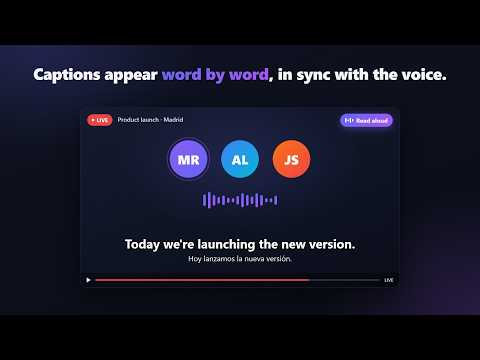
Natural AI replies on X, plus live translated captions for any video, stream or Space. Runs on your own free Groq key.
AutoMind turns any video, livestream or X Space into live translated captions, so you can follow every word in your own language. Captions appear over the video in real time, with an optional read-aloud voice. On X, it also drafts smart replies to posts in the post's language. Everything runs on one free Groq API key that you add once. Getting it takes about a minute, and the built-in setup screen walks you through it. ✨ KEY FEATURES 1. AI Reply Generator for X.com • One-click replies: Draft context-aware comments for any post. Nothing is posted for you — pick a draft, edit it if you like, and post it yourself. • Your tone: Professional, Casual, Witty, Analytical, Concise and more. • Automatic language matching: Replies follow the language of the post, or always use the language you set. • Choose the AI model that writes your replies in Settings. 2. Live Translated Captions • Works on any tab with sound: X Spaces, YouTube, Bilibili, livestreams, webinars and more. • Captions sit inside the video frame and scale with it, in 40+ languages. They also show in fullscreen. Long sentences are split into balanced two-line blocks. • Pick a caption style and position, or turn the on-video captions off and read them in the side panel only. • Free Google Translate by default, or AI translation that reads the previous lines for context and keeps product and brand names intact. • Optional read-aloud with a natural online voice or a voice installed on your computer. Each caption appears as it is read. • Keeps translating while you browse other tabs, and tells you when a second tab starts playing sound. • The side panel keeps the full caption history, ready to copy or export as a .txt file. • Start or stop with one click, Alt+T, or right-click → "AutoMind: Start / stop live captions". Open the panel with Alt+S or the button on the right edge of the page. 3. Translate Tab • Paste any text and get a natural translation, written the way a native speaker would say it. 4. Free to Use • AutoMind itself is free. AI replies, speech recognition and AI translation run on your own free Groq API key (console.groq.com/keys). Groq's free allowance applies; AutoMind adds no limit of its own. • Google Translate for captions needs no key and has no daily limit. 🔒 PRIVACY, IN PLAIN WORDS • Audio is captured only from the tab where you start captions, and only until you press Stop. • To produce captions and replies, audio clips and text go straight from your browser to Groq (speech recognition, AI replies, AI translation) and Google Translate (caption translation and the online voice). AutoMind has no server in between and does not keep them. • Your settings, API key and caption history stay in your browser. • No name, email, login or browsing history is collected, and nothing is sold or used for ads. AutoMind is an independent tool and is not affiliated with, endorsed by, or sponsored by X Corp. Made by @trungkts29 — https://x.com/trungkts29 WHAT'S NEW IN 2.6.0 • One key for everything: your free Groq key now powers AI replies and the Translate tab as well as live captions. The shared 50-a-day reply allowance is retired; if you have not added a key yet, the setup screen opens once to help you. • Faster captions: a line is shown as soon as the speaker pauses, instead of waiting for the next chunk of audio. • Voice and captions in step: with read-aloud on, each caption appears when the voice reaches it, and the original line follows along. The voice skips lines that have fallen too far behind instead of drifting. • Better on-video captions: placed inside the picture, sized to the video, in balanced two-line blocks. The caption box no longer appears empty or covers the speaker, and a new switch turns on-video captions off. • Cleaner text: no more sentences cut at "we will…", no repeated words where two audio chunks meet, and the video's title now helps spell names and technical terms correctly. • More sites and languages: better handling of Chinese, Japanese and Thai speech, embedded players and native fullscreen. • More natural AI replies and English translations, with far fewer rules getting in the way. • Redesigned side panel and popup: one clear Start button, larger captions, and settings folded into three simple groups. • Simpler settings: one key, one choice of reply model.
5 out of 52 ratings
Details
- Version2.6.2
- UpdatedNovember 15, 2026
- Offered bydev102vn
- Size403KiB
- LanguagesEnglish
- Developer
Email
dev102vn@gmail.com - Non-traderThis developer has not identified itself as a trader. For consumers in the European Union, please note that consumer rights do not apply to contracts between you and this developer.
Privacy

AutoMind - AI Replies & Live Captions for X has disclosed the following information regarding the collection and usage of your data. More detailed information can be found in the developer's privacy policy.
AutoMind - AI Replies & Live Captions for X handles the following:
This developer declares that your data is
- Not being sold to third parties, outside of the approved use cases
- Not being used or transferred for purposes that are unrelated to the item's core functionality
- Not being used or transferred to determine creditworthiness or for lending purposes
Support
For help with questions, suggestions, or problems, please open this page on your desktop browser