

AutoMind - AI Replies & Live Captions for X
1 rating
)
Overview
Natural AI replies on X, plus live translated captions for any video, stream or Space. 50 free AI replies a day.
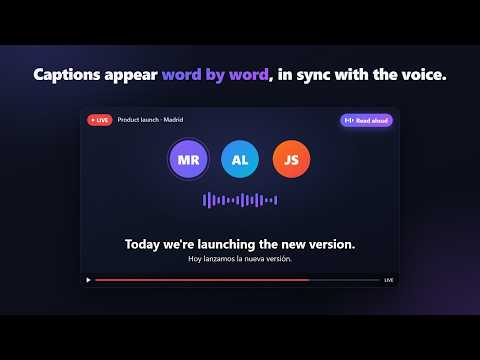
AutoMind turns any video, livestream or X Space into live translated captions, so you can follow every word in your own language. Captions appear right under the video in real time, with an optional read-aloud voice. On X, it also drafts smart replies to posts in the post's language. ✨ KEY FEATURES 1. AI Reply Generator for X.com • One-click replies: Draft context-aware comments for any post. Nothing is posted for you — pick a draft, edit it if you like, and post it yourself. • Your tone: Professional, Casual, Witty, Analytical, Concise and more. • Automatic language matching: Replies follow the language of the post, or always use the language you set. 2. Live Translated Captions • Works on any tab with sound: X Spaces, YouTube, livestreams, webinars and more. • Captions appear at the bottom of the screen, centred under the video, in 40+ languages. They also show in fullscreen, and long sentences are split into short, easy chunks. • Free Google Translate by default, or AI translation that reads the previous lines for context and keeps product and brand names intact. • Optional read-aloud with a natural online voice or a voice installed on your computer. Each caption appears word by word as it is read. • Keeps translating while you browse other tabs, and tells you when a second tab starts playing sound. • The side panel keeps the full caption history, ready to copy or export as a .txt file. • Start or stop with one click, Alt+T, or right-click → "AutoMind: Start / stop live captions". Open the panel with Alt+S or the button on the right edge of the page. 3. Free to Start • AI replies: 50 free per day, no account or API key needed. Resets at 0:00 UTC. • Live captions use a free Groq API key for speech recognition. Getting one takes about a minute at console.groq.com/keys, and the built-in setup screen walks you through it. Google Translate needs no key and has no daily limit. • Want more? Add your own API key from a supported AI provider, or connect a local AI server, for unlimited replies and faster streaming captions. 🔒 PRIVACY, IN PLAIN WORDS • Audio is captured only from the tab where you start captions, and only until you press Stop. • To produce captions and replies, audio clips and text are sent only to the speech, translation or AI service you choose in settings. AutoMind does not keep them. • Your settings, API keys and caption history stay in your browser. • The free reply tier uses an anonymous install ID to count daily uses. No name, email, login or browsing history is collected, and nothing is sold or used for ads. AutoMind is an independent tool and is not affiliated with, endorsed by, or sponsored by X Corp. WHAT'S NEW IN 2.4.6 • Captions moved to the bottom of the screen, centred under the video, so they no longer cover the speaker. They work in fullscreen too. • Captions appear word by word in step with the read-aloud voice, and stay on screen until the next line replaces them. • Live captions keep running when you switch tabs, and AutoMind tells you if a second tab starts playing sound. • Free Google Translate is now the default for subtitles, with no daily quota. AI translation is one click away. • New read-aloud voices: a natural online voice, or the best premium voice installed on your computer. • Faster first look at each sentence, translated on your device where the browser supports it. • Easier to reach: an "Open panel" button on the page, Alt+S, Alt+T and a right-click menu to start captions. • One-minute setup for the free Groq key, with a clear key status and a "Set API key" button under Start. • More natural AI replies: no filler praise, no random emojis.
5 out of 51 rating
Details
- Version2.4.6
- UpdatedOctober 17, 2026
- Offered bydev102vn
- Size363KiB
- LanguagesEnglish
- Developer
Email
dev102vn@gmail.com - Non-traderThis developer has not identified itself as a trader. For consumers in the European Union, please note that consumer rights do not apply to contracts between you and this developer.
Privacy

AutoMind - AI Replies & Live Captions for X has disclosed the following information regarding the collection and usage of your data. More detailed information can be found in the developer's privacy policy.
AutoMind - AI Replies & Live Captions for X handles the following:
This developer declares that your data is
- Not being sold to third parties, outside of the approved use cases
- Not being used or transferred for purposes that are unrelated to the item's core functionality
- Not being used or transferred to determine creditworthiness or for lending purposes
Support
For help with questions, suggestions, or problems, please open this page on your desktop browser