

Autofill
1 rating
)
Overview
Use your own AI model to generate safe test data and fill web forms.
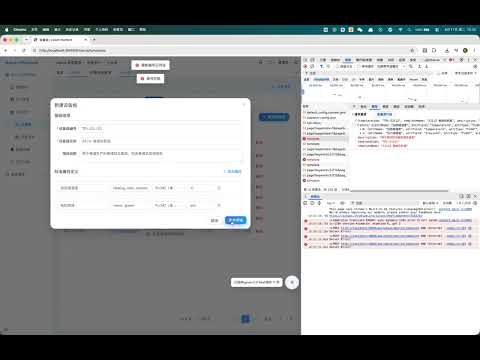
Autofill is a browser extension powered by large language models (LLMs). It automatically understands the structure and business semantics of web forms, as well as the user's input intent, and assists with or automatically completes form filling, information matching, content generation, and data validation. How to use: After installation, click the Autofill extension icon in your browser. Configure your DeepSeek API key. Open the website where you want to use Autofill, click the extension icon, and enable it. Refresh the page. When you need to fill out a form, click the small button in the bottom-right corner. For more details, please refer to: https://github.com/01Petard/Autofill
5 out of 51 rating
Details
- Version1.0.0
- UpdatedAugust 13, 2026
- Offered bypseudnous
- Size28.73KiB
- Languages2 languages
- Developer
Email
1520394133@qq.com - Non-traderThis developer has not identified itself as a trader. For consumers in the European Union, please note that consumer rights do not apply to contracts between you and this developer.
Privacy

Autofill has disclosed the following information regarding the collection and usage of your data. More detailed information can be found in the developer's privacy policy.
Autofill handles the following:
This developer declares that your data is
- Not being sold to third parties, outside of the approved use cases
- Not being used or transferred for purposes that are unrelated to the item's core functionality
- Not being used or transferred to determine creditworthiness or for lending purposes
Support
For help with questions, suggestions, or problems, visit the developer's support site