


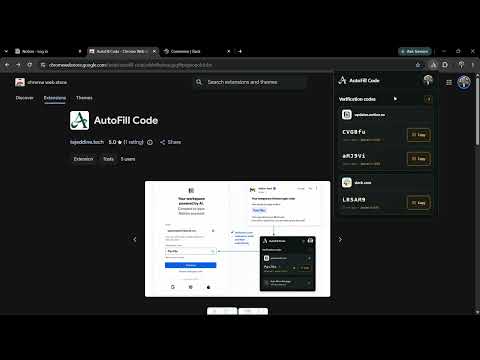
Overview
Find active email verification codes and fill compatible OTP inputs.
AutoFill Code makes email verification faster by finding verification codes in your Gmail inbox and helping you fill them into compatible websites. When a website asks for a one-time password or verification code, AutoFill Code detects the OTP field, looks for a matching recent verification email, and lets you fill the code without switching back and forth between your inbox and the website. Privacy first Your emails stay private. AutoFill Code does not send your emails, verification codes, or Gmail content to the developer or to its authentication service. Gmail data is accessed directly through Google's API and processed locally by the extension in your browser. On Opera, an encrypted Google renewal credential passes through a stateless authentication service so your Gmail connection can remain active after browser and computer restarts. The service has no user database and cannot access or store your Gmail messages or verification codes. The developer cannot see your inbox, verification codes, browsing activity, or Gmail messages. The extension uses Gmail read-only access only to find recent emails that may contain verification codes. It cannot send emails, modify messages, delete messages, or change your inbox. Features * Automatically detects OTP and verification-code fields * Finds recent verification codes in Gmail * Supports common 4–8 character verification codes * Helps fill codes without switching between Gmail and the current website * Keeps the Gmail connection active across Opera restarts * Uses Gmail read-only permission * Does not send, modify, or delete emails * Does not send your verification codes to the developer * Does not require your Gmail password * Processes verification-code detection locally in your browser * Works across many common login and verification flows Why does AutoFill Code need website access? The extension needs access to webpages so it can detect when a website is asking for a verification code and identify the appropriate OTP input field. It does not use this permission to collect your browsing history or send information about the websites you visit to the developer. Why does AutoFill Code need Gmail access? AutoFill Code uses Gmail read-only access to search recent messages for verification codes. This permission allows the extension to read messages for OTP detection, but it does not allow it to send, edit, or delete emails. Gmail messages and verification codes stay between your browser and Google. On Opera, only the encrypted renewal credential passes through the stateless authentication service used to keep Google access active.
5 out of 53 ratings
Details
- Version2.7.1
- UpdatedSeptember 21, 2026
- Size296KiB
- LanguagesEnglish
- DeveloperWebsite
Email
tajdinetajdine1@gmail.com - Non-traderThis developer has not identified itself as a trader. For consumers in the European Union, please note that consumer rights do not apply to contracts between you and this developer.
Privacy

AutoFill Code has disclosed the following information regarding the collection and usage of your data. More detailed information can be found in the developer's privacy policy.
AutoFill Code handles the following:
This developer declares that your data is
- Not being sold to third parties, outside of the approved use cases
- Not being used or transferred for purposes that are unrelated to the item's core functionality
- Not being used or transferred to determine creditworthiness or for lending purposes