

AutoClicker
9 个评分
)
概述
Simple auto-clicker: pick a target, set speed, go.
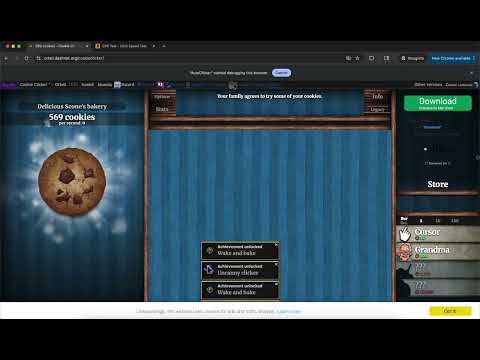
Pick a point on any page and auto-click it. Adjustable speed, follow-mouse mode, and a keyboard shortcut (⌥ A) to start/stop. AutoClicker is a lightweight tool for repetitive clicking tasks on any website. FEATURES • Pick a target by clicking anywhere on the page. • Adjustable click rate (0.1 – 255 clicks per second). Note some websites check for anti-autoclick which is when you must turn on the real clicks feature. CPS is limited 60 for real clicks • Follow-mouse mode: click wherever your cursor is in real time. • Optional color-changing cursor so you always know if the clicker is armed or running. • Real-mouse-clicks mode for sites that ignore synthetic clicks (uses the Chrome DevTools debugger — Chrome will show a notice bar while active; this is normal and expected). • Keyboard shortcut (Alt+A by default) to start and stop. • Works in iframed games and embedded players. • Runs independently per tab — switching tabs does not stop a running clicker in another tab. • Side panel UI stays open while you pick a target. PRIVACY AutoClicker does not collect, transmit, or store any personal data. All settings are saved locally in your browser. No analytics, no tracking, no servers. I made this for fun so I'm not tracking anything, but the full PP available at: https://github.com/dsgreen24/AutoClicker-Documents/blob/main/Privacy%20Policy HOW TO USE 1. Open the side panel by clicking the extension icon. 2. Click "Pick Target" and then click where you want on the page. (Or enable "Follow mouse.") 3. Set a speed in clicks per second. 4. Press "Start" or use Alt+A.
4.9 星(5 星制)9 个评分
详情
- 版本2.0.1
- 上次更新日期2026年4月24日
- 提供方DavidSebastianGreen
- 大小25.39KiB
- 语言English (United States)
- 开发者David Sebastian Green
339 CHAPLIN COVE AVE Las Vegas, NV 89183 US邮箱
davidsebastiangreen@gmail.com电话
+1 808-492-0963 - 交易者此开发者已根据欧盟的定义将自己标识为交易者,并承诺仅提供符合欧盟法律要求的产品或服务。
隐私权

该开发者已声明,您的数据:
- 不会因未获批准的用途出售给第三方
- 不会为实现与产品核心功能无关的目的而使用或转移
- 不会为确定信用度或放贷目的而使用或转移
支持
若有任何疑问、建议或问题,请在桌面浏览器中打开此页面