

Auto Web Agent

Overview
Control your browser with natural language: auto-click, type, navigate, extract. Works with your own custom AI models.
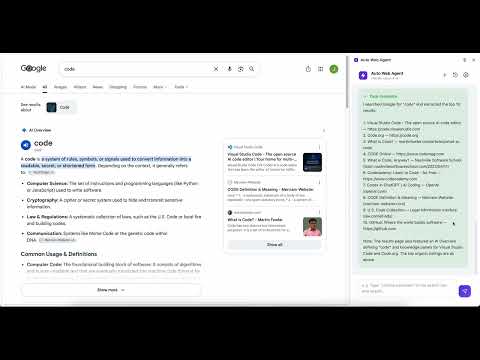
Auto Web Agent lets you control your browser in plain language — describe a goal, and it does the clicking, typing, navigating, and content extraction for you. ■ What it's for Turn any Chrome tab into an AI assistant. Just give a task in natural language — e.g. "Search Bing for Chrome extension development and open the first result", "Summarize the main points of this page", or "Open github.com and search for nanobrowser" — and the agent watches the page, decides the next step, and acts on it, over and over, until the job is done. ■ Why you should install it · Natural language, not scripts: describe the goal; the agent figures out the steps. No more repetitive clicking. · Fully transparent: a live side panel shows each step's thought → action → result, and the element it's about to touch lights up on the page with a colored, numbered box. · Bring your own model, no cloud lock-in: works with OpenAI, DeepSeek, Claude, OpenRouter, local Ollama, or any custom endpoint (API Key / Model / Base URL / Headers). · Privacy-first: your API key and settings stay in local browser storage; page content is sent only to the model you configure, only while a task runs. No analytics, no trackers, no third-party servers. · Bilingual: the UI and the agent's reasoning switch between English and 中文. · You stay in control: stop anytime, cap the number of steps. · Featherweight: pure JS/CSS/HTML, zero build step. Great for researchers, QA testers, developers, and anyone tired of repetitive clicking. How to use: after installing, open the side panel → enter your model's API key and model name in Settings → open any page and type a task. Auto Web Agent 让你用一句话指挥浏览器——描述目标,它自己完成点击、输入、导航和内容抓取。 ■ 用途 把任意 Chrome 标签页变成一个 AI 助手。你只需用自然语言下达任务,例如「在必应搜索 Chrome 扩展开发并打开第一条结果」「总结这个页面的主要内容」「打开 github.com 并搜索 nanobrowser」,Agent 会自动观察页面、决定下一步动作并逐步执行,直到任务完成。 ■ 为什么值得安装 · 自然语言,无需脚本:描述目标即可,Agent 自己拆解步骤,告别重复点击。 · 过程完全可见:侧边栏实时展示每一步的「思考 → 动作 → 结果」,页面上用彩色编号框高亮正在操作的元素。 · 自带模型,不锁定云端:支持 OpenAI、DeepSeek、Claude、OpenRouter、本地 Ollama 或任意自定义端点,可自定义 API Key / Model / Base URL / Headers。 · 隐私优先:API Key 与设置仅保存在浏览器本地,网页内容只在任务运行时发送给你自己配置的模型,无分析、无追踪、无第三方服务器。 · 中英双语:界面与 Agent 的回答语言一起切换。 · 完全可控:随时一键停止,可限制最大步数。 · 轻量零构建:纯原生 JS/CSS/HTML,加载即用。 适合研究人员、QA 测试、开发者以及所有厌倦重复点击的人。 使用方法:安装后打开侧边栏 → 在设置中填入你的模型 API Key 与模型名 → 打开任意网页,输入任务即可。
0 out of 5No ratings
Details
- Version1.0.0
- UpdatedJuly 23, 2026
- Offered byhuwindow
- Size89.99KiB
- Languages2 languages
- Developer
Email
huwindow@gmail.com - Non-traderThis developer has not identified itself as a trader. For consumers in the European Union, please note that consumer rights do not apply to contracts between you and this developer.
Privacy

Auto Web Agent has disclosed the following information regarding the collection and usage of your data. More detailed information can be found in the developer's privacy policy.
Auto Web Agent handles the following:
This developer declares that your data is
- Not being sold to third parties, outside of the approved use cases
- Not being used or transferred for purposes that are unrelated to the item's core functionality
- Not being used or transferred to determine creditworthiness or for lending purposes