

Auto Typer & Typing Simulator for Google Docs, Slides & Word — Duey.ai

Overview
Human auto typer for Google Docs, Slides & Word Online. Types your text at real speed with typos, fixes and breaks. Free.
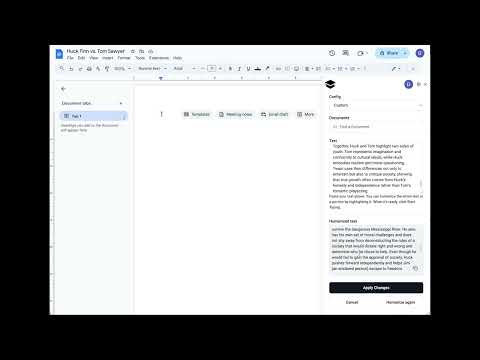
Duey is a human auto typer for Google Docs, Google Slides and Microsoft Word Online. Paste your text, click Start and walk away. Duey types it in keystroke by keystroke at a real human pace, with natural pauses, typos that get caught and fixed, and breaks. Your document builds up the way a person writes it, with a full Version History. Free. No account needed. Why it looks human Most auto typers enter text at a fixed, mechanical rate. Duey works like a typing simulator: speed drifts within a sentence, some words come quicker than others, and mistakes get fixed the way people fix them. Typos caught right away are backspaced and retyped. Ones noticed later are selected and retyped. You choose how human it looks: - Speed from 15 to 150 WPM: slow enough to match a real writer, fast enough for long documents - Mistakes: from clean typing to realistic slips and corrections - Correction speed and breaks Works where you write - Google Docs, with multi-block typing: if your doc already has headings or questions, paste each part, click where it goes, and Duey fills them all in one run - Google Slides: types into your slides and text boxes - Word Online: free, with the same speed and mistake controls Start it and walk away - Keeps typing at full speed when you switch tabs, minimize the window or step away - Progress shows in the tab title, like "[42%] My Doc" - See the estimated finish time before you start, and get a notification when it's done - Change the speed mid-run from the typing pill - Move or minimize the pill, or hide Duey's on-page controls - Emergency stop: Ctrl+Shift+S (⌘⇧S on Mac) pauses instantly from anywhere How to use the auto typer - Open your Google Doc, Slides deck or Word Online document. - Paste your text into Duey. - Set your speed and mistakes, then click Start. Duey Pro For power users. $60/year or $9.99/month. - Formatted typing: headings, bold, lists and links come through as real formatting - Sessions: schedule a doc to be typed over hours or days, even with your laptop closed - Humanizer and premium support What's new in 3.3 - Word Online is now free for everyone - Multi-block and free-plan fixes Questions or feedback: hello@duey.ai
4.1 out of 547 ratings
Details
- Version3.3.1
- UpdatedOctober 1, 2026
- Size930KiB
- Languages8 languages
- DeveloperWebsite
Email
hello@duey.ai - Non-traderThis developer has not identified itself as a trader. For consumers in the European Union, please note that consumer rights do not apply to contracts between you and this developer.
Privacy

Auto Typer & Typing Simulator for Google Docs, Slides & Word — Duey.ai has disclosed the following information regarding the collection and usage of your data. More detailed information can be found in the developer's privacy policy.
Auto Typer & Typing Simulator for Google Docs, Slides & Word — Duey.ai handles the following:
This developer declares that your data is
- Not being sold to third parties, outside of the approved use cases
- Not being used or transferred for purposes that are unrelated to the item's core functionality
- Not being used or transferred to determine creditworthiness or for lending purposes
Support
For help with questions, suggestions, or problems, visit the developer's support site