


總覽
當打開多個分頁時,提高瀏覽器速度並減少記憶體負載。
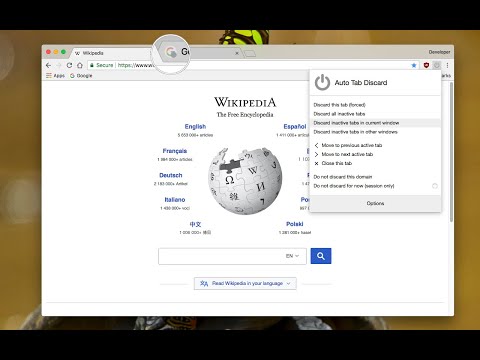
Auto Tab Discard a lightweight extension that uses the native method (tabs.discard) to unload or suspend browser tabs to significantly reduce the memory footprint of your browser when many tabs are opened. If you like to use many open tabs at once, this extension could help you to keep your browser fresh with low memory usage by parking (hibernating) inactive tabs to save up to 80% of the used memory. This also helps portable devices to save battery. Features: 1. Speeds up your browser and minimize the memory usage: Inactive, idle or forgotten tabs can be auto-suspended after a configurable period of time or be suspended manually from the toolbar popup. 2. Tabs (domains) can be whitelisted to avoid automatic suspension. 3. Suspended tabs are retained after closing and reopening browser (using your browser's session restore functionality) 4. Tab's favicon displays the suspension status (If the icon has opacity it is discarded) 5. Tabs are being restored with all information kept intact (like scroll position or the content of text boxes) when it becomes visible again 6. When a tab is discarded, no JavaScript code or dom event is active. Basically, the tab is paused. Options: There are a few options to customize when a tab gets discarded: 1. Pinned tabs 2. When there is a media source playing inside a tab 3. When the computer is connected to a power source 4. When there is a form element (with changes) that has not yet been submitted. Notes: 1. To prevent automatic tab discard, set the period to zero in the options page 2. You can lazy load tabs (open in the discarded mode) using the right-click context menu item.
4.2 分 (滿分 5 分)351 個評分
詳細資料
- 版本0.6.8.2
- 已更新2024年2月17日
- 提供者joue.quroi
- 大小167KiB
- 語言14 種語言
- 開發人員
電子郵件
joue.quroi@gmail.com - 非交易商這位開發人員並未表明自己是交易商。歐盟地區的消費者請注意,消費者權利不適用於你和這位開發人員之間簽訂的合約。
隱私權

這位開發者就你的資料做出下列聲明:
- 除經核准的用途外,不會將你的資料販售給第三方
- 不會基於與商品核心功能無關的目的,使用或轉移資料
- 不會為了確認信用度或基於貸款目的,使用或轉移資料
支援
如有疑問或建議,請前往開發人員的支援網站