Item logo image for Auto Scroll

Auto Scroll

5.0(

1 rating

)
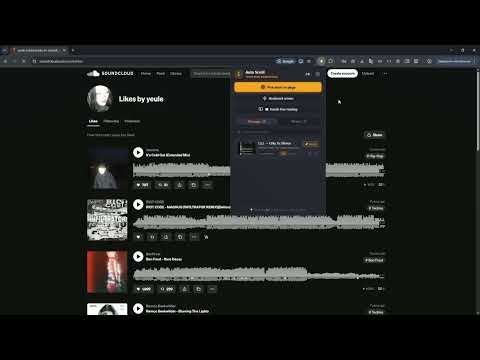
Item media 4 (screenshot) for Auto Scroll
Item video thumbnail
Item media 2 (screenshot) for Auto Scroll
Item media 3 (screenshot) for Auto Scroll
Item media 4 (screenshot) for Auto Scroll
Item video thumbnail
Item media 2 (screenshot) for Auto Scroll
Item media 3 (screenshot) for Auto Scroll
Item media 4 (screenshot) for Auto Scroll

Overview

Smart deep bookmarking & infinite feed auto-scroll for SoundCloud, social networks, and long web pages.

Never lose your place on infinite feeds, social media, long articles, or sound streams again! Auto Scroll is an intelligent deep-bookmarking and automated feed navigation extension for Chromium browsers. Designed specifically for modern dynamic single-page applications (SoundCloud, Twitter/X, Reddit, YouTube, digital libraries, and long-read articles) where traditional browser bookmarks and URL hashes fail. ⚡ KEY FEATURES 🎯 Precision Element Picker (Deep Anchor) Click any specific track, comment, tweet, or paragraph on the page. Auto Scroll analyzes its unique DOM fingerprint, author, title, and structure to bring you back to the exact spot whenever you return. 🚀 Smart Feed Auto-Seek When navigating back to a saved track or post buried deep down an infinite scroll feed, Auto Scroll automatically advances the feed, simulates natural user scrolling to trigger dynamic loading, and smoothly navigates right to your target item. 📖 Hands-Free Reader (Teleprompter Mode) Enjoy smooth, continuous auto-scrolling with customizable speed (px/sec). Perfect for reading e-books, scripts, documents, and news feeds without touching the mouse or keyboard. Includes smart pause on manual wheel interaction. 📸 Instant Screen Bookmark Capture your current viewport position in one click, complete with visual thumbnail previews in your bookmarks list. 📝 W3C Text Quote Selection Right-click on highlighted text in articles or online books to save an exact quote bookmark directly from the context menu. 🔒 100% PRIVATE & OFFLINE • No account or sign-in required. • All bookmarks, thumbnails, and settings are stored locally on your device (chrome.storage.local). • Zero tracking, zero telemetry, and zero remote servers. ⌨️ QUICK START 1. Open any page or infinite feed (e.g., SoundCloud, article, or social network). 2. Click the Auto Scroll extension icon. 3. Select "Pick spot on page" and click your target item, or click "Hands-free reading" for teleprompter mode. 4. Later, simply click "Go to" in your bookmarks list to instantly return to that exact element! (Press Esc at any time to cancel scrolling or element picker).

Details

  • Version
    1.0.0.0
  • Updated
    October 29, 2026
  • Offered by
    hvghnbguhh@gmail.com
  • Size
    52.1KiB
  • Languages
    2 languages
  • Developer
    Email
    vicemaisterdevelop@gmail.com
  • Non-trader
    This developer has not identified itself as a trader. For consumers in the European Union, please note that consumer rights do not apply to contracts between you and this developer.

Privacy

Manage extensions and learn how they're being used in your organization
The developer has disclosed that it will not collect or use your data. To learn more, see the developer’s privacy policy.

This developer declares that your data is

  • Not being sold to third parties, outside of the approved use cases
  • Not being used or transferred for purposes that are unrelated to the item's core functionality
  • Not being used or transferred to determine creditworthiness or for lending purposes

Related

Infinite Auto Scroll

5.0

Automatically scrolls a webpage with user-defined speed.

Read Aloud Extension

5.0

Listen to web pages, PDFs, ebooks and documents — a read aloud extension with natural text to speech voices and highlighting.

OmniClip Sync

0.0

Your ultimate, cloud-synced universal web noteboard. Right-click to capture and manage notes, media, and links.

Auto Scroll

0.0

Automatically scroll web pages with smooth scrolling, jump scroll mode, and adjustable speed.

Read Along

0.0

Reads web pages and docs aloud, highlighting every word and auto-scrolling to keep your place.

xScroller

0.0

Smooth auto-scroll that stays steady on long pages, including X.

Auto Scroll

0.0

Auto-scroll pages with adjustable speed, distance, and pause duration

Favys

0.0

Quickly save pages to Favys with AI-powered tagging, scheduled reminders, web clippings, and Secret Vault protection.

ScrollSaver

5.0

Automatically saves and restores scroll positions for web pages

Auto Refresh

4.8

Enhance efficiency with Auto Refresh Chrome Extension. Automate page reloads and updates for seamless browsing experience.

AutoScroll Pro – Hands-Free Reading

5.0

Hands-free automatic scrolling for any webpage. Read articles, docs and research without touching your mouse.

AutoScroll

5.0

Automatically scroll web pages at a customizable speed.

Infinite Auto Scroll

5.0

Automatically scrolls a webpage with user-defined speed.

Read Aloud Extension

5.0

Listen to web pages, PDFs, ebooks and documents — a read aloud extension with natural text to speech voices and highlighting.

OmniClip Sync

0.0

Your ultimate, cloud-synced universal web noteboard. Right-click to capture and manage notes, media, and links.

Auto Scroll

0.0

Automatically scroll web pages with smooth scrolling, jump scroll mode, and adjustable speed.

Read Along

0.0

Reads web pages and docs aloud, highlighting every word and auto-scrolling to keep your place.

xScroller

0.0

Smooth auto-scroll that stays steady on long pages, including X.

Auto Scroll

0.0

Auto-scroll pages with adjustable speed, distance, and pause duration

Favys

0.0

Quickly save pages to Favys with AI-powered tagging, scheduled reminders, web clippings, and Secret Vault protection.

Search
Clear search
Close search
Google apps
Main menu