

Auto Scroll Controller
1 rating
)
Overview
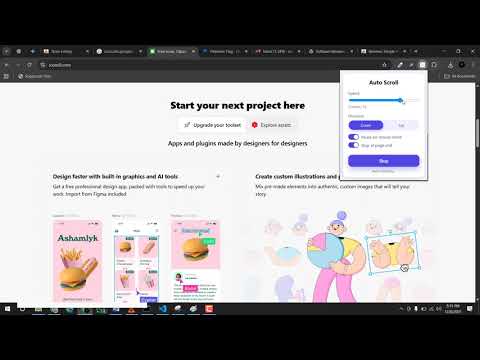
Smooth auto-scroll with speed presets, keyboard shortcuts, per-site memory, loop mode, and auto-start rules.
🖱️ Auto Scroll Controller: The Ultimate Hands-Free Experience Tired of manually scrolling through endless articles, e-books, social media feeds, or code documentation? Auto Scroll Controller is a premium productivity tool designed to turn your browsing into a smooth, hands-free experience. Whether you are studying long-form content, reviewing code, or reading digital music sheets and lyrics, this tool lets you focus entirely on the content—not the mouse wheel. ⚡ Why You’ll Love This Tool 🚀 Instant Speed Presets: Click-and-go with optimized speed presets: Slow (2), Normal (5), Fast (20), or the high-speed Turbo (50) mode. 🎛️ Precision Fine-Tuning: Use the slider or number input to lock in your perfect scrolling pace from 1 to 50. ↔️ Two-Way Motion: Smoothly glide down to read forward or slide back up to revisit content instantly. ⏸️ Smart Double-Pause Magic: Pause on Hover: Simply move your mouse cursor over the page to pause, and watch it automatically resume when you stop moving. Pause on Click: Briefly halts scrolling when you click a link or interaction point, resuming automatically after 1.5 seconds. 🔁 Loop & Bounce Mode: Reached the bottom? The page can automatically bounce and scroll back up in reverse, creating a continuous loop. 📈 Smooth Acceleration: Prevents sudden page jumps by gently ramping up scroll speed when starting or reversing. 🧠 Remember Per-Site Settings: The extension remembers your customized speed, direction, and options specifically for every site you visit. 🎯 Auto-Start Lists: Configure your favorite domains (like news or social feeds) to begin scrolling automatically the moment they load. ⌨️ Keyboard Shortcuts: Control everything instantly without opening the popup: Alt + S to Start/Stop. Alt + Up / Down to adjust speed. Alt + R to reverse direction. ☀️ Dark Theme Support: Switch between Light and Dark mode UI with a single click to match your browser's aesthetic. 💾 Backup & Restore: Easily export all your site profiles, auto-start configurations, and custom preferences to a JSON backup file. 🌟 Perfect For: 📖 Reading: Ideal for long-form articles, blogs, e-books, and news feeds. 💻 Developers: A fluid screen scroller for code reviews, API documentations, and logs. 🎶 Musicians: Keep hands on your instrument while digital sheets, tabs, or lyrics scroll seamlessly. ♿ Accessibility: A vital tool to reduce repetitive finger and wrist strain from mouse wheeling. 🛠️ How to Get Started Open: Click the extension icon in your browser toolbar. Configure: Pick a preset (Slow, Normal, Fast, Turbo) or slide to custom speed. Customize: Toggle settings like Pause on Hover, Loop Mode, or Smooth Acceleration. Activate: Click Start (or press Alt + S) to begin hands-free reading! 🔒 Privacy & Permissions Your data stays entirely on your local device. We never track your browsing history or collect personal information. activeTab: Allows the extension to safely inject the scrolling logic into the webpage you are viewing. scripting: Required to execute smooth page scrolling and detect your hover/pause events. storage: Saves your preferences, presets, and site profiles locally. tabs: Used to read the active tab's domain name to load your customized settings for that specific site.
5 out of 51 rating
Details
- Version2.0.1
- UpdatedJuly 12, 2026
- Offered byMustafa Riaz
- Size35.91KiB
- LanguagesEnglish
- DeveloperGhulam Mustafa
NEAR SAGAR KARIYANA STORE MOHALLAH JAHANGEER PURA PINDI BHATTIAN DISTT, Hafizabad Punjab Pindi Bhattian 52180 PKEmail
mustafariazdev@gmail.comPhone
+92 309 6435752 - TraderThis developer has identified itself as a trader per the definition from the European Union and committed to only offer products or services that comply with EU laws.
Privacy

This developer declares that your data is
- Not being sold to third parties, outside of the approved use cases
- Not being used or transferred for purposes that are unrelated to the item's core functionality
- Not being used or transferred to determine creditworthiness or for lending purposes