

Auto Refresh & Clicker
15 lượt xếp hạng
)
Tổng quan
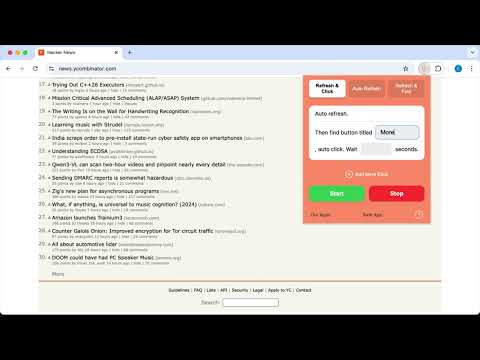
Auto Refresh & Click the button with keywords. Any questions, please contact cameoshell09@gmail.com
"Auto Refresh & Clicker" is a lightweight and easy-to-use browser extension that helps you manage web pages automatically. Not only can it automatically refresh the web page according to the time interval you set, ensuring that you get the latest content in a timely manner, it can also monitor whether the button or link you specify appears: when the button or link appears, "Auto Refresh & Clicker" can automatically click it for you. Ideal for users who need to frequently refresh web pages and click on specific elements. Highlights: • Auto refresh: Set the refresh interval to keep web pages updated without manual operation. • Intelligent monitoring: Specify a button or link and the program will automatically detect its occurrence and trigger a click. • Lightweight and easy to use: Simple interface, convenient and fast operation methods, improve your browsing efficiency. • Save time: Automatically complete repetitive operations, freeing you from tedious web page management. For people: • Users who need to monitor web page updates in real time. • Users who want to browse the web more efficiently.
3,9/515 lượt xếp hạng
Chi tiết
- Phiên bản1.8.9
- Đã cập nhật15 tháng 12, 2025
- Nhà cung cấpluopks-group
- Kích thước165KiB
- Ngôn ngữ10 ngôn ngữ
- Nhà phát triển
Email
cameoshell09@gmail.com - Người bán phi thương mạiNhà phát triển này không tự nhận mình là người bán. Đối với người tiêu dùng ở Liên minh Châu Âu, xin lưu ý rằng các quyền của người tiêu dùng không được áp dụng trong hợp đồng giữa bạn và nhà phát triển này.
Quyền riêng tư

Nhà phát triển này tuyên bố rằng dữ liệu của bạn
- Không được bán cho bên thứ ba, ngoài những trường hợp sử dụng đã được phê duyệt
- Không được sử dụng hoặc chuyển nhượng cho các mục đích không liên quan đến chức năng chính của mặt hàng
- Không được sử dụng hoặc chuyển nhượng để xác định khả năng thanh toán nợ hoặc phục vụ mục đích cho vay
Hỗ trợ
Nếu bạn có câu hỏi, ý kiến đề xuất hoặc gặp vấn đề, vui lòng mở trang này bằng trình duyệt dành cho máy tính để được trợ giúp