

Auto PiP Master

Overview
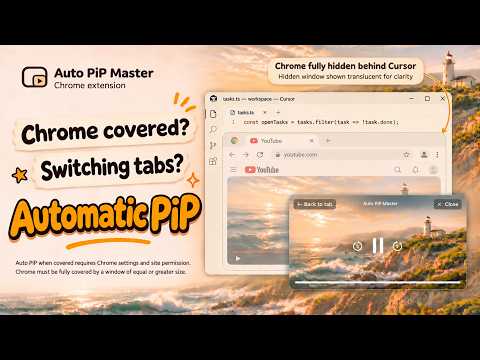
When another app covers Chrome or you switch tabs, a custom PiP player opens automatically.
Keep watching with Auto PiP Master while you work in another app. When Chrome detects that its window is covered, it opens the playing video in a small PiP (Picture-in-Picture) window that stays above other windows. Chrome's automatic PiP feature for covered windows and the site's automatic PiP permission must both be enabled. The custom PiP player makes videos easier to watch and control than Chrome's default PiP. Control playback, resize the window, and move it around, all from the small window. When you return to the original video tab, PiP opened by the extension closes, and you can keep watching on the original page. Key features • Easy playback controls in a small window Play or pause, seek with the playback bar, and skip backward or forward. You can also use Space and the left and right arrow keys. The skip interval is 5 seconds by default and can be set to 1–60 seconds. • Your preferred size and position Scroll the mouse wheel to resize PiP and drag it to move it. When you finish resizing, the window adjusts to the video's aspect ratio. If it extends beyond the screen, it moves back into view. Your last size and position are remembered, too. • Switch to the video you just watched Watch a video in another tab, then leave that tab, and PiP switches to the video you just watched. The original video's volume and mute settings stay unchanged. PiP you opened directly through Chrome or a site's menu is never automatically replaced or closed. • A shortcut when you need it Open PiP for the video you watched most recently in the same Chrome profile. Use the same shortcut to close PiP opened by the shortcut or automatically by the extension. • Settings that work for you Turn automatic PiP on or off and exclude specific sites. Choose whether muted videos also open automatically when you switch tabs within Chrome. How to use 1. Install the extension and play a video. If it doesn't work on a page that was open before installation, refresh that page once. 2. To open PiP automatically when another app covers Chrome, enable Chrome's automatic PiP feature for covered windows and allow automatic PiP for that site. 3. Cover Chrome with another app's window. PiP opens automatically when the operating conditions are met. You can also use automatic switching when you move to another Chrome tab. In Chrome versions that offer the covered-window feature as an experimental setting, open the address below. Set “Auto picture in picture on window occluded” to “Enabled” and restart Chrome. The available settings may vary by version. chrome://flags/#auto-picture-in-picture-on-window-occluded Manual shortcut • Windows/Linux: Ctrl + Shift + 9 • macOS: ⌘ + ⇧ + 9 To use the shortcut from other apps, set its scope to “Global” at chrome://extensions/shortcuts. If you change the keys, click “Apply shortcut” in the extension menu. This restarts the extension and may close an open PiP. Requirements and limitations • Chrome 125 or later is required. The custom PiP player works on HTTPS sites and localhost. • Automatic switching when another app covers Chrome follows Chrome's coverage detection and automatic PiP conditions. It applies to supported videos with audible playback. Additional support for automatic switching with muted and embedded videos applies only to tab switching within Chrome. • On macOS, Chrome may not detect that it's covered when another app's window overlaps it in the same position and at the same size. Use the shortcut in that case. Opening PiP manually may move focus to Chrome or PiP. • Minimizing Chrome or leaving the original video visible on another monitor does not open a new PiP automatically. • The custom PiP player also works with supported videos on Netflix and Coupang Play. Depending on the site's policies and playback method, a video may open in Chrome's default PiP or may not work. Subtitles and ads may also appear differently. The extension's skip interval, wheel resizing, and position correction do not apply to default PiP. • On Google Meet, Zoom, Jitsi Meet, and Whereby, the service's own PiP takes priority by default. Whether it opens automatically depends on the service and Chrome settings. You can also choose to keep video PiP behavior for each service. Permissions and privacy The extension uses access to HTTP and HTTPS sites to automatically find and control videos and embedded players across sites. It changes page elements to control playback and build the PiP interface. The read and change permissions granted by Chrome cover more than video information. The extension briefly connects to the debugger to support some tab switches or when you open PiP manually. This can happen not only when you use the shortcut, but also when you use a page's PiP button or Chrome's media controls just after an automatic switch. It disconnects when the operation is finished, but Chrome's debugging notice may remain briefly. Page and frame addresses, titles, video state, tab and window usage order, and monitor information needed for PiP are processed on your device. Some embedded videos are also transferred within your device, without an external relay server. Settings, excluded sites, and PiP size and position are saved in your browser. The extension does not record videos or save them as files, and does not request microphone or camera input. It does not send this information to servers operated by the developer or third parties, or sell it. There are no ads, analytics, tracking features, or account registration. Video sites and Chrome handle their own data under their respective policies. Contact Send any problems or ideas for improvements to tech.jmtt@gmail.com. Please include the affected site, your Chrome version, and steps to reproduce the issue to help with troubleshooting. Leave out account details and sensitive information.
0 out of 5No ratings
Details
- Version1.0.1
- UpdatedNovember 8, 2026
- Offered byjaemin
- Size255KiB
- Languages10 languages
- Developer
Email
tech.jmtt@gmail.com - Non-traderThis developer has not identified itself as a trader. For consumers in the European Union, please note that consumer rights do not apply to contracts between you and this developer.
Privacy

Auto PiP Master has disclosed the following information regarding the collection and usage of your data. More detailed information can be found in the developer's privacy policy.
Auto PiP Master handles the following:
This developer declares that your data is
- Not being sold to third parties, outside of the approved use cases
- Not being used or transferred for purposes that are unrelated to the item's core functionality
- Not being used or transferred to determine creditworthiness or for lending purposes