


Übersicht
Automate your bulk video creation workflow on Meta AI. Save time and accelerate creativity!
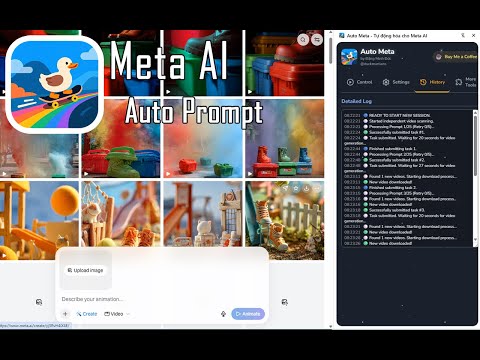
Stop creating Meta AI videos one by one. Auto Meta automates your entire workflow, helping you turn a folder of images or a list of ideas into hundreds of AI videos with just a few clicks. Install Auto Meta to save hours of manual work and accelerate your content creation. ✨ WHY SHOULD YOU INSTALL AUTO META? This tool is designed to solve the single biggest problem with Meta AI: the manual workflow. Instead of repeating the tedious process of uploading 1 image, entering 1 prompt, waiting, and downloading, Auto Meta does it all for you in a bulk queue. It's the ultimate tool for content creators, digital marketers, and social media managers who need to scale up their AI video production without wasting time. 📖 DETAILED FUNCTIONS Auto Meta operates intelligently with two modes, which activate automatically based on your input: 1. Image-to-Video Mode (Activates when you select images) Perfect for creating bulk videos from an existing library of images. - How it works: Select multiple images, add your list of prompts. The tool will automatically pair 1 image with 1 prompt and click "Generate". - Prompt Cycling: If your prompt list is shorter than your image list, the tool automatically cycles back and reuses prompts from the beginning. - Image Sorting: Manage your image queue by sorting A-Z, Z-A, Newest, or Oldest. 2. Text-to-Video Mode (Activates when NO images are selected) Ideal for when you just have ideas (prompts) and want Meta AI to generate the video. - How it works: Simply enter your list of prompts (separated by a blank line). The tool will automatically take one prompt at a time and click "Generate". - Smart: The tool detects you haven't selected images and switches to this mode automatically—no settings required. Key Supporting Features: 📥 Auto-Download: The tool constantly scans the page and automatically clicks the download button for any newly finished videos. 📝 Import from File: Easily import hundreds of prompts at once from a prepared .txt file. ⚙️ Advanced Control: - Start From...: Choose the exact starting position (e.g., start from image #50 or prompt #100). - Custom Wait Times: The tool intelligently suggests different wait times (10-20s for image mode, 15-30s for text mode), but you can override them at any time. 💡 IMPORTANT TIP FOR 100% AUTOMATIC DOWNLOADING To have videos download straight to your folder without a "Save As..." pop-up, you must do the following: - Go to chrome://settings/downloads in your browser. - Turn OFF the option: "Ask where to save each file before downloading".
3,5 von 555 Bewertungen
Details
- Version1.1.6
- Aktualisiert26. März 2026
- Größe3.04MiB
- Sprachen2 Sprachen
- EntwicklerWebsite
E-Mail
dangduc131@gmail.com - Kein HändlerDieser Entwickler hat sich nicht als Händler deklariert. Für Verbraucher in der Europäischen Union gelten die Verbraucherrechte nicht für Verträge, die zwischen dir und diesem Entwickler geschlossen werden.
Datenschutz

Dieser Entwickler erklärt, dass deine Daten
- nicht an Dritte verkauft werden, außer in den genehmigten Anwendungsfällen
- nicht für Zwecke genutzt oder übertragen werden, die nichts mit der Hauptfunktionalität des Artikels zu tun haben
- nicht zur Ermittlung der Kreditwürdigkeit oder für Darlehenszwecke verwendet oder übertragen werden
Support
Wenn du Hilfe bei Fragen, Vorschlägen oder Problemen benötigst, öffne diese Seite in deinem Desktop-Browser