


Overview
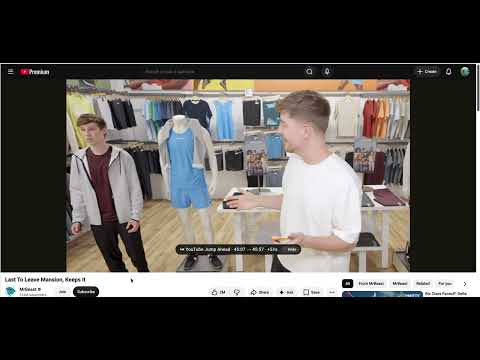
Skip ahead more smoothly on YouTube with automatic Jump Ahead and optional skips for clearly labeled ad chapters.
Less reaching. More watching. Auto Jump Ahead for YouTube automates skip actions that YouTube already provides, so you can keep your attention on the video. HOW IT HELPS • Auto Jump Ahead — When YouTube shows its own built-in "Jump Ahead" control on a video, the extension activates it for you automatically. • Labeled ad chapters (optional) — When a video has chapters and one is clearly labeled as an ad or paid promotion (for example "Ad Break", "Sponsor", or "Paid Promotion"), the extension can skip that chapter. This relies on the video's own chapter markers. • Clear feedback — A small on-screen notice explains whether a Jump Ahead or an ad chapter was skipped, and includes Undo. • Predictable starts — Signals that begin in the first 15 seconds are ignored, so a video does not jump shortly after it starts. • Your controls — Two simple on/off toggles in the popup. Music videos are left alone by default. WHAT IT DOES NOT DO • It is not an ad blocker. It does not block, remove, or skip the video ads YouTube plays before or during a video. • It does not skip every sponsor mention. It only acts on information YouTube already provides: whether Jump Ahead is available, and chapters that are explicitly labeled. • It does nothing on videos that have no Jump Ahead and no labeled chapters. • Jump Ahead is a YouTube feature and only appears where YouTube chooses to offer it. PRIVACY • No account, no sign-in, no tracking, no analytics. • The only thing stored is your two on/off settings, saved locally through Chrome. • Nothing is sent to the developer. Privacy policy: https://jiahongc.github.io/auto-jump-ahead-for-youtube/privacy.html Not affiliated with, endorsed by, or sponsored by YouTube or Google LLC. "YouTube" is a trademark of Google LLC, used here only to describe what this extension works with.
5 out of 51 rating
Details
- Version1.19
- UpdatedAugust 21, 2026
- Size35.87KiB
- LanguagesEnglish
- DeveloperWebsite
Email
jiahong1996@gmail.com - Non-traderThis developer has not identified itself as a trader. For consumers in the European Union, please note that consumer rights do not apply to contracts between you and this developer.
Privacy

This developer declares that your data is
- Not being sold to third parties, outside of the approved use cases
- Not being used or transferred for purposes that are unrelated to the item's core functionality
- Not being used or transferred to determine creditworthiness or for lending purposes
Support
For help with questions, suggestions, or problems, visit the developer's support site