

Auto Image Gen
46 ratings
)
Overview
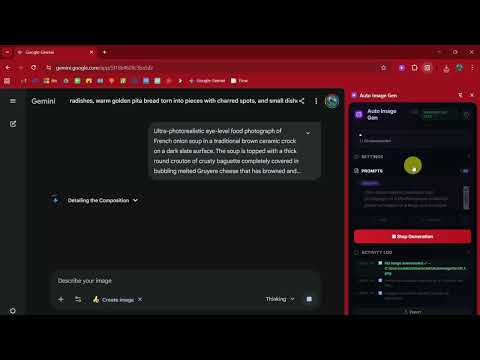
Automate bulk image generation on Google Gemini. Batch process prompts, auto-download images with custom naming support.
Auto Image Gen automates the entire image workflow on Google Gemini. Load your prompts, click Start, and walk away — the extension handles everything from sending prompts to downloading HD images with organised file names. Now with three powerful modes: generate images from text prompts, transform existing images into new styles, and extract text from image documents with one-click CSV export. --- HOW TO USE: 1. Go to gemini.google.com 2. Click the Auto Image Gen icon in your Chrome toolbar 3. The Side Panel opens alongside Gemini 4. Choose your mode, add prompts or upload images, and click Start --- **THREE MODES IN ONE EXTENSION** **Text → Image** The original bulk generation mode. Add 10, 50, or 100+ prompts, click Start, and every image is automatically generated and downloaded in sequence. Perfect for content calendars, product art, and social media batches. **Image → Image** Upload a source image and let Gemini transform it using your prompts. Generate dozens of variations from a single reference — different styles, backgrounds, color treatments, or art mediums — all automatically downloaded. • Upload one source image and apply many transformation prompts • Or upload multiple source images matched 1:1 with prompts — batch transform your entire image library • Full thumbnail grid with per-image delete, enlarge, and add-more controls • Drag and drop images directly onto the upload zone **Template Mode (Image → Image)** Write one prompt with a {var} placeholder and a list of values — the extension expands it into a full batch automatically. Example: Template: "Generate this exact art style but the character should be a {var}" List: fox / wolf / bear / lion / tiger... Result: 50 images, each a different animal in the same style, saved as fox_1.png, wolf_1.png, bear_1.png... Import variable lists from a TXT file. Live counter shows how many prompts will be generated before you start. **Image → Text (OCR)** Upload a batch of document images — book pages, scanned tables, handwritten notes, receipts. Write one global extraction prompt and Gemini reads every image and returns structured text. Each image downloads as a .txt file, and a Master CSV is compiled from all extracted data at the end of the batch. • Works with printed books, vocabulary pages, tables, forms, and receipts • Master CSV includes all data with per-source image markers • Thumbnail grid with live progress indicators — completed pages show a green checkmark • Clear All button resets images, prompt, and results in one click --- **WHAT IT DOES** • Processes 10, 50, or 100+ prompts automatically in a single session • Downloads full-resolution HD images via Gemini's native export • Transforms source images using your text instructions • Extracts and compiles text data from document images into CSV • Organises files with custom naming: animal_1.png, day_1.png, or timestamps, sequential, and more • Batch naming with === markers for multi-day content planning • Smart retry system for failed or skipped generations • Real-time progress tracking with detailed activity logs --- **PERFECT FOR** • Illustrators and character artists — create full character sets in a consistent style using Template Mode • Social media managers — generate entire content calendars in one session • Designers — produce dozens of product variations, colorways, and style treatments automatically • Researchers and publishers — extract and compile text data from scanned documents and book pages • Content creators — anyone who generates, transforms, or processes images in bulk on Gemini --- **KEY FEATURES** • Side Panel UI — stays open alongside Gemini for easy monitoring • Three Modes — Text → Image, Image → Image, Image → Text (OCR) • Template Mode — one prompt + variable list = unlimited batch variations • Batch Import — load dozens of prompts from TXT or CSV files • Multi-Day Batches — use === 24 === markers to auto-name files by day • HD Downloads — automatic download with verification and smart retry • Retry System — one-click retry for any failed or skipped prompt • Drag and Drop — drag images directly onto the upload zone • Activity Log — full session logs with export capability • Customisable — adjust timing, naming, and download preferences • Settings collapsed by default — prompts are front and centre on open --- **FILE NAMING OPTIONS** • Custom Prefix: fox_1.png, wolf_1.png — or 24_1.png, 24_2.png... • Sequential: image_001.png, image_002.png... • From Prompt: first-words-of-prompt.png • Timestamp: gemini_1708123456.png --- **BATCH FILE FORMAT (TXT)** === 24 === A vertical infographic about healthy eating --- A quick explanation post about meal prep --- === 25 === A motivational quote poster --- An image post about morning routines This creates: 24_1.png, 24_2.png, 25_1.png, 25_2.png --- **TEMPLATE MODE FORMAT** Template prompt (written once in the extension): Generate this exact art style but the character should be a {var} Variable list (one per line, or imported from TXT): fox wolf bear lion tiger This generates 5 jobs. Files saved as: fox_1.png, wolf_1.png, bear_1.png, lion_1.png, tiger_1.png --- **WHAT'S NEW IN v1.5.0** • Image → Image completely rebuilt — multi-source image support, thumbnail grid, drag and drop, per-image delete, lightbox preview, live completion tracking • Template Mode — batch image transformation from a single prompt and variable list • Image → Text (OCR) — new mode for bulk document text extraction with Master CSV compilation • Settings and Activity Log collapsed by default for a cleaner prompt-first layout • OCR Clear All button — reset entire OCR session in one click --- **Disclaimer** This extension is an independent project and is not affiliated with, endorsed by, or connected to Google or the Google Gemini team. --- **Privacy Policy Summary** • All prompts, images, and settings are stored locally in the browser via chrome.storage.local • Images are downloaded directly from Gemini to the user's local Downloads folder • The extension only runs on gemini.google.com and does not access any other websites • No analytics, tracking, or telemetry of any kind • Optional email signup: Users may choose to subscribe to our newsletter for prompt guides and tips. Email addresses are collected via Google Forms and stored in Google Sheets. No email is collected without explicit user action. We do not sell or share email addresses with third parties. Contact contact@urduwriting.com to unsubscribe.
4.6 out of 546 ratings
Details
- Version1.5.0
- UpdatedApril 20, 2026
- Offered byShahzaib
- Size46.56KiB
- LanguagesEnglish (United States)
- Developer
Email
contact@urduwriting.com - Non-traderThis developer has not identified itself as a trader. For consumers in the European Union, please note that consumer rights do not apply to contracts between you and this developer.
Privacy

Auto Image Gen has disclosed the following information regarding the collection and usage of your data. More detailed information can be found in the developer's privacy policy.
Auto Image Gen handles the following:
This developer declares that your data is
- Not being sold to third parties, outside of the approved use cases
- Not being used or transferred for purposes that are unrelated to the item's core functionality
- Not being used or transferred to determine creditworthiness or for lending purposes