


概要
Automated follow up emails and mail merge
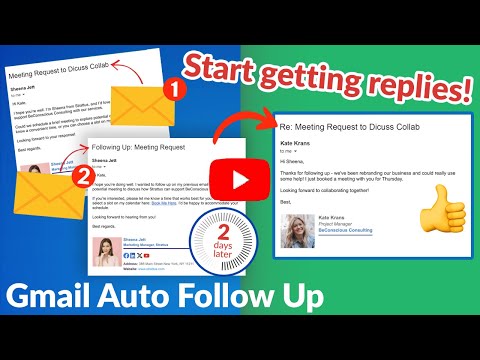
Auto Follow Up for Gmail™ is a Google Chrome Extension that helps you follow up on your email emails. Just set up a sequence of emails to send to your recipients over time from your Gmail™. Let’s say you meet a lot of people at a networking event. You want to email all of them to explore opportunities, but it’s hard to follow up with so many people. Auto Follow Up for Gmail™ makes it easy to reach your clients. It automates the process for you with personalized emails to multiple contacts with just a few clicks. Auto Follow Up for Gmail™ has two methods to create auto follow-ups: ***Auto Follow Up on Your Emails*** Send an email as usual, then activate follow-up either during the sending (click on Gmail Auto Follow-Up under the send button) or after it’s sent by selecting the email in your Sent label and activating a follow-up template for this email. Follow-up templates specify intervals, email content, and whether to track clicks and opens. In other words, Follow-up templates define criteria and conditions under which additional emails will be sent and emails which will be sent. Example: You email an employee about a deal status. To ensure the email isn’t overlooked, activate a follow-up so if there’s no reply in two days, a follow-up email is automatically sent. This feature is great for managers, sales call follow-up, effective client communication, and more. ✅ Managers: Ensures timely communication by sending automatic reminders, like if there's no reply on a project status within a set timeframe. ✅ Sales Call Follow-Up: Increases conversion rates by maintaining persistent contact, such as resending proposal details to a client who hasn't responded after the initial sales call. ✅ Client Communication: ensure that important information requests are addressed promptly and not forgotten (e.g., reminding a client to send required documents). ***Auto Follow Up Campaigns*** Start the cloudHQ wizard, upload your recipient list, and set your follow-up rules and sequences. Follow-up rules determine the criteria and conditions under which additional emails will be sent. These rules can be based on various triggers, such as a recipient opening the initial email, clicking a link within the email, or not responding within a specified time frame. In addition, you need to establish your follow-up sequences, which are the series of messages that will be sent to recipients over a period of time. Example: You send an email campaign to 100 warm leads from a trade show offering to set up a demo of your product. When you send that campaign, you set it so that two days later, a follow-up email (a reminder) is sent to anyone who hasn’t replied. Three days after that, another reminder is sent, and a few days after that, a final email is sent asking for a reply. This approach is perfect for sales outreach for large number of recipient: ✅ Take advantage of all your opportunities and close more business. ✅ Save time and get more done with automated outreach emails to prospects. ✅ Always be visible to your clients in their inbox. ***Features include*** 👉 Mail merge so that you can send out bulk email messages that look personalized. You can import recipient list and merge tags from Google Sheets, CSV or Google Contacts. 👉 Simple-to-set-up, automated email responses. 👉 Email tracking so that you know who read your emails, and when. 👉 Gmail email templates so that your emails can either be beautiful html-based templates, or just simple text-based templates. The choice is yours! 👉 Video email so that you can record yourself in an email via video so that you can "speak" to your audience. 👉 Screencasting so that you can demonstrate something on your screen. 👉 The ability to link back to your CRM, like Salesforce. All this, right from your Gmail™ account! There's no 3rd party website you'll need to learn or visit. Whether you're a: 👨🏾💼A busy professional, and you want to follow up with 40 new potential clients whose cards you just picked up at a convention last week. 👩🏫An overworked teacher that needs to schedule 75 parent/teacher conferences. 👨🏿⚖️A lawyer who needs to constantly remind his clients that they need to send their emails for discovery. 👩🏽💼A realtor who wants to send out her latest listing to your clients. 👨🏼🎓A job seeker who wants to make sure that they're automatically following up with recruiters. 👰🏻🤵🏽Or maybe you’re getting married and you need to remind 150 of your friends to RSVP. Get started today! cloudHQ. Helping your productivity, 1 click at a time. cloudHQ website: https://www.cloudhq.net/ App website: https://www.gmail-auto-follow-up.com/ Pricing: https://www.gmail-auto-follow-up.com/pricing Support page: https://support.cloudhq.net/category/browser-extensions/gmail-auto-follow-up/ Blog: https://blog.cloudhq.net Demo: https://www.cloudhq.net/demo Google Workspace, Google Contacts, Google Sheets, Google Drive, Google Alerts and Gmail are trademarks of Google LLC. Use of this trademark is subject to Google Permissions. cloudHQ is trademark of CloudHQ LLC. https://www.cloudhq.net/trademark
5 点満点で 4.933 件の評価
詳細
プライバシー

Auto Follow Up for Gmail™ by cloudHQ から、お客様のデータの収集と使用に関する以下の情報が開示されています。 詳しくは、デベロッパーの privacy policy をご確認ください。
Auto Follow Up for Gmail™ by cloudHQ は次を扱います。
このデベロッパーは、お客様のデータについて以下を宣言しています
- 承認されている以外の用途で第三者に販売しないこと
- アイテムの中心機能と関係のない目的で使用または転送しないこと
- 信用力を判断する目的または融資目的で使用または転送しないこと
サポート
質問や提案、問題がある場合は、デベロッパーのサポートサイトにアクセスしてください。