


總覽
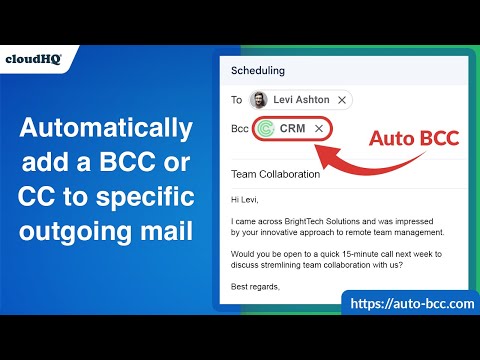
Setup automatic blind copies to your CRM or any other email address
With the Auto BCC for Gmail by cloudHQ Chrome extension, you can automatically blind copy (or copy) specific people on specific emails so that you can rest assured that whoever should have a copy of your email, automatically does. Here's a list of features: ✅ Automatically CC or BCC another email address (like another one of your email addresses, your boss, your assistant, etc). ✅ Multiple rules based on your "from" email address: —Only email messages that you send from your professional email address will be CC or BCC'ed to an email address of your choice. ✅ Multiple rules based on your receiver's email address or domain: — Emails sent to certain contacts (for example, important clients) automatically have a CC or BCC included in your emails. ✅ Exclusion rules based on your receiver's email address or domain: — Emails that you send to your private contacts or internal company contacts do not get CC'ed or BCC'ed to anyone. ✅ Full support for Salesforce CRM, HubSpot CRM, and other major CRMs. cloudHQ. Helping professionals 1 click at a time. Website: https://www.auto-bcc.com/ Pricing: https://www.auto-bcc.com//pricing Support page: https://support.cloudhq.net/category/browser-extensions/auto-bcc-for-gmail/ Blog: https://blog.cloudhq.net X: https://x.com/cloudhq Facebook: https://www.facebook.com/cloudHQ cloudHQ is trademark of CloudHQ LLC. https://www.cloudhq.net/trademark
4.2 分 (滿分 5 分)122 個評分
詳細資料
隱私權

「Auto BCC for Gmail™ by cloudHQ」已揭露下列關於收集及使用資料的資訊。 如需更多詳細資訊,請參閱開發人員的《privacy policy》。
Auto BCC for Gmail™ by cloudHQ 會處理下列資料:
這位開發者就你的資料做出下列聲明:
- 除經核准的用途外,不會將你的資料販售給第三方
- 不會基於與商品核心功能無關的目的,使用或轉移資料
- 不會為了確認信用度或基於貸款目的,使用或轉移資料
支援
如有疑問或建議,請前往開發人員的支援網站