


개요
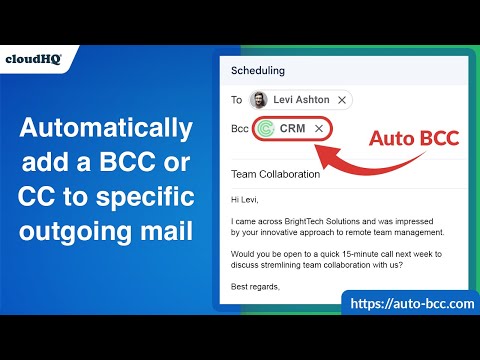
Setup automatic blind copies to your CRM or any other email address
With the Auto BCC for Gmail by cloudHQ Chrome extension, you can automatically blind copy (or copy) specific people on specific emails so that you can rest assured that whoever should have a copy of your email, automatically does. Here's a list of features: ✅ Automatically CC or BCC another email address (like another one of your email addresses, your boss, your assistant, etc). ✅ Multiple rules based on your "from" email address: —Only email messages that you send from your professional email address will be CC or BCC'ed to an email address of your choice. ✅ Multiple rules based on your receiver's email address or domain: — Emails sent to certain contacts (for example, important clients) automatically have a CC or BCC included in your emails. ✅ Exclusion rules based on your receiver's email address or domain: — Emails that you send to your private contacts or internal company contacts do not get CC'ed or BCC'ed to anyone. ✅ Full support for Salesforce CRM, HubSpot CRM, and other major CRMs. cloudHQ. Helping professionals 1 click at a time. Website: https://www.auto-bcc.com/ Pricing: https://www.auto-bcc.com//pricing Support page: https://support.cloudhq.net/category/browser-extensions/auto-bcc-for-gmail/ Blog: https://blog.cloudhq.net X: https://x.com/cloudhq Facebook: https://www.facebook.com/cloudHQ cloudHQ is trademark of CloudHQ LLC. https://www.cloudhq.net/trademark
5점 만점에 4.2점평점 122개
세부정보
개인정보 보호

Auto BCC for Gmail™ by cloudHQ에서 데이터 수집 및 사용과 관련하여 다음 정보를 공개했습니다. 더 자세한 정보는 개발자의 privacy policy을 참고하세요.
Auto BCC for Gmail™ by cloudHQ 항목은 다음을 처리합니다.
개발자가 사용자 데이터에 관해 다음과 같이 선언했습니다
- 승인된 사용 사례를 제외하고 서드 파티에 판매하지 않음
- 항목의 핵심 기능과 관련 없는 목적으로 사용하거나 전송하지 않음
- 신용도 판단 또는 대출 목적으로 사용하거나 전송하지 않음
지원
질문, 제안 또는 문제와 관련하여 도움이 필요하시면 개발자의 지원 사이트를 방문하세요.