


概要
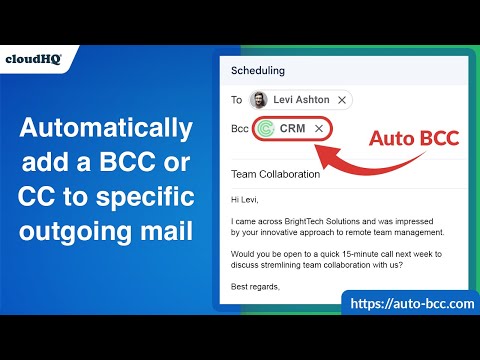
CRMまたはその他の電子メールアドレスへの自動ブラインドコピーを設定します
With the Auto BCC for Gmail by cloudHQ Chrome extension, you can automatically blind copy (or copy) specific people on specific emails so that you can rest assured that whoever should have a copy of your email, automatically does. Here's a list of features: ✅ Automatically CC or BCC another email address (like another one of your email addresses, your boss, your assistant, etc). ✅ Multiple rules based on your "from" email address: —Only email messages that you send from your professional email address will be CC or BCC'ed to an email address of your choice. ✅ Multiple rules based on your receiver's email address or domain: — Emails sent to certain contacts (for example, important clients) automatically have a CC or BCC included in your emails. ✅ Exclusion rules based on your receiver's email address or domain: — Emails that you send to your private contacts or internal company contacts do not get CC'ed or BCC'ed to anyone. ✅ Full support for Salesforce CRM, HubSpot CRM, and other major CRMs. cloudHQ. Helping professionals 1 click at a time.
5 点満点で 4.2122 件の評価
詳細
プライバシー
Auto BCC for Gmail™ by cloudHQ から、お客様のデータの収集と使用に関する以下の情報が開示されています。 詳しくは、デベロッパーの privacy policy をご確認ください。
Auto BCC for Gmail™ by cloudHQ は次を扱います。
このデベロッパーは、お客様のデータについて以下を宣言しています
- 承認されている以外の用途で第三者に販売しないこと
- アイテムの中心機能と関係のない目的で使用または転送しないこと
- 信用力を判断する目的または融資目的で使用または転送しないこと
サポート
質問や提案、問題がある場合は、デベロッパーのサポートサイトにアクセスしてください。