

Authify (2FA Authenticator)
6 ratings
)
Overview
Security-first local TOTP and HOTP authenticator with encrypted backups.
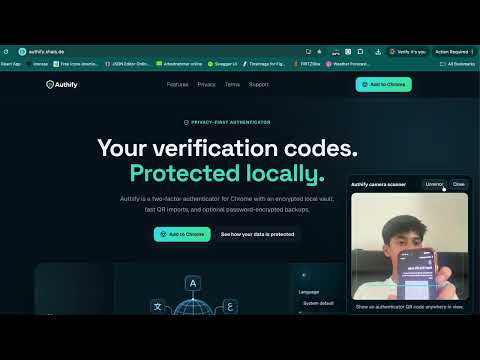
𝐒𝐞𝐜𝐮𝐫𝐞 𝐚𝐧𝐝 𝐏𝐫𝐢𝐯𝐚𝐭𝐞 𝟐𝐅𝐀 𝐢𝐧 𝐂𝐡𝐫𝐨𝐦𝐞 Authify is an independent TOTP and HOTP authenticator that generates verification codes locally in your browser. Your accounts are protected inside an AES-256-GCM encrypted vault secured by your master password. 𝗞𝗲𝘆 𝗙𝗲𝗮𝘁𝘂𝗿𝗲𝘀 🔐 Password-encrypted local vault ⏱️ TOTP and HOTP verification codes 📷 QR, webcam, image, URL, and manual imports 📦 Google Authenticator transfer QR support ☁️ Encrypted Google Drive backups 📁 Password-protected offline backups 📋 One-click copy and optional autofill ⭐ Search, favorites, and account organization 🌐 Multiple languages and themes 🛡️ No ads, analytics, or behavioral tracking QR codes and camera frames are processed locally. Authify never automatically submits login forms or shares your OTP secrets with advertisers or analytics providers. 𝗩𝗲𝗿𝘀𝗶𝗼𝗻 𝗛𝗶𝘀𝘁𝗼𝗿𝘆 𝑉𝑒𝑟𝑠𝑖𝑜𝑛 1.0.22 | 𝑆𝑒𝑝𝑡𝑒𝑚𝑏𝑒𝑟 8, 2026 🔑 Added optional passkey recovery during setup and in Security settings. ⏱️ Authify now keeps the vault unlocked securely for up to 24 hours. 🔐 Added a forgotten-password reset option with confirmation protection. 📷 Improved the webcam QR scanner layout and removed unnecessary scrolling. ✨ Fixed passkey options not appearing immediately after setup. 🛠️ Added minor security, interface, and stability improvements. 𝑉𝑒𝑟𝑠𝑖𝑜𝑛 1.0.21 | 𝑆𝑒𝑝𝑡𝑒𝑚𝑏𝑒𝑟 3, 2026 📷 Fixed an issue where opening the webcam scanner redirected users to the master-password screen. 🔐 Webcam scanning now keeps the unlocked vault session active and secure. ⚡ Improved webcam startup and reliability for Authify Pro users. 𝑉𝑒𝑟𝑠𝑖𝑜𝑛 1.0.20 | 𝑆𝑒𝑝𝑡𝑒𝑚𝑏𝑒𝑟 2, 2026 🔐 Improved vault security—master passwords and decrypted vault data are no longer stored in Chrome Session Storage. 🔑 Added a technology-themed password generator during setup. 📋 Added quick copy and apply controls for suggested passwords. 👑 Replaced Pro text badges with cleaner crown icons. ✨ Improved the onboarding layout to fit without scrolling. 🛠️ Added minor interface and stability improvements. 𝑉𝑒𝑟𝑠𝑖𝑜𝑛 1.0.19 | 𝐴𝑢𝑔𝑢𝑠𝑡 30, 2026 ☁️ Improved Google Drive connection and account switching. 📧 Added the connected Google account email. 🗂️ Added encrypted backup history management. 📦 Increased transfer capacity to 10 accounts per QR. 🎨 Refined backup layouts, dialogs, alerts, and controls. 🌐 Moved language selection into Settings. 🛠️ Fixed authorization, navigation, scanner, and password issues. 𝑉𝑒𝑟𝑠𝑖𝑜𝑛 1.0.14 | 𝐴𝑢𝑔𝑢𝑠𝑡 29, 2026 📷 Improved camera permission handling. 🎥 Refined webcam scanning and visual feedback. 🪞 Added an unmirrored preview and mirror control. 🐛 Fixed camera, video playback, and interface issues. 𝑉𝑒𝑟𝑠𝑖𝑜𝑛 1.0.13 | 𝐴𝑢𝑔𝑢𝑠𝑡 29, 2026 🎥 Added webcam QR scanning. 🖱️ Added screen-area QR scanning. 🖼️ Improved QR detection from uploaded images. 📦 Added Google Authenticator migration imports. 𝑉𝑒𝑟𝑠𝑖𝑜𝑛 1.0.9 | 𝐴𝑢𝑔𝑢𝑠𝑡 27, 2026 🏪 Prepared Authify for Chrome Web Store publishing. 🎨 Updated logos and extension icons. 📦 Reduced package size and refined permissions. ⚙️ Improved Manifest V3 service-worker reliability. 𝑉𝑒𝑟𝑠𝑖𝑜𝑛 1.0.8 | 𝐴𝑢𝑔𝑢𝑠𝑡 24, 2026 🧹 Refactored and improved extension reliability. 👤 Fixed missing issuer labels. 🎨 Polished account cards, settings, and navigation. 🔒 Strengthened import and backup validation. 𝑉𝑒𝑟𝑠𝑖𝑜𝑛 1.0.1 | 𝐴𝑢𝑔𝑢𝑠𝑡 22, 2026 👑 Introduced Authify Pro. ☁️ Added encrypted Google Drive backups. 🌐 Added multiple languages. 🔍 Added search, favorites, and account ordering. ⚙️ Expanded backup, security, and appearance settings. 𝑉𝑒𝑟𝑠𝑖𝑜𝑛 1.0.0 | 𝐴𝑢𝑔𝑢𝑠𝑡 14, 2026 🎉 Initial Authify release. ⏱️ Added TOTP and HOTP generation. 🔐 Added the encrypted local vault. 🔲 Added QR and manual account setup. 📁 Added encrypted offline backup and restore. 𝗣𝗿𝗶𝘃𝗮𝗰𝘆 🛡️ Your decrypted vault and master password remain only in temporary extension memory. Authify cannot recover forgotten master or backup passwords. 𝗙𝗲𝗲𝗱𝗯𝗮𝗰𝗸 🐞 📧 haidari.shais@gmail.com
5 out of 56 ratings
Details
- Version1.0.22
- UpdatedSeptember 9, 2026
- Offered byRafi Haidari
- Size439KiB
- Languages14 languages
- Developer
Email
haidari.1988@gmail.com - Non-traderThis developer has not identified itself as a trader. For consumers in the European Union, please note that consumer rights do not apply to contracts between you and this developer.
Privacy

This developer declares that your data is
- Not being sold to third parties, outside of the approved use cases
- Not being used or transferred for purposes that are unrelated to the item's core functionality
- Not being used or transferred to determine creditworthiness or for lending purposes
Support
For help with questions, suggestions, or problems, please open this page on your desktop browser