


Overview
Read web pages, articles & PDFs aloud with natural Text to Speech (TTS) voices. 100% offline. No subscription.
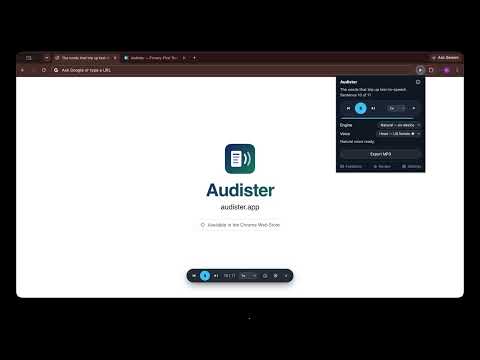
Audister is a privacy-first Text to Speech (TTS) extension that reads web pages, news articles, and PDFs aloud using natural, human-like AI voices that run 100% on your own computer. Read aloud any page with one keystroke (Alt+R) and follow along with sentence-by-sentence highlighting. Open a PDF — including local files on your own machine — in the built-in reader and it reads exactly like a web page. Most natural-sounding read-aloud and screen reader extensions send your articles, browsing history, and text to remote servers for processing. Audister does not. By utilizing state-of-the-art on-device deep learning (Kokoro-82M), Audister runs 100% locally. No account creation. No tracking. Nothing uploaded. --- ★ PDFs THAT READ IN THE RIGHT ORDER Most read-aloud tools treat a PDF as one long wall of text and read it in whatever order the file happens to store it. Audister measures the page layout first: • Two-column papers and reports read down one column and then the other — not straight across the gutter. • Running headers, footers and page numbers are learned and left out, instead of interrupting a sentence halfway through. • Bullet and numbered lists read as lists, and the bullet character itself is never spoken. • Citation markers ([12], [3-5]), reference sections and dense table blocks are skipped rather than read out loud. • Local files work too — open a PDF straight off your own disk. --- ★ AN HONEST PRICE (No Subscriptions) Tired of paying $10 to $20 every single month for high-quality voices? Audister is free to use forever with standard system voices. Unlock unlimited local AI natural voices and MP3 exports for a single, flat one-time upgrade of $19. No recurring charges. ★ COMPARED TO SUBSCRIPTION APPS • Audister: $19 — one-time, yours forever • Typical premium read-aloud apps: $100–$140 every year, forever --- ★ FEATURES • Reads PDFs Too: Opens PDFs in a built-in reader that highlights and follows along sentence by sentence, the same as a web page — including local files on your own machine. • State-of-the-Art Local AI: Experience warm, natural voice tones running directly on your CPU or GPU. • Privacy by Design: Your reading history, text content, and private keys never leave your machine. • Smart Skip: Automatically filters out webpage noise—skipping cookie consent banners, header menus, share icons, and sidebars—so reading starts immediately. • Read Exactly What You Want: Right-click to read the whole page, just your selection, a single section, or from any point onward. • On-Page Controls: A compact player bar right on the page—play, pause, skip a sentence—without opening the popup. • MP3 Export: Save any reading session to a high-quality local MP3 file to listen on the go. • Focus Follow-Along: Highlights the current active sentence dynamically on the page as it reads. • Bring-Your-Own-Key (Optional): Advanced users can optionally connect their own OpenAI, Google Cloud TTS, or ElevenLabs keys to use cloud-hosted voices. Usage of 3rd party APIs voids privacy claims since data is sent to the API. • Sentence-Aware Pronunciation: A proprietary pronunciation engine decides how a word sounds from the sentence around it — "a rebel may rebel," "present the present," "you have already read it" — where many text to speech engines get them wrong. No engine gets every word right, but this one reads the sentence before it decides. --- ★ SYSTEM REQUIREMENTS & DOWNLOAD DETAILS To deliver premium, near-human voices without a server, Audister runs AI models directly on your hardware. • Downloading: Selecting "Natural Voices" triggers a one-time download (~92MB to 310MB depending on your system's hardware capabilities). • Performance: On modern computers (Apple Silicon M1/M2/M3/M4, or machines with dedicated GPUs), voice synthesis starts almost instantly. On older or weaker laptops, we recommend using the free System Voices or running a brief hardware benchmark directly in the options page to verify. ★ OUR GUARANTEE We believe in our product. If Audister doesn't run well on your computer, or you're unhappy for any reason, email support within 30 days for a no-questions-asked refund.
5 out of 51 rating
Details
- Version1.3.7
- UpdatedOctober 30, 2026
- FeaturesOffers in-app purchases
- Size9.3MiB
- LanguagesEnglish
- Developer
- Non-traderThis developer has not identified itself as a trader. For consumers in the European Union, please note that consumer rights do not apply to contracts between you and this developer.
Privacy

Audister: Text to Speech & PDF Read Aloud has disclosed the following information regarding the collection and usage of your data. More detailed information can be found in the developer's privacy policy.
Audister: Text to Speech & PDF Read Aloud handles the following:
This developer declares that your data is
- Not being sold to third parties, outside of the approved use cases
- Not being used or transferred for purposes that are unrelated to the item's core functionality
- Not being used or transferred to determine creditworthiness or for lending purposes
Support
For help with questions, suggestions, or problems, visit the developer's support site