


Overview
Text to speech studio: turn text into AI voice with ChatGPT and Gemini voices, then download MP3, WAV, AAC or Opus. Free to try.
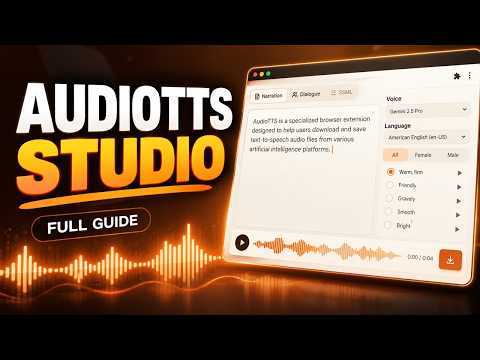
AudioTTS turns text into natural AI voice and lets you download it as MP3, WAV, AAC or Opus. Use ChatGPT's voices and Google's Gemini and Chirp voices in a full-screen text to speech studio, then save the audio for videos, podcasts, audiobooks, lessons and voice-overs. Sign in with Google, open a supported site, and start making audio in seconds 🌱 🎙️ ChatGPT voices (chatgpt.com) 👏 Download any ChatGPT reply as audio, or pick several replies and join them into one file 👏 Paste a long script: AudioTTS splits it, has ChatGPT read every part, and joins everything into one file 👏 Dialogue mode: give each character their own voice 👏 Change the voice of a whole script or a single line without regenerating it 👏 Real MP3, WAV, AAC and Opus output, plus Enhance for even, podcast-ready loudness 👏 Scripts run in a Temporary Chat, so your chat history stays clean 🗣️ Google Gemini and Chirp 3 HD voices 🔥A full-screen TTS studio with Gemini 3.1 Flash, Gemini 2.5 Pro and Flash, Chirp 3 HD, Neural2, WaveNet and more 🔥100+ languages including Indonesian, English, Spanish, Hindi, Arabic and Japanese 🔥Multi-speaker dialogue with any number of characters 🔥Emotion and delivery marks such as whisper, laugh, sigh and pauses, plus style direction 🔥Long text is split, generated and joined automatically, with automatic retries 🔥Speed, pitch, volume, sample rate and MP3 or WAV download 🔥URL https://www.gstatic.com/cloud-site-ux/text_to_speech/text_to_speech.min.html AudioTTS also works on several other AI voice sites. See the full list here: 👉 https://pastebin.com/qhEWR86L 💎 Plans Free: 5 downloads a day on ChatGPT and Google voices, and free on most other sites. Premium: unlimited downloads, joining multiple replies and parts, dialogue with several voices, WAV, AAC and Opus, and Enhance. 🎞️ Tutorial: https://www.youtube.com/playlist?list=PLkoaVIOMqPXNOJX5hS55C6ozZwwsjL2i7 🍪 Works in Chrome and other browsers that support Chrome extensions. 💬 Need help? Use the Support tab, or chat with us on WhatsApp: https://wa.me/6287889486240 AudioTTS is an independent tool and is not affiliated with or endorsed by OpenAI or Google. ChatGPT is a trademark of OpenAI; Gemini is a trademark of Google. 🙋FREQUENTLY ASKED QUESTIONS ✅ How do I download ChatGPT voice as MP3? Open chatgpt.com and press the green Audio button under any reply. For more control, open the Studio button at the bottom right: pick replies, choose a voice for each, and download them as one MP3, WAV, AAC or Opus file. ✅ Can I turn my own long text into ChatGPT voice? Yes. Paste your script into Studio > Script. AudioTTS splits it into parts, has ChatGPT read each one in the voice you choose, checks that every part matches your text, and joins everything into a single audio file. ✅ Which ChatGPT voices are available? All nine: Breeze, Spruce, Cove, Ember, Sol, Arbor, Maple, Vale and Juniper. You can listen to each one before you choose, and change the voice later without regenerating the text. ✅ Can I make a dialogue or podcast with several voices? Yes. Write lines as "Name: what they say" in Dialogue mode and give each character a voice. In the Google studio, Gemini voices can also speak two characters together naturally, and your cast can be any size. ✅ Does it fill up my ChatGPT history? No. Long scripts run in a ChatGPT Temporary Chat by default, so they never appear in your history. You can turn this off under Advanced. Each part does count as a message toward your ChatGPT usage limit. ✅ How do I use Gemini text to speech for free? Open the Google studio and tick the "I'm not a robot" check, which comes from Google. You then get Gemini 3.1 Flash, Gemini 2.5 Pro and Flash, Chirp 3 HD, Neural2, WaveNet and more, with no Google Cloud account or API key. ✅ Does it support Indonesian and other languages? Yes. The Google studio covers more than 100 languages and accents, including Indonesian, Malay, English, Spanish, Portuguese, Hindi, Arabic, Japanese, Korean and Chinese. ✅ Can I add emotion, whispering or pauses? Yes. With Gemini voices, insert marks such as whispering, laughing, sigh, shouting, sarcasm, and short, medium or long pauses straight into your text, and add a style direction like "warm storyteller" or "news anchor". Chirp 3 HD voices support pause marks. ✅ Is there a text length limit? No fixed limit. Long text is split at sentence ends, generated part by part with automatic retries, and joined into one file. If one part still fails, you keep all the audio before it and can continue from there. ✅ Which audio formats can I download? MP3 on every plan. Premium adds WAV, AAC and Opus, plus Enhance, which evens out the volume to podcast loudness and shapes the voice. ✅ Is AudioTTS free? Yes, to start. The free plan includes 5 downloads a day on ChatGPT and Google voices and is free on most other sites. Premium gives unlimited downloads, joining many replies or parts into one file, multi-voice dialogue, all formats and Enhance. ✅ Why does the Google studio ask me to tick a captcha again? Google's check expires after a while. If it expires during a long job, AudioTTS pauses, asks you to tick it once more, and then carries on without losing any finished parts. ✅ Is my text private? Your text goes only to ChatGPT or Google to create the audio. AudioTTS's own servers handle only your sign-in, your plan and your daily download count. Drafts and settings stay in your browser.
3.1 out of 5157 ratings
Details
- Version2.3.2
- UpdatedNovember 2, 2026
- FeaturesOffers in-app purchases
- Size338KiB
- LanguagesEnglish (United States)
- DeveloperWebsite
Email
baabullah@gmail.com - Non-traderThis developer has not identified itself as a trader. For consumers in the European Union, please note that consumer rights do not apply to contracts between you and this developer.
Privacy

AudioTTS - The AI Voice Downloader has disclosed the following information regarding the collection and usage of your data. More detailed information can be found in the developer's privacy policy.
AudioTTS - The AI Voice Downloader handles the following:
This developer declares that your data is
- Not being sold to third parties, outside of the approved use cases
- Not being used or transferred for purposes that are unrelated to the item's core functionality
- Not being used or transferred to determine creditworthiness or for lending purposes
Support
For help with questions, suggestions, or problems, please open this page on your desktop browser