

Audio Booster: Real Surround, EQ & Spatial Sound

Overview
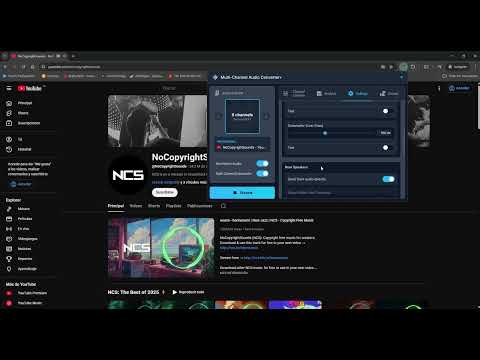
Turn any tab's stereo into immersive surround or 8D spatial audio. Boost volume, fine-tune with a 7-band EQ and normalizer.
Stereo Audio to Real Surround Sound — Take Your Sound to the Next Level! Get ready to rediscover your favorite music and movies! This extension turns flat stereo audio from any tab into a vibrant surround experience (2.1, 4.0, 4.1, 5.1, 7.1 and 7.2) or true 8D spatial sound with HRTF — louder, clearer and perfectly balanced. The ultimate tool to get the most out of your speakers or headphones, and it's 100% free. ⚠️ LIMITATIONS & IMPORTANT NOTES 📺 Full Screen Mode: Chrome's tabCapture API has security restrictions that block standard fullscreen while capturing. Press F11 to force fullscreen. 🎞️ Per-Tab Permission: Chrome requires you to enable each tab by clicking the extension icon on it (or press Alt+Shift+S). 〰️ Note for Optical Cable (SPDIF/Toslink) users: optical carries only 2 uncompressed channels, so your system reports stereo. Don't worry — manually select 5.1, 7.1 or 7.2 and the extension generates the surround signal; your receiver handles the rest. Ignore the warning icon. 🚀 HIGHLIGHTS 🌀 8D Virtual (HRTF) — True binaural spatial sound that rotates around your head using real Head-Related Transfer Functions. Choose the path (Circular, Orbital, Pendulum) and rotation speed (2–15 seconds per turn). Works on any hardware — headphones strongly recommended for the full immersive experience. 🎚️ Cinematic Surround Engine — An intelligent matrix keeps vocals up front while sending ambient sounds to the rears. Configurable ambiance depth, direct rear send, L/R rear inversion and adjustable delay buffer for that real theater feel. 🗣️ Dialogue Boost (New!) — One slider lifts voices (center channel, or the L+R mid in systems without a center) so you never miss a line. 🌙 Night Mode (New!) — Evens out loud and quiet scenes so explosions don't wake the house and whispers stay audible. Perfect for late-night watching. 🎧 Crossfeed for Headphones (New!) — Softens the harsh hard-panned stereo separation for a more natural, speaker-like listen on headphones. 🛡️ Limiter & Normalizer (New!) — A per-channel limiter stops clipping and distortion, while the smart look-ahead AGC keeps ads and content at a consistent volume without harsh peaks. 🎭 Audio Presets (now with your own!) — Switch instantly between optimized setups: Cinema Action, Voice/Podcast, Music Stereo+, Gaming… or save your own named presets and export/import them as a file. Your manual tweaks are preserved when you return to Default. 📌 Per-Site Memory (New!) — Optionally remember and auto-apply your settings for each website (e.g. 5.1 + EQ on one site, plain stereo on another). 🔊 Smart Global Mode (Set it and forget it!) — Activate once and the extension follows your audio: - 🕵️ Automatic detection of the active tab - 👀 Seamless switching between YouTube, Spotify, etc. - 🚦 Patient resume when you hit play again - 🎯 "Always Active" option: capture starts automatically when you open the popup 🎧 Smart Mono Mix — Detects when only one channel has audio (common in old recordings or bad uploads) and copies it to the other side automatically, with no action from you. 🎚️ 7-Band Graphic Equalizer — Full control over bass, mids and highs with intuitive sliders, plus pre-amplification (0–200%) to boost quiet sources. 🎛️ Free Channel Routing — Reassign any input channel to any output. Send Center to LFE, swap surrounds, mute specific channels — total flexibility. 📊 Live Audio Analysis (4 views + loudness) — Switch between real-time logarithmic frequency spectrum, time-domain waveform, 7-band level meters and a 3D sound field, with live readouts of clipping, peak frequency, spectral centroid, dynamic range and LUFS loudness. 🔊 Deep Bass & Clear Vocals — Smart Subwoofer/Center separation with professional-grade Linkwitz-Riley filters. Customizable crossover (50–500 Hz Center HPF, 80–250 Hz Subwoofer LPF) with a built-in test mode to isolate each channel. ⚡ Performance Optimizations - Auto Silence Bypass: pauses CPU-heavy processing when there's no audio - Configurable Visualizer FPS (Auto/60/30/15) - VU meter smoothing - Lightweight AudioWorklet processing with near-zero garbage collection in the hot path ⌨️ Keyboard Shortcuts (New!) — Toggle the extension on the current tab (Alt+Shift+S) or open the popup (Alt+Shift+U). Both customizable in chrome://extensions/shortcuts. 🎨 Light & Dark Theme (New!) — Follows your system automatically, or force light or dark. ☁️ Sync Across Devices — Sign in with your Google account and your settings travel with you to every Chrome installation. 🌍 24 Languages — English, Spanish, French, German, Italian, Portuguese (BR/PT), Russian, Japanese, Chinese (Simplified/Traditional), Korean, Hindi, Arabic, Polish, Dutch, Turkish, Indonesian, Ukrainian, Swedish, Vietnamese, Czech, Thai and Hebrew. ⚙️ Automatic Configuration — On install, the extension detects your hardware and selects the best system. You can always change it manually. 📈 Anonymous Statistics (Opt-Out) — Helps improve the extension and show where it's being used on a live map. Only a coarse, city-level location (derived from your IP) is used — never your audio, browsing or personal data. Disable it anytime in Settings. 🎁 ABOUT DONATIONS: 100% free with all features unlocked. The "Donate" tab is completely optional. 🔒 PERMISSIONS NOTE: "tabs" is used only to detect which tab is playing and active; "tabCapture" to process that tab's audio; "storage" to save your settings. We do NOT read, store or share your browsing history, and your audio NEVER leaves your browser. 🛠️ SUPPORT: Please use our Help Center before leaving a negative review: 👉 https://chromewebstore.google.com/detail/hpmbefgjnjkkdcgdbjplmdhiedhgknek/support Positive reviews keep this project free. Thank you!
4.7 out of 559 ratings
Details
- Version5.7.6
- UpdatedOctober 9, 2026
- Size421KiB
- Languages24 languages
- DeveloperSysProfile SRLWebsite
Avenida Rivadavia 2970 Avenida Rivadavia 2970 CABA, Ciudad Autónoma de Buenos Aires 1406 AREmail
soporte@sysprofile.com.ar - Non-traderThis developer has not identified itself as a trader. For consumers in the European Union, please note that consumer rights do not apply to contracts between you and this developer.
Privacy

This developer declares that your data is
- Not being sold to third parties, outside of the approved use cases
- Not being used or transferred for purposes that are unrelated to the item's core functionality
- Not being used or transferred to determine creditworthiness or for lending purposes
Support
For help with questions, suggestions, or problems, please open this page on your desktop browser