

Attribute Class Enhancer for Webflow
3 ratings
)
Overview
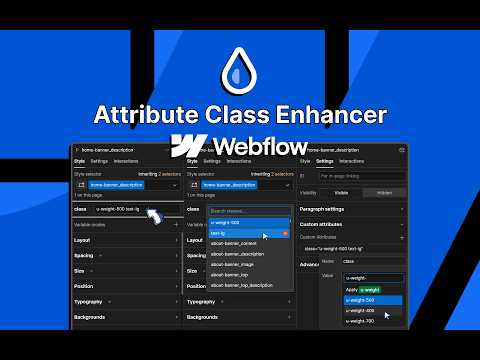
Provides better attribute class suggestions while designing on Webflow
Attribute Class Enhancer for Webflow is a specialized developer tool designed to supercharge your workflow inside the Webflow Designer. When working with complex Webflow builds, custom elements, CMS-bound elements, or component properties, you often need to define class names within the custom attributes field. By default, this is a plain text input. This extension upgrades that experience by bringing Webflow's native class auto-complete functionality directly into the custom attributes panel. Key Features: - Smart Auto-Complete: Automatically detects when you are editing a custom attribute named class and provides a dropdown list of all existing CSS classes in your Webflow project. - Real-time Search: Quickly filter through hundreds of project classes with a fast, built-in search input within the popup. - Seamless UI Integration: The searchable dropdown blends perfectly with Webflow's native UI, anchoring automatically to Custom attributes field, Component Properties, and the Style Panel. - Style Panel Widget: Injects a dedicated, easy-to-use custom attribute class widget directly into the Webflow Style Panel for instant access. - Multi-Class Support: Click and toggle multiple classes effortlessly. It handles spacing and appending classes automatically. Who is this for? - This extension is built for advanced Webflow developers, technical designers, and power users who frequently utilize custom attributes to pass class names into regular elements, CMS-bound elements, and components. Updates: - Keyboard navigation: Use ↑/↓ to move through suggestions, Enter to toggle a class, and Escape to close. Tab now only cycles between the search box and the list, instead of leaking focus out to the rest of the Designer while the list is open. - Combo classes now surface when they can actually be used. - Update notice: if you're mid-session when the extension updates, a small in-Designer banner now lets you reload the tab to pick up the new version, instead of leaving you on a silently broken build until you refresh yourself. If you previously added a class to a Custom Element and it never showed up on your published site, it was written to the panel that does not publish it. Re-apply that class through the Style Panel widget and it will go to the right place. Ordinary elements are unaffected. How to use: 1. Install the extension and open your Webflow Designer project. 2. Select any element on your canvas. 3. Navigate to the Custom Attributes section (or look for the new widget in the Style Panel). 4. Add a custom attribute named class. 5. Click into the value field. A searchable dropdown will instantly appear, displaying all the CSS classes available in your current project. 6. Search, click, and toggle classes to apply them as the attribute's value.
5 out of 53 ratings
Details
- Version0.0.3
- UpdatedAugust 9, 2026
- Offered byfrontendcsssimplified
- Size19.76KiB
- LanguagesEnglish
- Developer
Email
frontendcsssimplified@gmail.com - Non-traderThis developer has not identified itself as a trader. For consumers in the European Union, please note that consumer rights do not apply to contracts between you and this developer.
Privacy

This developer declares that your data is
- Not being sold to third parties, outside of the approved use cases
- Not being used or transferred for purposes that are unrelated to the item's core functionality
- Not being used or transferred to determine creditworthiness or for lending purposes
Support
For help with questions, suggestions, or problems, please open this page on your desktop browser